6
Set up
Preparation
Basic Operation
Advanced Operation
Reference Section
Connecting your TV (continued)
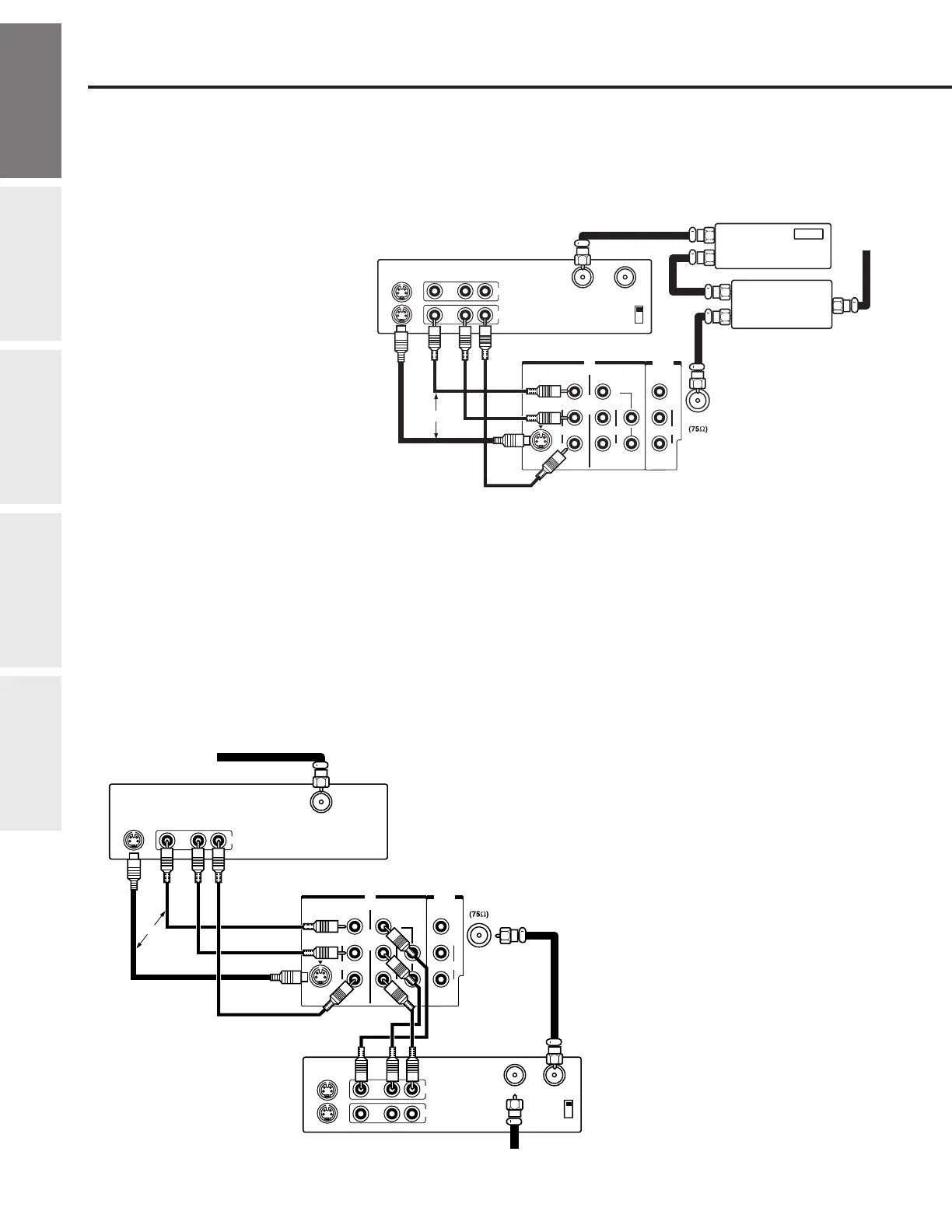
Connecting a cable converter box and a VCR
This connection allows you to watch videotapes and watch and record basic and premium cable channels. Tune the TV and
VCR channels to 3 or 4 (whichever channel is vacant in your area), and then use the converter box to change channels.
You will need:
• one cable signal splitter
• three coaxial cables
• one pair of audio cables (one single audio
cable for a mono VCR)
• one video cable (for video cable type, see
“Note Regarding Picture Quality” on
page 5).
Note:
If you have a mono VCR, connect TV L/Mono Audio
IN to VCR Audio OUT using only one audio cable.
When you use a converter box with your TV, you
may not be able to program certain features using
the remote control, such as blocking channels or
programming your favorite channels.
Connecting a satellite receiver and a VCR
This connection allows you to watch satellite, VCR, and TV programs.
You can record one TV channel while watching another channel.
You will need:
• one coaxial cable
• two pairs of audio cables (one single and one pair of audio cables
for a mono VCR)
• two video cables (for video cable type, see “Note Regarding
Picture Quality” on page 5).
Notes:
●
To watch from the satellite receiver, the TV
must select VIDEO-1.
●
To watch from the VCR, the TV must select
VIDEO-2.
IN
OUT
S-VIDEO
VIDEO VIDEO
L/
MONO
R
AUDIO
L/
MONO
R
AUDIO
VIDEO
L
Y
R
AUDIO
VIDEO-1 VIDEO-2
P
B
P
R
COLOR
STREAM
INPUT
IN from ANT OUT to TV
S-VIDEO VIDEO AUDIO
LR
IN
OUT
OR
ANT
CH3
CH4
Cable
Signal
Splitter
IN
OUT
OUT
IN
OUT
Cable
Converter
Box
From
Cable
IN
OUT
ANT
S-VIDEO
VIDEO VIDEO
L/
MONO
R
AUDIO
L/
MONO
R
AUDIO
VIDEO
L
Y
R
AUDIO
VIDEO-1 VIDEO-2
P
B
P
R
COLOR
STREAM
INPUT
Satellite IN
S-VIDEO
OUT
VIDEO AUDIO
LR
OUT
IN from ANT OUT to TV
CH3
CH4
S-VIDEO VIDEO AUDIO
LR
IN
OUT
OR
From Satellite dish
Satellite Receiver
TV
Stereo VCR
From antenna
Set up
Stereo VCR
TV


 To Next Page
 Loading...