16 FT-70DR/FT-70DE Operating Manual
Selecting the Communication Mode
Using AMS
(
Automatic Mode Select
)
function
The FT-70DR/DE transceiver is equipped with the AMS
(
Automatic Mode Select
)
func-
tion which automatically selects the communication mode corresponding to the received
signal.
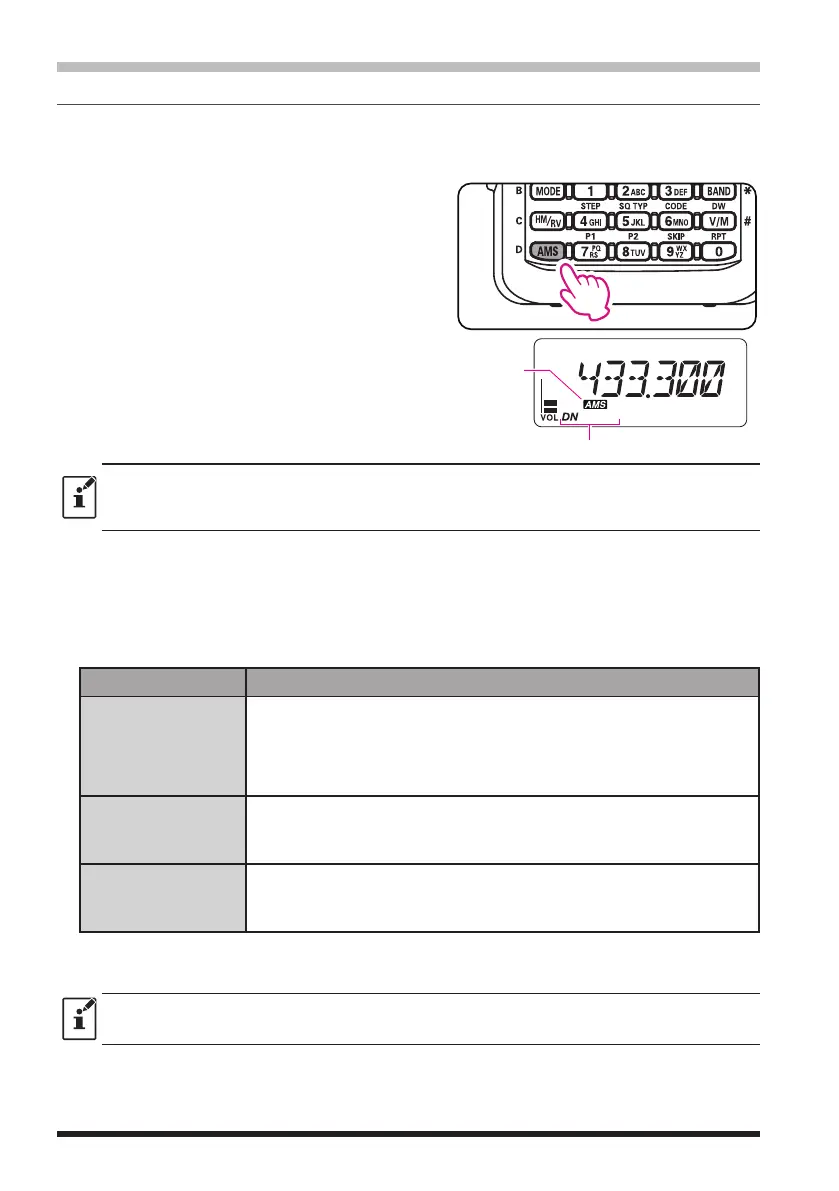
1. Press and hold the
[
AMS
]
key to turn the
AMS function ON or OFF.
When the AMS function is turned OFF, the
communication mode must be selected man-
ually. See
"
(
Fixing the Communication
Mode
)
".
The selected communication mode is displayed
under the AMS icon.
Current Communication Mode
AMS icon
z
The default setting is “ON” in the AMS function.
z
AMS function may only be turned ON when operating within the 144 MHz and 430 MHz
Amateur Bands
●
Setting the transmission mode when using the AMS function
The AMS function will automatically set the receiver to the mode of the received signal,
but the transmission mode may be fixed regardless of the received mode.
1. Press the
[
AMS
]
key.
2. Rotate the DIAL knob to tune to the desired transmission mode as follows.
Transmit Mode Receive and Transmit
TX AUT
(
TX AUTO
)
Receive׃ Automatically selects the communication mode of transmission
according to the signal being received.
Transmit: Transmits automatically in the communication mode selected
by the AMS function, or in the mode selected manually by
pressing the
[
MODE
]
key.
TX FM
Receive׃ Automatically selects the communication mode of transmis-
sion according to the signal being received.
Transmit׃ Always transmits in the analog FM mode.
TX DIG
(TX DIGITAL)
Receive׃ Automatically selects the communication mode of transmission
according to the signal being received.
Transmit׃ Always transmits in the DN mode.
3. Press the
[
AMS
]
key or the PTT switch to save the setting and return to normal oper-
ation.
When the AMS function is ON, press the
[
MODE
]
key to change the communication mode tem-
porarily.



 To Next Page
 Loading...





