Instrument and control functions
5-38
1
2
3
4
5
6
7
8
9
10
11
12
EAU67155
CCU (for equipped models)
The CCU (communication control unit)
connects to the vehicle’s CAN (control-
ler area network) and has a GPS re-
ceiver to enable the recording of
vehicle and riding data (see “Logging”
on page 5-21). Logging data and YRC
setting data can be accessed when a
smartphone or tablet is connected to
the CCU wireless network.
From the Google© or Apple© applica-
tion store, download the “Y-TRAC” ap-
plication to make use of the logging
data and the “YRC Setting” application
to remotely adjust the YRC settings.
To connect to the CCU wireless net-
work
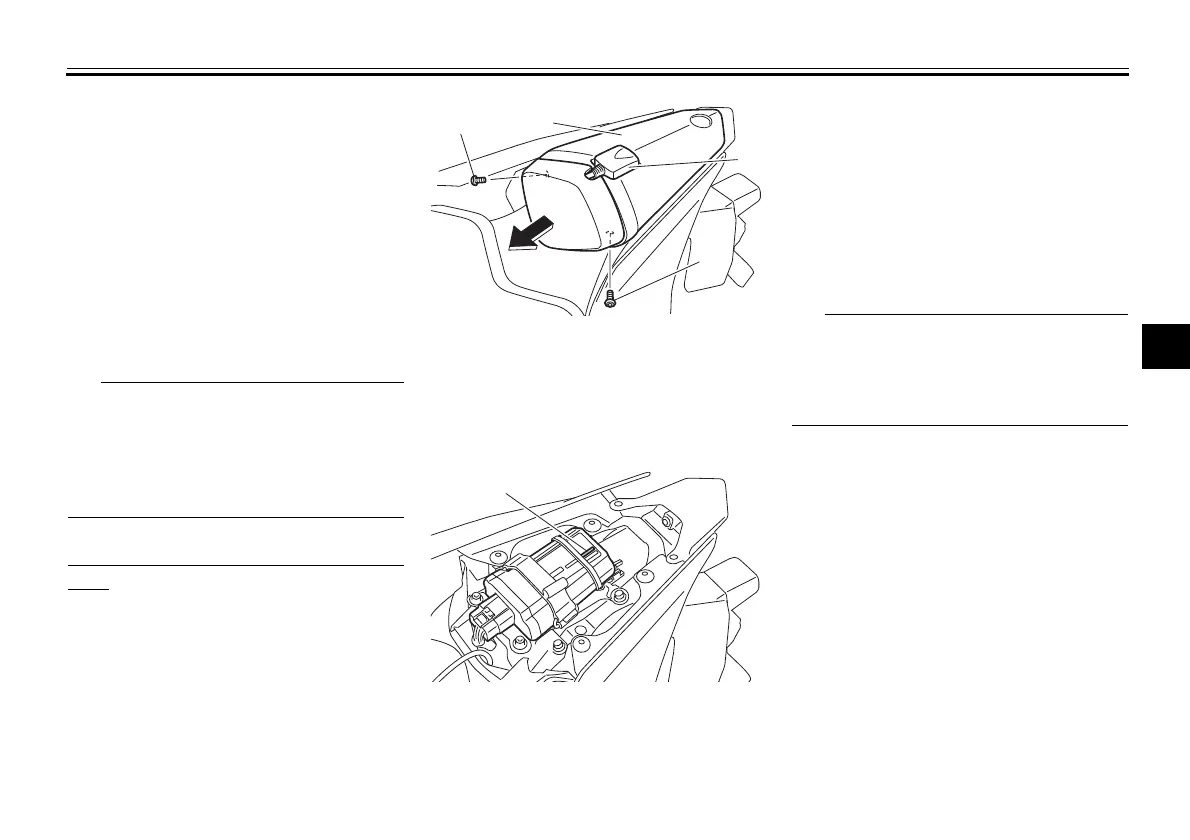
1. Remove the screws, move the
GPS receiver, and then remove
the seat cover as shown.
2. Note down the CCU serial num-
ber.
3. Turn the key to “ON” and approach
the vehicle with a wireless capable
smartphone or tablet.
4. Connect to the wireless network
“Yamaha Motor Network” by input-
ting the CCU serial number as the
password.
5. Install the seat cover and GPS re-
ceiver to the original position, and
then install the screws.
Since all CCU-equipped models put out
a similarly named wireless network,
have only one vehicle turned on at a
time to avoid confusion.
1. Screw
2. Seat cover
3. GPS receiver
1. CCU serial number
1
1
2
3
1
2CR-9-21.book 38 ページ 2015年9月2日 水曜日 午後2時25分


 To Next Page
 Loading...