User's Guide The HDD Drives
Chapter 4 - The HDD Drives
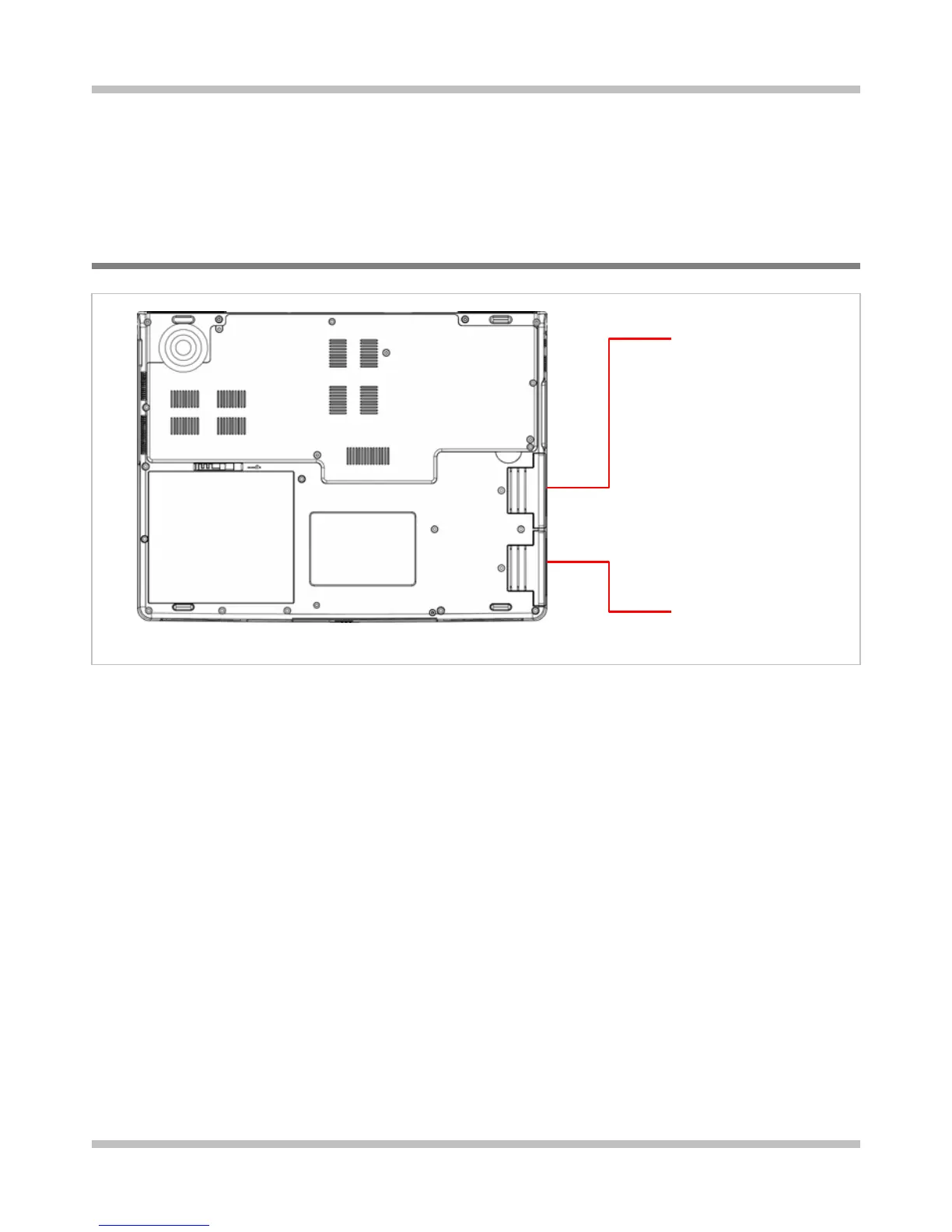
4.1 The Two HDD Sockets
The primary
HDD socket
The secondary
HDD socket
Your notebook is equipped with two sets of HDD sockets. These sockets support industry
standard 2.5”/9.5mm SATA-2 Gen1i (1.5Gb/s) hard disk drives. Unless you are going to
install two Windows bootable HDD drives into these sockets, there is generally no need to
distinguish which socket is the primary socket and vice versa. Below are the three major
scenarios:
• One Windows™ bootable HDD drive: You are at your liberty to use either one of
the two sockets. But the primary socket is your preferred choice for the bootable
HDD drive.
• One Windows™ bootable HDD drive and another Windows™ non-bootable HDD
drive: You are at your liberty to use either one of the two sockets for the bootable
HDD drive. Again, the primary socket is your preferred choice for the bootable HDD
drive.
• Both HDD drives are Windows™ bootable: Choose the HDD drive you want the
system to boot up from and have this drive installed on the primary socket.
Page 4-1



 To Next Page
 Loading...










