ASUS TS100-E10-PI4
4-37
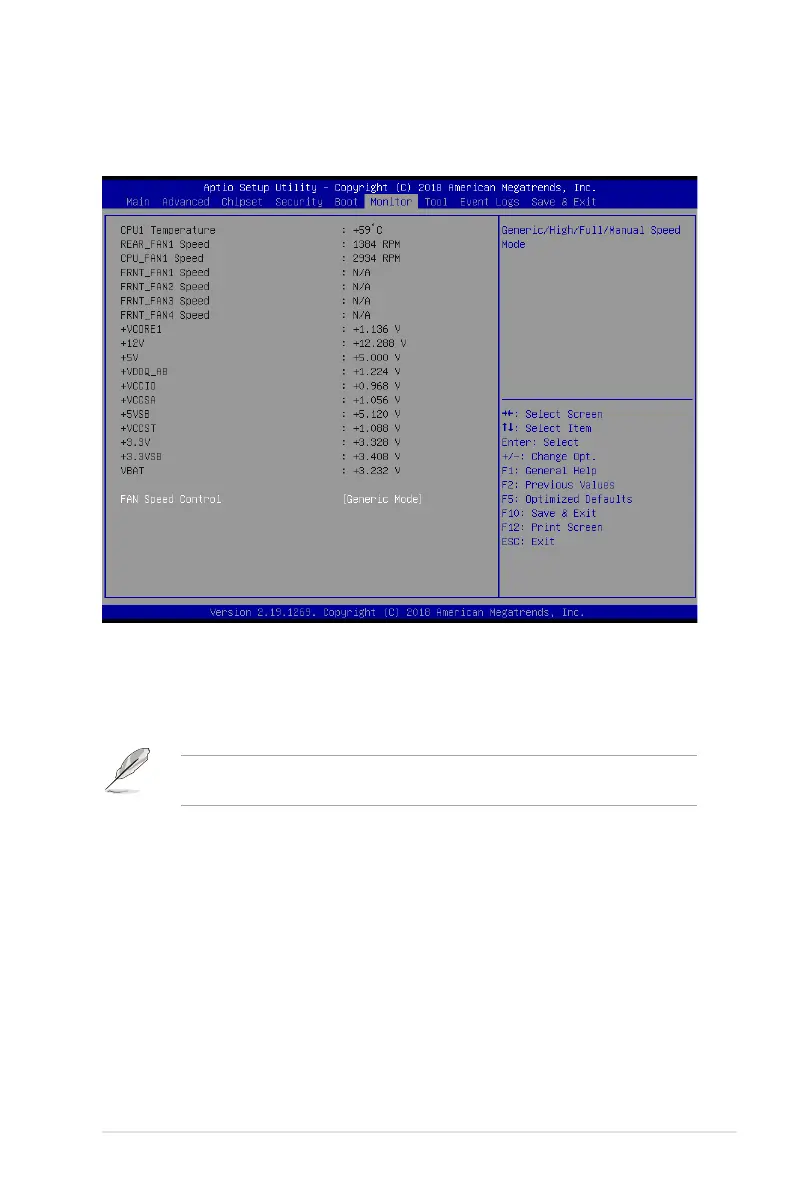
Fan Speed Control [Generic Mode]
Allowsyoutoselectthepower-onstatefortheNumLock.
Congurationoptions:[GenericMode][HighSpeedMode][FullSpeedMode][ManualSpeed
Mode]
The following item appears only when you set the Fan Speed Control to [Manual Speed
Mode].
REAR_FAN1 / CPU_FAN1 / FRNT_FAN1-3 Duty [50]
Allows you to set the desired POST Report waiting time from 1 to 10 seconds. Use the
<+>or<->toadjustthevalue.Thevaluesrangefrom10to100.
4.8 Monitor menu
Thismenudisplaysthesystemtemperature,fanspeed,andpowerstatus.Youcanalso
change the fan settings in this menu.


 To Next Page
 Loading...









