Specifications are subject to change without notice
AtlasSound.com
1601 JACK MCKAY BOULEVARD ENNIS, TEXAS 75119 U.S.A. • TELEPHONE: (800) 876-3333 • FAX: (800) 765-3435
©2006 ATLAS SOUND LP Printed in U.S.A. 000106 ATS002171 RevA 01/06 PP
OWNER'S MANUAL
AA35 MIXER AMPLIFIER
12
QUICK START EXAMPLES
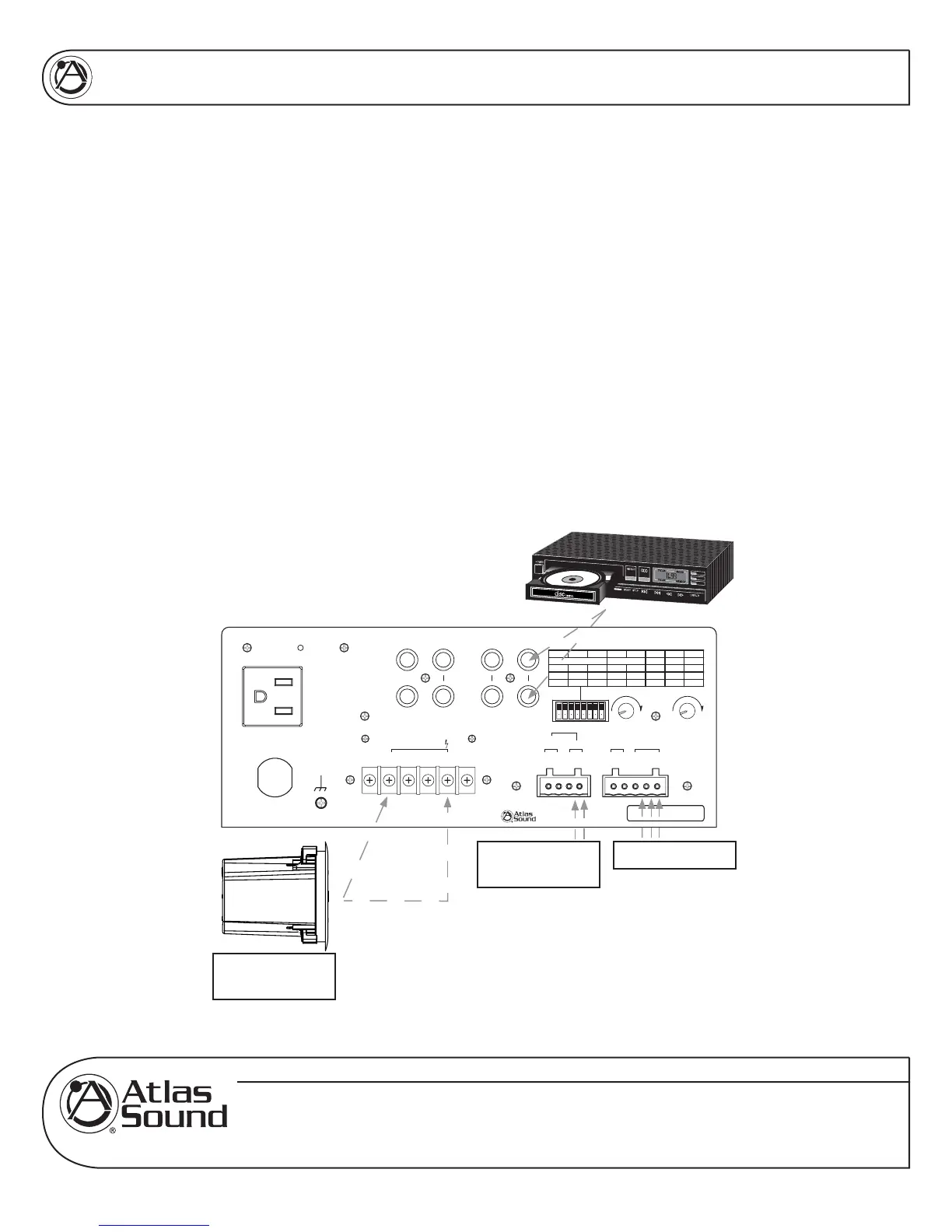
Setup – Example 1: Typical paging with Background Music
• Connect a paging mic to INPUT 1.
• Set Dipswitch 7 to the "MIC" position.
• Connect a CD player to the RCA jacks on INPUT 2. This is known as BGM or
Back Ground Music.
• Set Dipswitch 2 to the "ON" position allowing the signal to be routed to ZONE
2 output (known as the Music On Hold output or MOH).
• Set Dipswitch 5 to the "ON" position. When a page is received via Input 1 the
page mic, the background music (BGM) will mute, allowing the page to be
clearly heard. Note: The music on hold (MOH) will not be muted.
• The ZONE 2 level control and the MUTE SENS controls are adjusted as
needed.
• Connect the speakers to the desired output terminals.
Example 1
On
Off
Low cut
8
On
Off
43
21
Phantom
Mute Rcv
Off
On
Off
On
Off
On
Off
On
5
Zone 2 Assign
6
Input 3 Input 2 Input 1
Input1
7
Input 2
Input 3
Line/Tel
Mic
Off
On
Unswitched Outlet
120V AC 60Hz
Max 500W
Outlet Breaker
125V AC 4A
Push Reset
120V AC 60Hz 100W
Amp In
Line Out A
Line Out B
Pre Out
Input 3 Input 2
L
R
Zone2
100
Level
Mute
Sens
100
Remote
Mute
G-+
Input 1
¡
8
1W
¡
600
Zone 2 Out
-+-+
Speaker Output 35W
COM
25V
¡
8
70V
L
R
£Èä£Ê>VÊV>ÞÊÛ`°]ÊÃ]Ê/8ÊÇx££Ê
nää®ÊnÇÈÎÎÎÎÊÌ>Ã-Õ`°V
77)+
7jbWiIekdZ77I[h_[iC_n[h7cfb_\_[h
CLASS 2 WIRING
To 70V
Speakers
To PBX
MOH Input
Paging Mic

 To Next Page
 Loading...