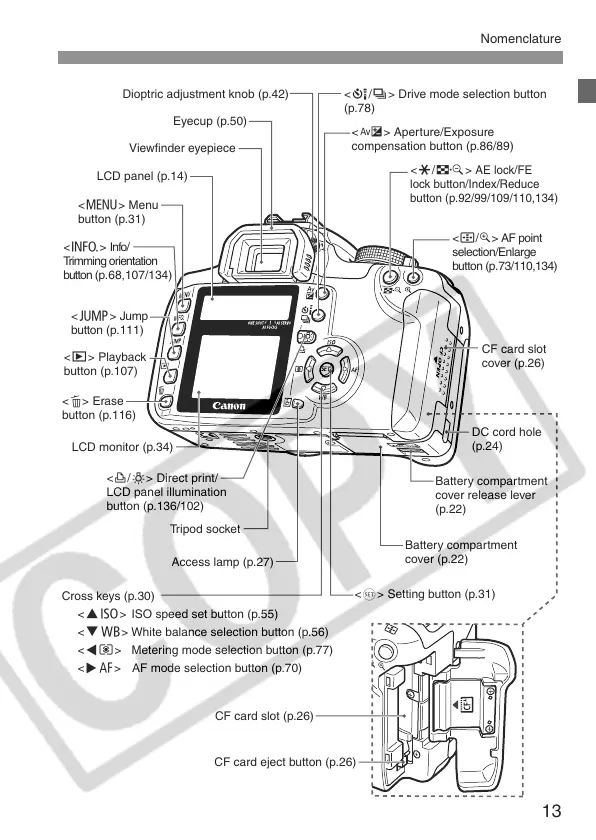
Tripod socket
Access lamp (p.27)
Battery compartment
cover release lever
(p.22)
Battery compartment
cover (p.22)
<O> Aperture/Exposure
compensation button (p.86/89)
<Q/i> Drive mode selection button
(p.78)
Viewfinder eyepiece
Eyecup (p.50)
LCD panel (p.14)
Dioptric adjustment knob (p.42)
CF card slot
cover (p.26)
CF card slot (p.26)
CF card eject button (p.26)
LCD monitor (p.34)
<l/U> Direct print/
LCD panel illumination
button (p.136/102)
<S/u> AF point
selection/Enlarge
button (p.73/110,134)
<A/I>
AE lock/FE
lock button/Index/Reduce
button (p.92/99/109/110,134)
<M> Menu
button (p.31)
<B> Info/
Trimming orientation
button (p.68,107/134)
<C> Jump
button (p.111)
<x> Playback
button (p.107)
<L> Erase
button (p.116)
<0> Setting button (p.31)
DC cord hole
(p.24)
Cross keys (p.30)
<WZ> ISO speed set button (p.55)
<XB> White balance selection button (p.56)
<Yq> Metering mode selection button (p.77)
<ZE> AF mode selection button (p.70)


 To Next Page
 Loading...









