5958
● Shooting ●
Function
Reference
Pages
Flash
Macro Mode
Infinity Mode
Exposure Compensation
White Balance
Photo Effect
ISO Speed
Auto Focus Frame
Digital Zoom
AF-assist Beam
Single
Continuous
Self-Timer
Off
Slow-Synchro
p. 43
p. 45
p. 45
p. 46
p. 52
p. 53
p. 54
p. 55
p. 51
p. 35
p. 34
Shooting
Method
: Default settings : Available : Available only for the first image
:
The ISO speed is automatically set between the equivalent of 50 and 150 (PowerShot A200) or 64 and 150 (PowerShot A100)
: Setting is retained even after power off.
Replaying
Use this feature to view recorded images one
at a time on the LCD monitor (Single Image
Replay).
1
Press the button.
The last image shot is displayed.
2
Press or button to switch the
displayed image.
Hold down or button to display images
continuously.
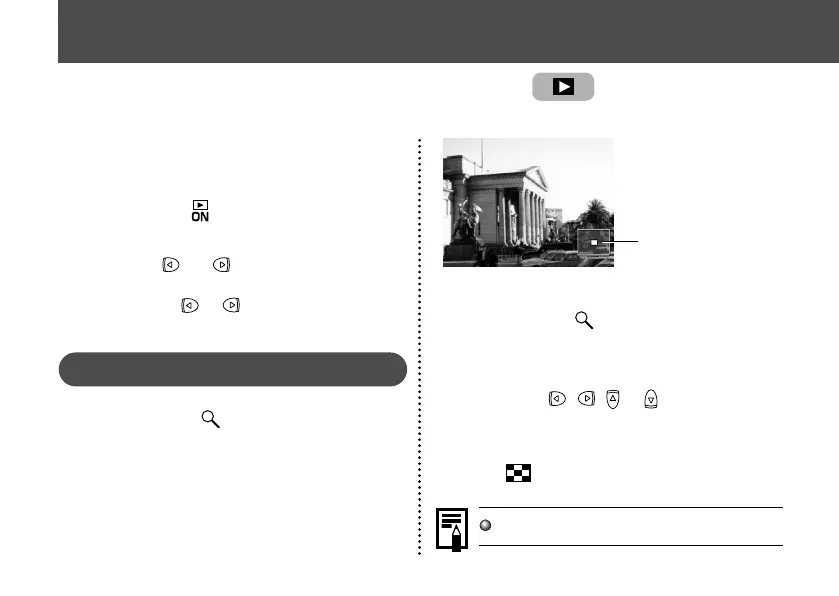
Magnifying Images
1
Press the button during single
replay.
The image enlarges gradually by up to 10
times.
Approximate Location
of the Magnified Area
• When you hold down the SET button and
press the button, the image enlarges
in the order: approximately 2.5 times → ap-
proximately 5 times → approximately 10
times.
• Press , , or buttons to change
the display position vertically and horizon-
tally.
• To return to normal-size display, press the
button.
2
Movies cannot be enlarged.
Displaying Images Individually



 To Next Page
 Loading...