30
English
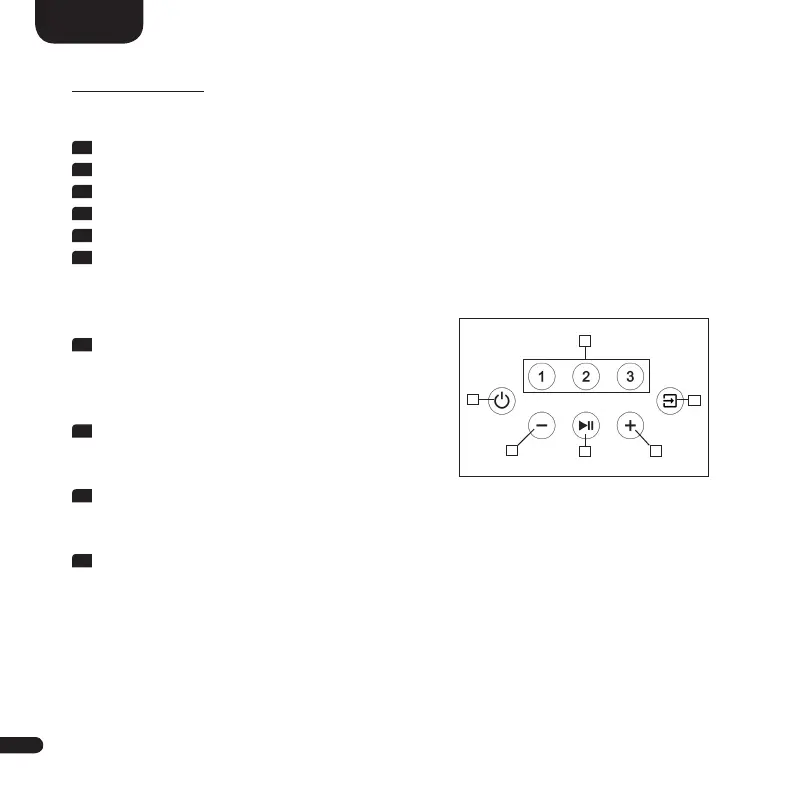
TOUCH KEYS
Device control:
1
Power - Toggles the speaker On / Off (On / Standby)
2
Preset 1-3 - Preset keys for direct access of previously stored settings
3
Input - Toggles input forward
4
Plus - Increases main volume
5
Minus - Decreases main volume
6
Play/Pause - Play/pause function for Chromecast built-in for audio,
Spotify Connect and Bluetooth wireless technology
Menu control:
3
Input
• Get to the menu (press and hold for 3 seconds)
• Back one level in the menu
• Exit the menu (press and hold for 3 seconds)
4
Plus
• Menu selection upwards
• Increase menu value
5
Minus
• Menu selection downwards
• Decrease menu value
6
Play/Pause
• Continue to the next menu level
• Confirm selection
2
1
5
6
4
3


 To Next Page
 Loading...