3 - 121
Chapter 3 Removal and Replacement Procedures (RRPs)
Version 1 2006.11.28
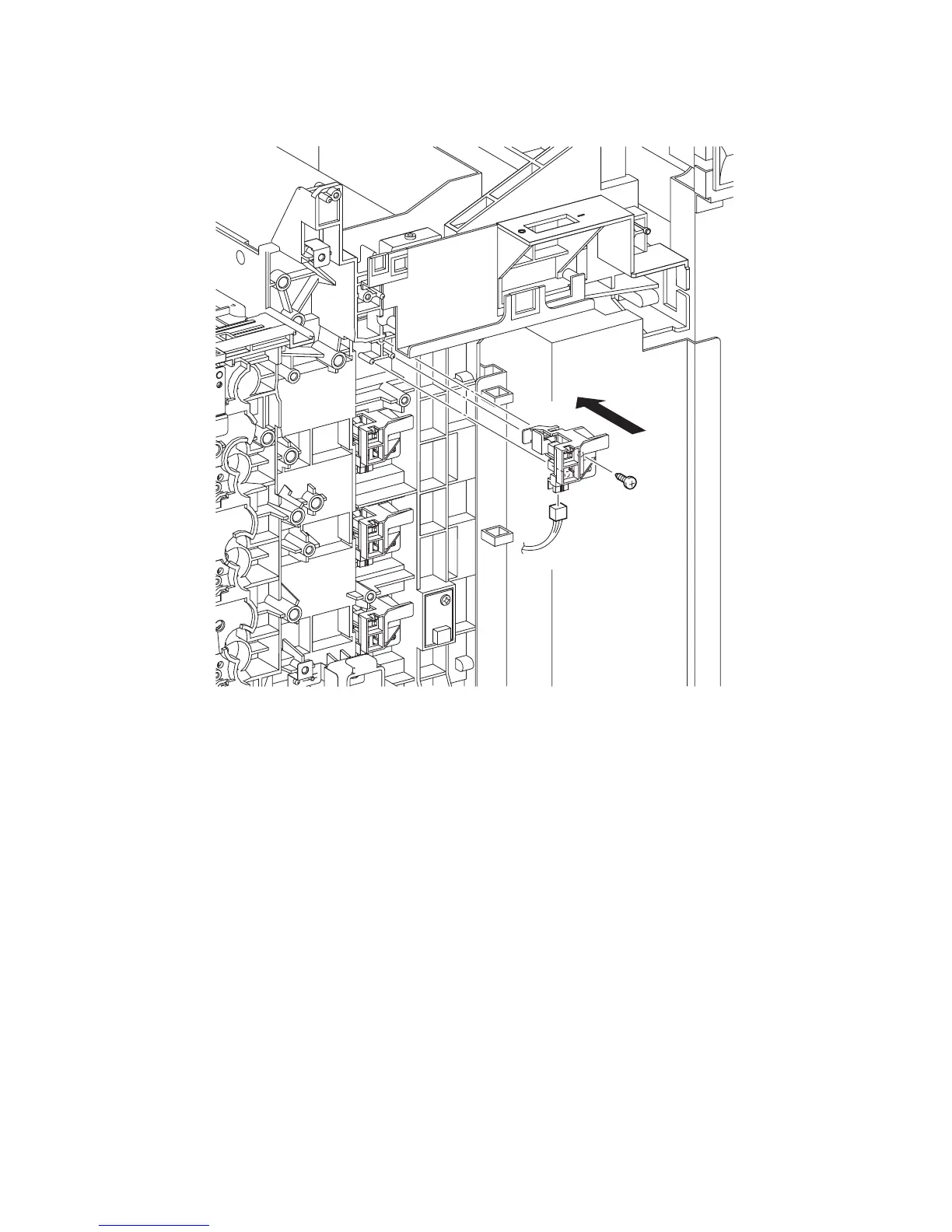
Replacement 9 TONER CARTRIDGE SENSOR ASSEMBLY (K) (PL5.1.4)
1) Engage the connector (P/J193) of the TONER CARTRIDGE SENSOR ASSEMBLY (K).
2) Replace the TONER CARTRIDGE SENSOR ASSEMBLY (K) by mating the two holes on the
TONER CARTRIDGE SENSOR ASSEMBLY (K) with the bosses on the printer,
3) Secure the TONER CARTRIDGE SENSOR ASSEMBLY (K) to the printer using the one screw
(silver, tap, 10mm).
Go to the next replacement step:
Replacement 10 PHOTOCONDUCTOR (PC) / DEVELOPER (DEV) DRIVE (PL8.1.2)
Gnb03113KA
3)
2)
1)



 To Next Page
 Loading...











