2. SHIP INFORMATION INPUT
2-4
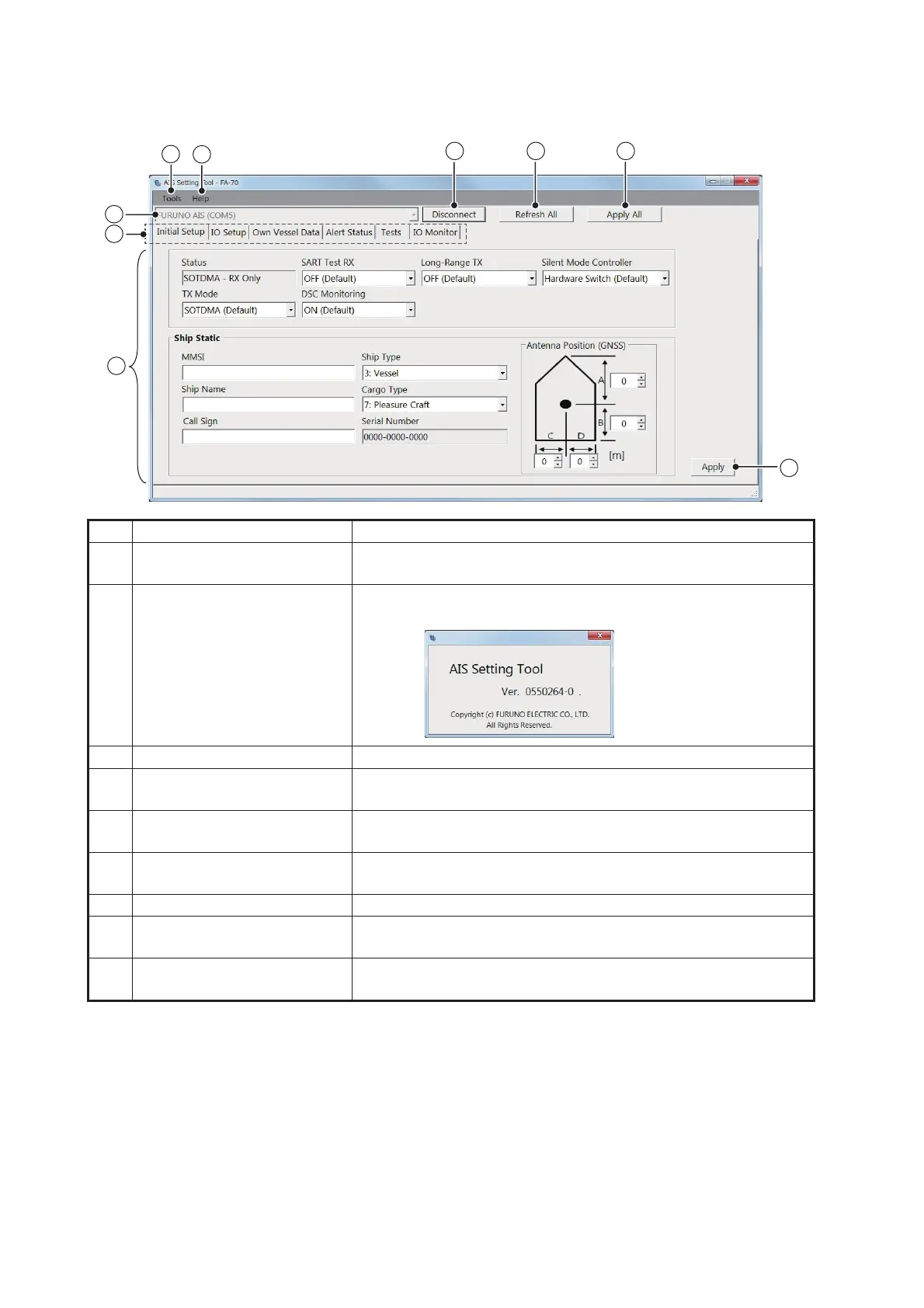
2.4 Overview of the AIS Setting Tool
No. Name Description
1 [Tools] • [Disconnect]: Disconnects from the FA-70.
• [Screenshot…]: Takes a screenshot.
2 [Help] • [Usage Considerations]: Shows the precautions for use.
• [About]: Shows the program version number.
3 Port selection Select the COM port to connect.
4 [Connect]/[Disconnect] • [Connect]: Connects to the FA-70.
• [Disconnect]: Disconnects from the FA-70.
5 [Refresh All] Obtains the latest data from the FA-70, and then updates all
settings of all menu tabs.
6 [Apply All] Saves all settings in all tab pages, and then transmits the data
to the FA-70.
7 Menu tab Opens each menu.
8 Setting/Display area Shows the setting values, menu options, status, test results,
and other according to the selected menu.
9 [Apply] Saves all settings in the current tab page, and then transmits
the data to the FA-70.
1
xx
xx denotes minor
modifications.


 To Next Page
 Loading...





