BIOS Setup - 68 -
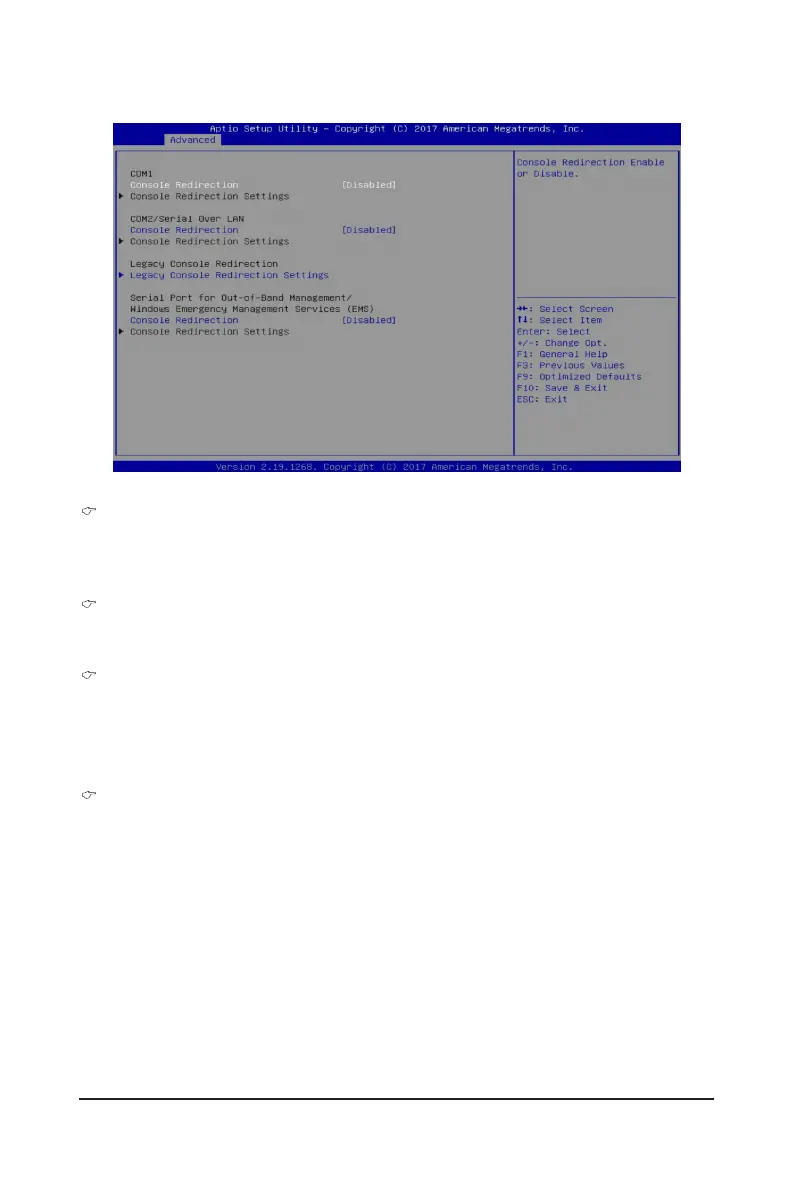
5-2-5 Serial Port Console Redirection
COM1/COM2 Serial Over LAN Console Redirection
(Note)
Select whether to enable console redirection for specied device. Console redirection enables the users
to manage the system from a remote location.
Options available: Enabled/Disabled. Default setting is Disabled.
Legacy Console Redirection
Selects a COM port for Legacy serial redirection. The options are dependent on the available COM
ports.
Serial Port for Out-of-Band Management/Windows Emergency Management Services
(EMS) Console Redirection
(Note)
Selects a COM port for EMS console redirection. EMS console redirection allows the user to congure
Console Redirection Settings to support Out-of-Band Serial Port management.
Options available: Enabled/Disabled. Default setting is Disabled.
COM1/COM2 Serial Over LAN/Legacy/Serial Port for Out-of-Band EMS Console
Redirection Settings
Press [Enter] for conguration of advanced items.
Please note that this item is congurable when COM1/COM2 Serial Over LAN/Serial Port for Out-
of-Band Management EMS Console Redirection is set to Enabled.
(Note) Advanced items prompt when this item is dened.


 To Next Page
 Loading...