43
06 Electrical Connection
User Manual V1.6-2024-03-20
4 5 6 7 8 9 10
11 12 13 14 15 16
1
2
3
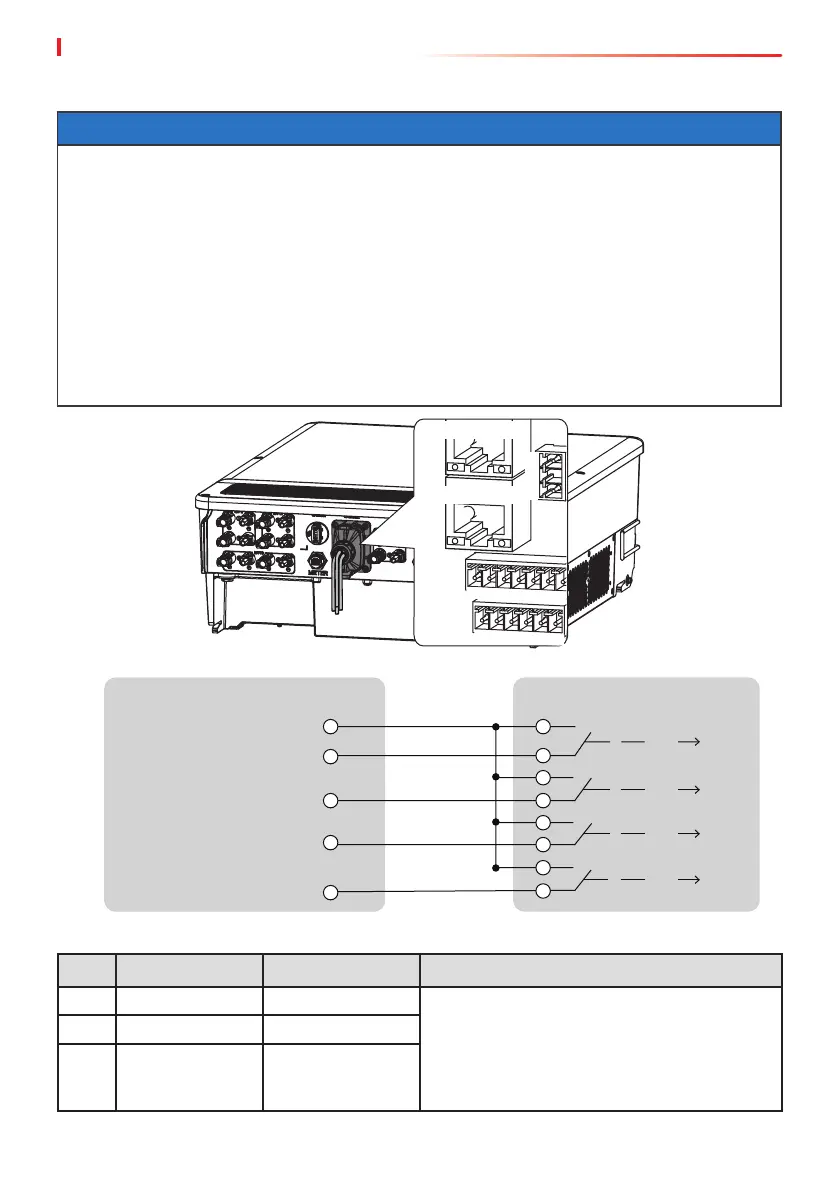
EMS/PAR
EMS/PAR
No. Port Denition Function Description
1 DO1+ Dry contact Optionnal function. The inverter reserves a
dry contact controlling port, which supports
connecting additional
contactors to enable/disable the load. For high
voltage AC230V. PIN2 is reserved for safety
regulations.
2 NC Reserved PIN
3 DO1- Dry contact
Inverter RCR
K4
K3
K2
K1
0%
30%
60%
100%
(PIN11 COM/DRM0 or REF_1)
PIN12 REFGEN or REF_2
PIN13 DRM4/8 or DI_4
PIN14 DRM3/7 or DI_3
PIN15 DRM2/6 or DI_2
PIN16 DRM1/5 or DI_1
6.7 Communication Connection
NOTICE
• Make sure that the communication device is connected to the right COM port. Route the
communication cable far away from any interference source or power cable to prevent the
signal from being inuenced.
• Enable the DRED, RCR or remote shutdown function via SolarGo App after cable
connections.
• If the inverter is not connected to the DRED device or remote shutdown device, do not
enable these functions in the SolarGo App, otherwise the inverter cannot be connected to
the grid for operation.
• To realize functions such as load control, remote shutdown, DRED/RCR, the communication
cable have to be connected to the master inverter. Otherwise, the functions cannot work
properly.


 To Next Page
 Loading...