GB
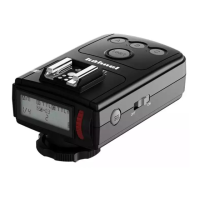
8 Viper TTL - English
your devices
• A -TurnoffbothViperTTLtransmitterandreceiver
• B - Hold down <Test> button
08
and turn ON
“transmitter”.LED
06
willashrapidly,releasethetest
button and LCD
05
will display “coding”
• C - Now hold down receiver <Test> button
15
and
turn ON
12
“receiver”. The LED
11
willashgreen
rapidly. Release <Test> button
15
. The LED
06
will
changetoredONallthetimeconrmingDCMis
completed
• D - IfyouhaveadditionalViperTTLreceivers,then
repeatstage“C”.(ViperTTLtransmittermuststillbein
“coding”)
• IfyouareusingtheViperTTLincombinationwiththe
hähnel Modus 600RT Speedlight, you can still DCM all
devices.UsethesameprocedurefromAtoDandthen
alsoDCMmatchtheModus600RTasaslaveversionas
explainedinModusmanual
• ItispossibletoresettheViperTTLtransmitterand
receiver to “open channel”
• Hold down <Test> button
08
andturnONtransmitter
and continue to hold down button
08
formorethan5sec.
LED
06
willchangefromrapidashingtoalwaysON.
Transmitterisnow“openchannel”
• Now hold down receiver <Test> button
15
and turn ON
receiver and continue to hold down button
15
formore
than 5 sec. LED
11
willchangefromrapidashingto
always ON. Receiver is now “open channel”
• Ifyouwishtouseold3rdpartySpeedlight’swhicharenot
E-TTLori-TTLcompatible,thensetswitch
16
to Group
“C”whilstperformingtheresetoftheReceiverto“open
channel”. This allows 3rd party Speedlight’s to be triggered
inSpeedlight“M”mode.Checkourwebsitewww.hahnel.
ieformoreinfo
Multiple Receivers & Flash Guns
• Additional Viper TTL receivers (i.e. Speedlights) can
betriggeredwirelesslyfromtheViperTTLtransmitter.
These additional receivers are available as an
accessory
Software Upgrade
• ThemicroUSBsocket
09
and
13
can be used to
updatetheViperTTLrmwareifnecessary.Goto
ourwebsitewww.hahnel.ieforinformationonhowto
downloadandupdatethermware


 To Next Page
 Loading...
