277
uuAudio System Basic OperationuPlaying a USB Flash Drive
Continued
Playing a USB Flash Drive
Your audio system reads and plays sound files on a USB flash drive in either MP3,
WMA, or AAC
*1
format.
Connect your USB flash drive to the USB port, then select the USB mode.
2 USB Port(s) P. 203
*1:Only AAC format files recorded with iTunes are playable on this unit.
*2:Some or all of the lists may not be displayed.
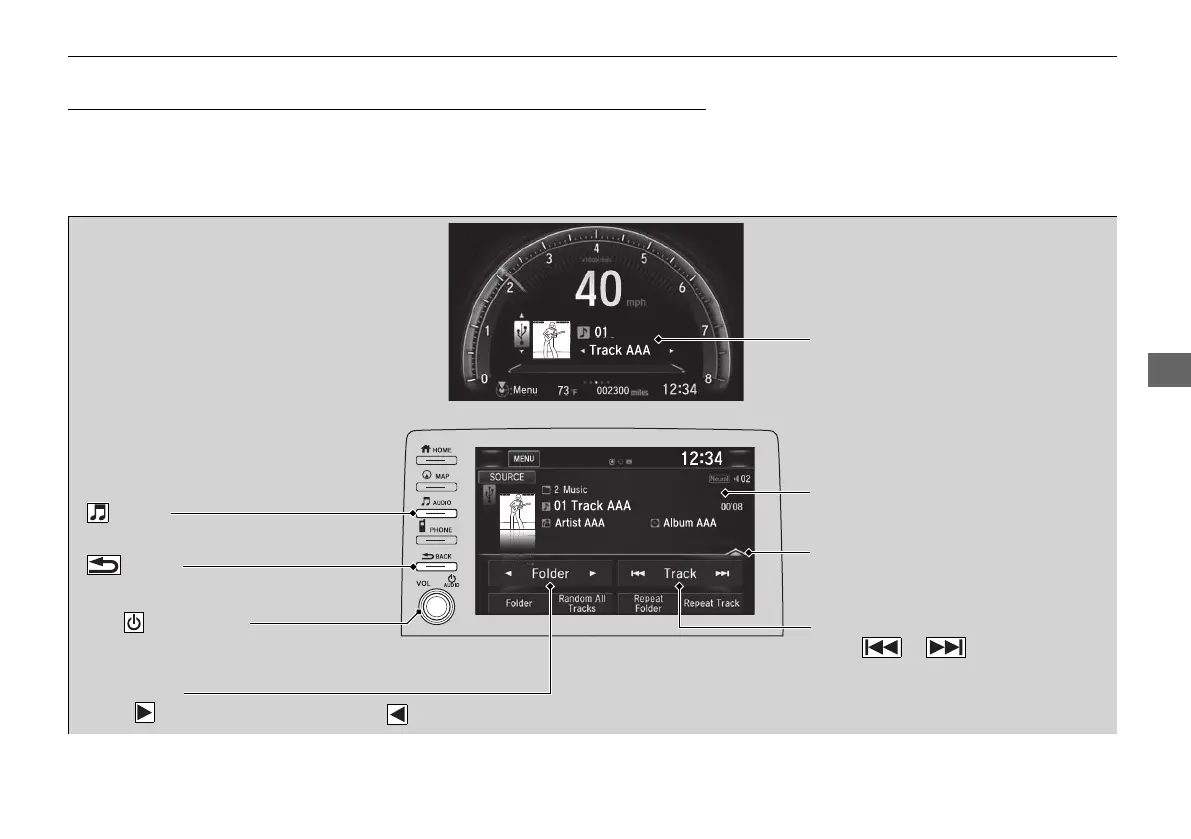
Track Icons
Select or to change files.
Select and hold to move rapidly within
a track.
Open/Close Icon
*2
Displays/hides the detailed
information.
Folder Icons
Select to skip to the next folder, and to skip to the beginning of the previous folder.
Audio/Information Screen
Driver Information Interface
Button
Press to go back to the previous display.
VOL/ AUDIO Knob
Press to turn the audio system on and off.
Turn to adjust the volume.
Button
Press to display the audio screen.
21 CIVIC 4D HCM_HMIN_J (KA KL KC)-31TBA6500.book 277 ページ 2020年8月25日 火曜日 午後2時6分


 To Next Page
 Loading...