16
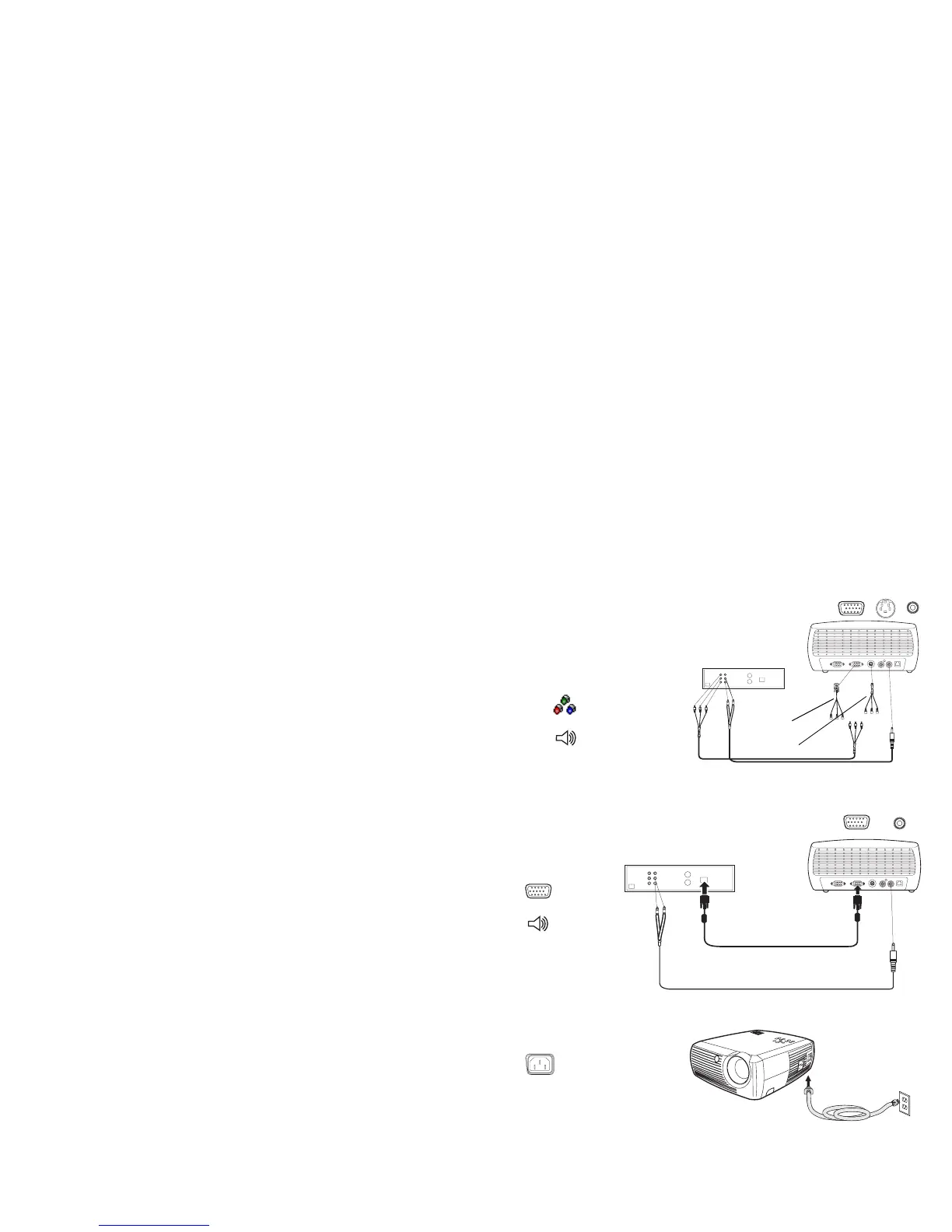
Component video connection
If your video device has component connectors, use a Component to S-
video adapter or a Component to VESA adapter (available from a third-
party vendor) for HD and progressive sources. Plug the component cable
into the video device. Plug the other end of the component cable into the
adapter and plug the adapter into the projector’s S-video (for S-video) or
Computer in (for VESA) connector. Use the audio adapter as described on
the previous page.
Component connection offers the highest quality video output.
VGA connection
If your video device has a 15-pin VGA output, plug one end of the included
computer cable to the VGA connector on your video source. This connector
may be labeled “To Monitor” on the video source. Plug the other end of the
cable into the Computer In connector on the projector.
Use the audio adapter as described on the previous page.
Connect the power cord to the Power connector on the side of the projector
and to your electrical outlet.
NOTE: Always use the power cord that shipped with the projector.
connect component cables via component
to S-video adapter and audio cables via
audio adapter
or
via component to VESA adapter and
audio adapter
Component
to VESA
Component
to S-video
connect VGA cable and
audio cable via audio
adapter
connect power cable



 To Next Page
 Loading...











