Tuner
20
Trac Information (FM only)
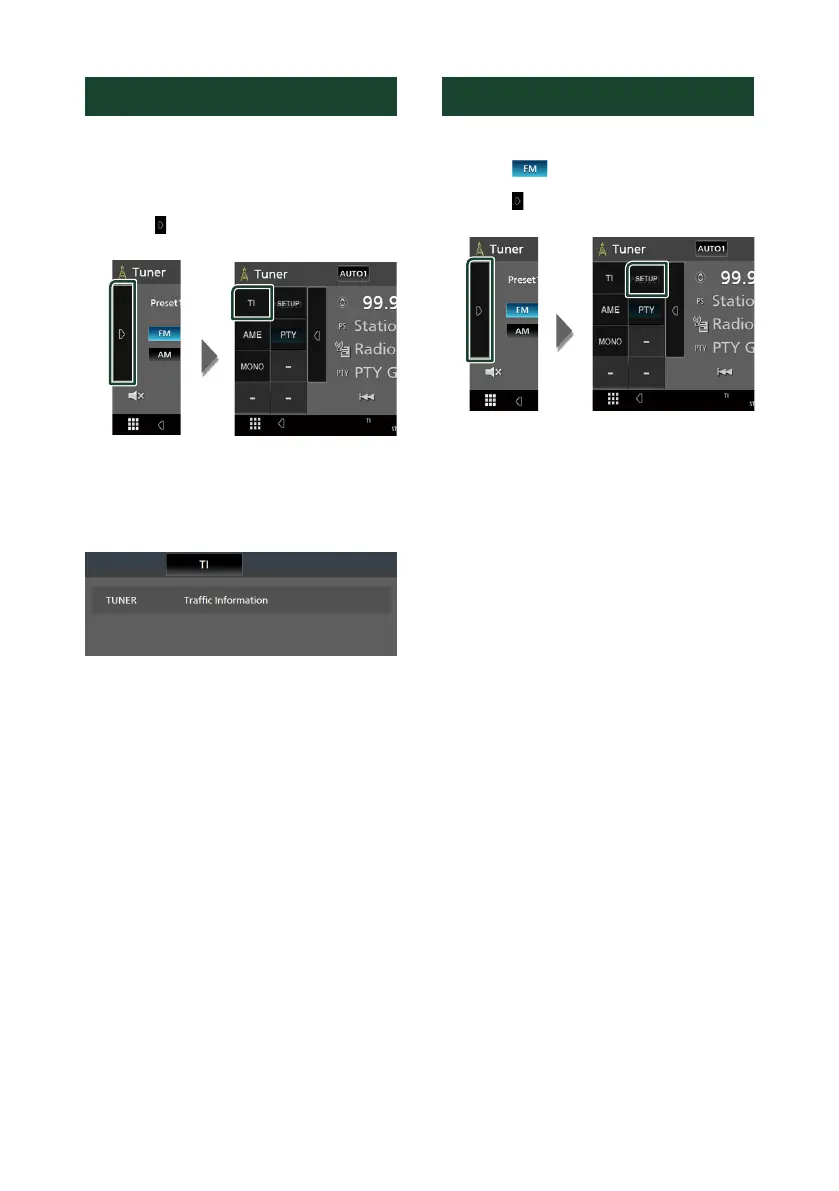
You can listen and watch the traffic information
automatically when a traffic bulletin starts.
However, this feature requires a Radio Broadcast
Data System that includes the TI information.
1
Touch [ ] on the left side of the screen.
Touch [TI].
Traffic information mode is set.
Ñ When the trac bulletin starts
The Traffic Information screen appears
automatically.
Tuner Setup
You can set tuner related parameters.
1
Touch [ ].
2
Touch [ ] on the left side of the screen.
Touch [SETUP].
Tuner SETUP screen appears.
3
Set each item as follows.
■ [RDS CT] (FM only)
Synchronizing the Radio Data System station
time data and this unit’s clock.
“ON” (Default), “OFF”
■ [Area Setting]
The tuner channel interval changes
depending on the area where you use this
unit.
[North America] (Default): Select this when
using in North America. FM/AM intervals
are set to 200 kHz/10 kHz.
[South America]: Select this when using in
South America. FM/AM intervals are set to
50 kHz/10 kHz.
[Europe]: Select this when using in any other
areas. FM/AM intervals are set to 50 kHz/9
kHz.
!B5H-0357-10_JVC_KWM_K_En.indb 20 2020/04/17 16:25


 To Next Page
 Loading...









