26
SiriusXM® RADIOSiriusXM® RADIO
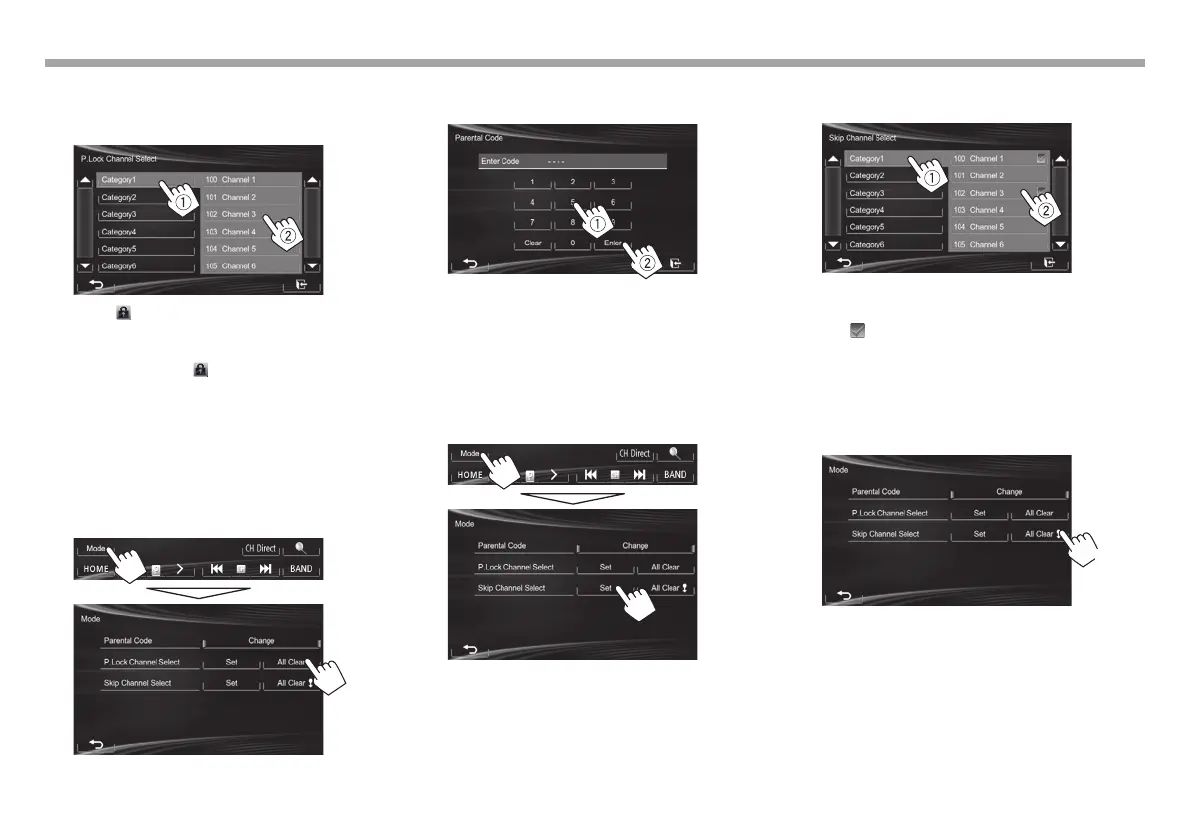
3 Select a category (1), and then a channel
you want to activate the parental lock for
(2).
• The indicator appears beside the channel
with the parental lock activated.
• To cancel the selection, select the locked channel
again in Step 3. The indicator disappears and
the selection is canceled.
• When you try to receive a channel with the
parental lock activated, the parental code input
screen appears and you cannot receive the
channel until you enter the correct code.
Clearing the parental lock for all locked channels
1 Display the <Parental Code> screen.
2 Enter your parental code number (1), then
confirm the entry (2).
• Press [Clear] to delete the entry.
R Skipping unwanted channels
If you do not want to receive some channels, you
can skip them.
Activating channel skipping
1 Display the <Skip Channel Select> screen.
2 Select a category (1), and then select a
channel you want to skip (2)
• You can change the page to display more
items by pressing [J]/[K].
The indicator appears beside the selected
channels.
• Repeat this step if you want to skip more channels.
Clearing the channel skipping for all skipped
channels
On the <Mode> screen:
(Hold)
KW-VEntryJ.indb26KW-VEntryJ.indb26 2013/10/3016:052013/10/3016:05


 To Next Page
 Loading...








