Left
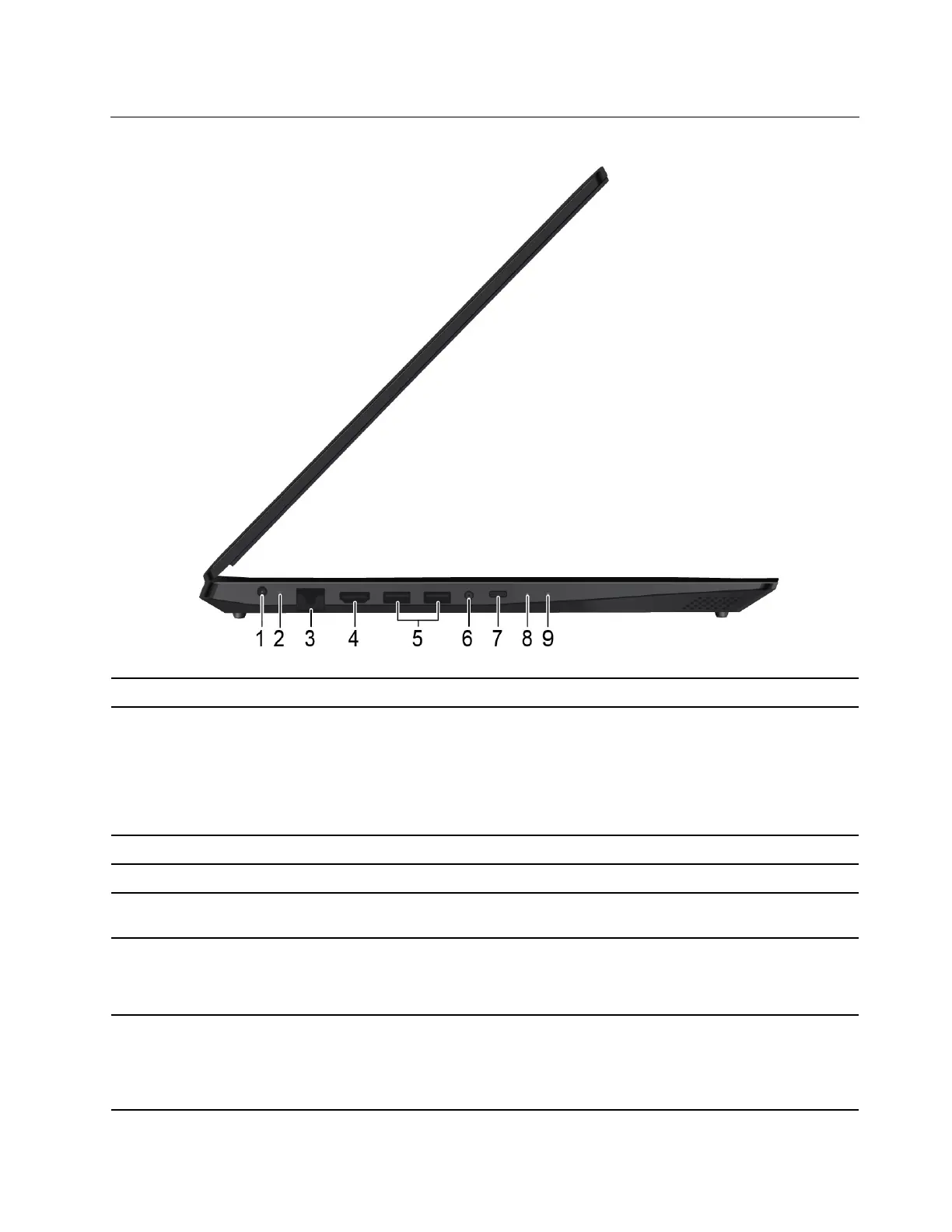
1. ac power connector
Connects to the ac power adapter.
2. Battery/Charging status
indicator
Indicates the ac power and battery power status of the computer.
White: connected to ac power (battery power 91%–100%)
Amber: connected to ac power (battery power 1%–90%)
Off: not connected to ac power
3. Ethernet connector
Connects your computer to a local network.
4. HDMI
TM
connector
Connects to devices with HDMI input such as a TV or a display.
5. USB 3.0 connector Connects USB-compatible devices, such as a USB keyboard, USB mouse, USB
storage device, or USB printer.
6. Audio connector Connect headphones or a headset with a 3.5-mm (0.14-inch), 4-pole plug to listen
to the sound from the computer.
Note: The conventional microphone is not supported.
7. USB-C
TM
connector* Connects to USB-C accessories to expand computer functionality, transfer data,
or charge your device.
Note: When the battery power is below 10%, the connected USB-C accessories
might not work correctly.
Chapter 1. Meet your computer 5



 To Next Page
 Loading...