4. BAR-CODE SCAN PROCEDURE
1) Untie the screw of Loader.
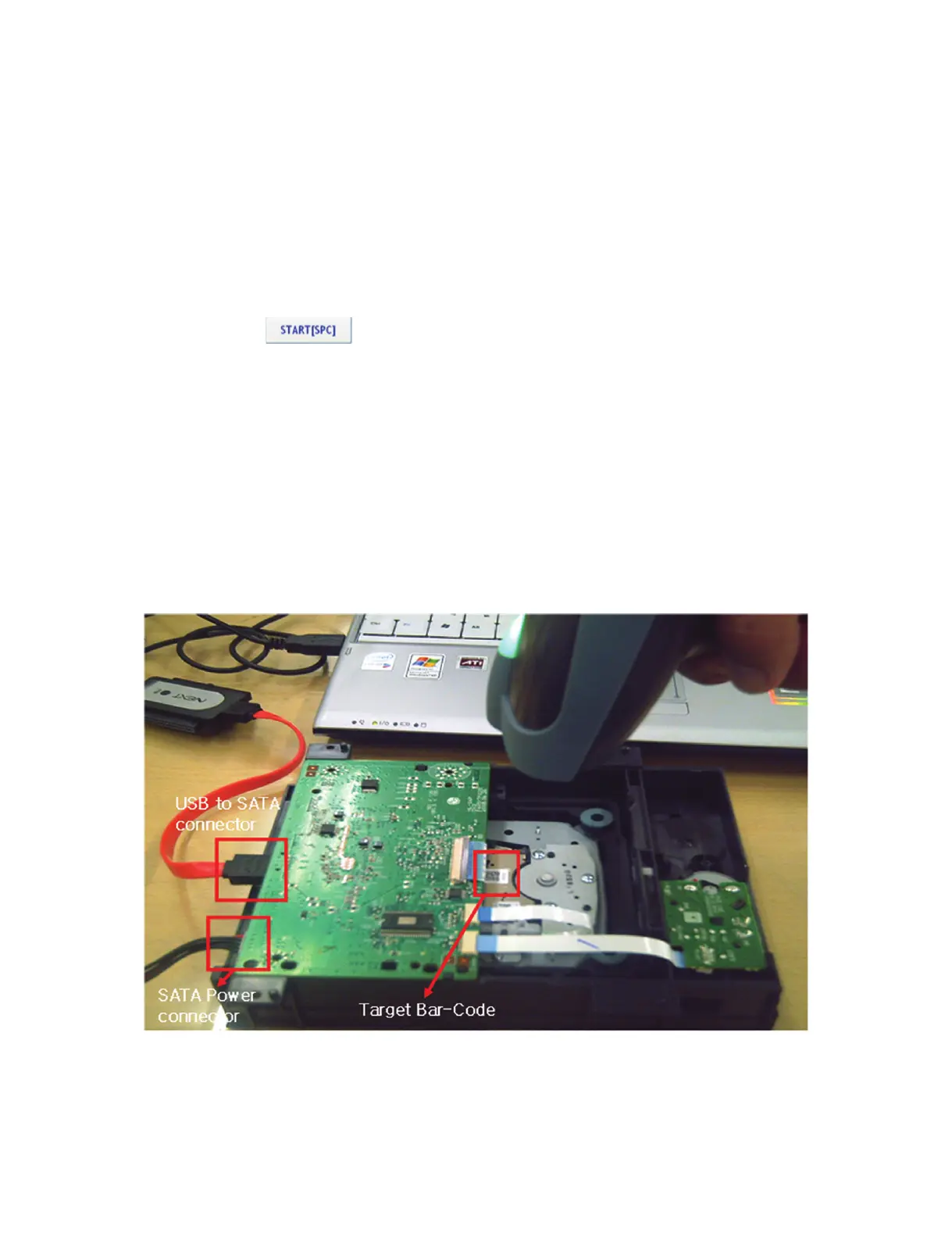
2) Connect the “USB to SATA connector” and “SATA Power” to the Loader.
3) Connect the “USB to SATA connector” to the PC.
4) Connect the “Bar-Code Scanner” to the PC.
5) Run the Bar-Code Scan Tool (Loader Tester).
6) Click “Start” Button
(Tip. If Drive can not be detected, please plug off and on again the “USB to SATA connector” to the PC and
wait for 15 seconds.)
7) Sled will move the innermost.
8) Focus on the target of Bar-Code and Pull the trigger of Bar-Code scanner until Bar-Code can be scanned
to the Bar-Code scan Tool (Loader Tester)
9) If Bar-Code scan succeeds, “ OK” will display in the result windows.
However, Bar-Code scan fails, “NG” will display in the result windows.
In case you got “ NG” result, please check procedure up from 2 to 8. then try it again.


 To Next Page
 Loading...