E119
Reference Section
For Shooting
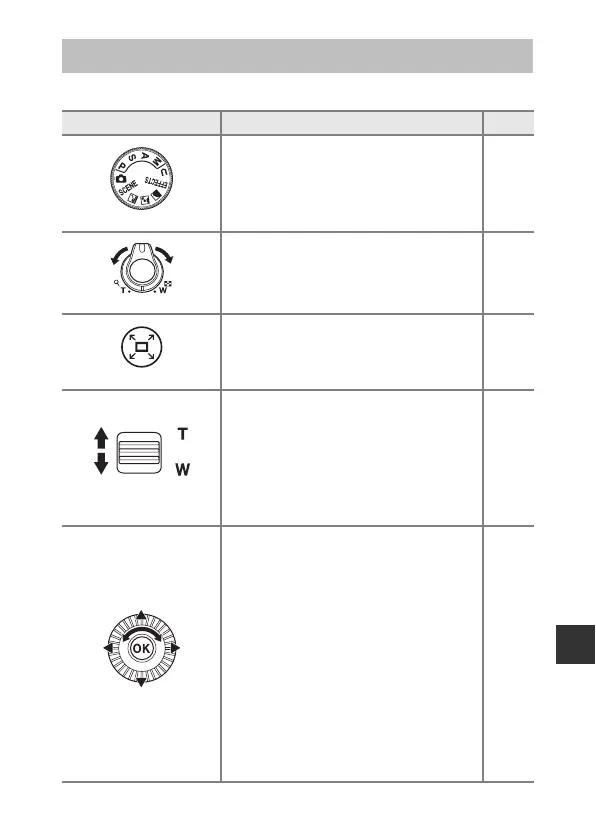
Principle Functions of the Controls
Control Main Function A
Mode dial
Change the shooting mode. 24
Zoom control
Move toward g (i) (telephoto) to zoom in
closer to the subject, and move toward f
(h) (wide-angle) to zoom out and view a
larger area.
20
Snap-back zoom button
Widen the angle of view temporarily. 21
Side zoom control
Use the function assigned in Assign side
zoom control.
• Zoom: Move toward g (telephoto) to
zoom in closer to the subject, and move
toward f (wide-angle) to zoom out and
view a larger area.
• Manual focus: When the focus mode is set
to E (manual focus), adjust the focus.
20, 57
41, 42
Multi selector
• While the shooting screen is displayed:
Display the following setting screens by
pressing:
-Up (H): m (flash mode)
-Left (J): n (self-timer/remote control/
smile timer)
-Down (I): p (focus mode)
-Right (K): o (exposure compensation)
25
• When the shooting mode is l or m:
Rotate the multi selector to set the
aperture value.
30, 32
• While the setting screen is displayed:
Select an item using HIJK or by
rotating the multi selector; apply the
selection by pressing the k button.
50


 To Next Page
 Loading...