EasyManua.ls Logo

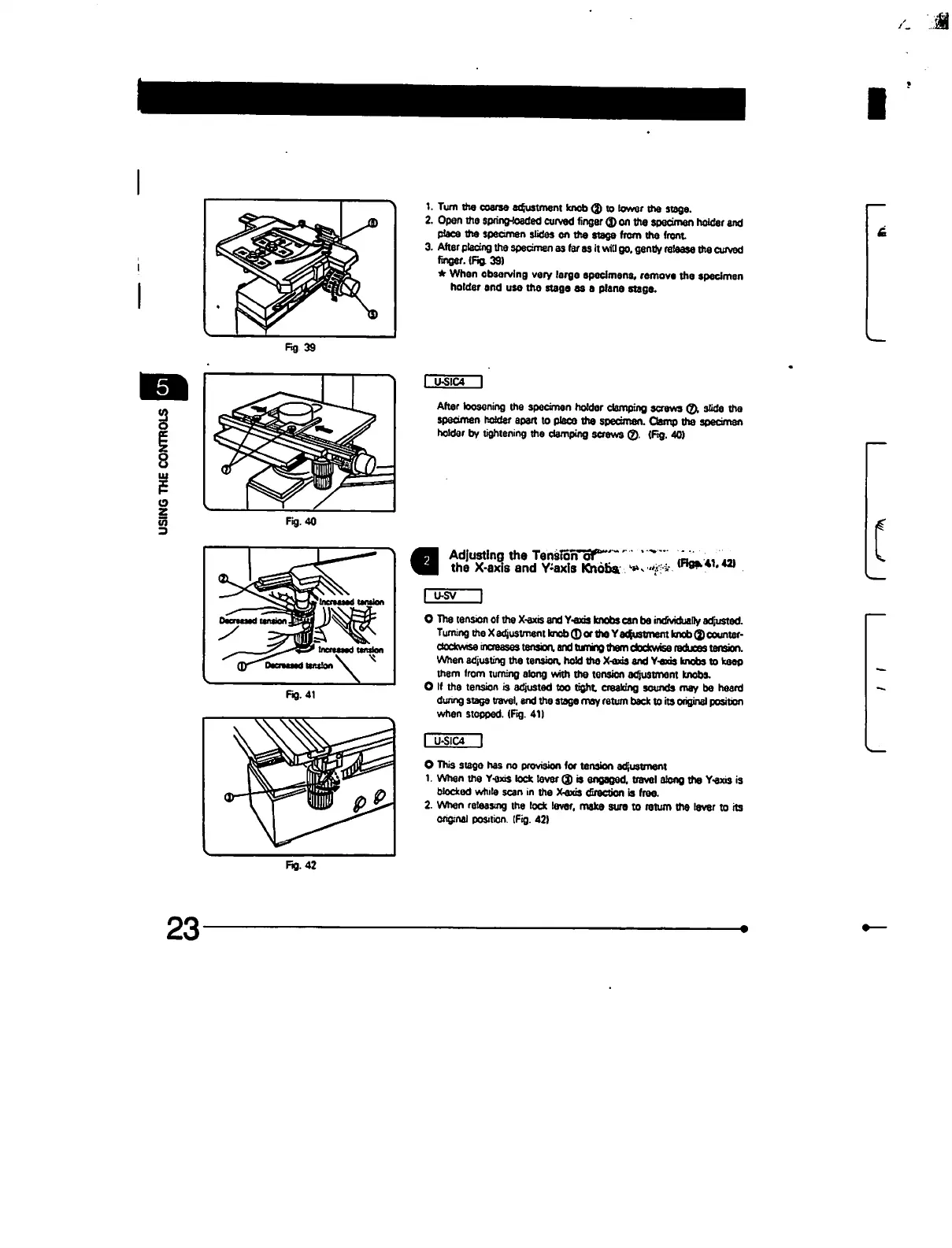
Olympus BX60 - Adjusting the Tension of the X-Axis and Y-Axis Knobs

Olympus BX60
47 pages
Print Icon
To Next Page IconTo Next Page
To Previous Page IconTo Previous Page
Loading...
fig
39
Fig,
41
1.
Turn
the
coarse
adjustment
knob
®
to
lower
the
stage.
2.
Open
the
spring-loaded
curved
linger
(D on
the
specimen
holder
and
place
tha
specimen
slides
en
the
stags
from
the
front
3.
After
placing
the
specimen
as
far
as
it
will
go.
gentty
release
the
curved
finger.
(Fig,
39)
When
obsarving
very
large
specimens,
remove
the
specimen
holder
and
use
the
stage
es a
plane
stage.
U-S1C4
I
After
loosening the
specimen
holder
clamping
screws
©i
slide
tha
specimen
holder
apart
to
place
the
specimen.
Clamp
the
specimen
holder
by
tightening
the
clamping
screws
©.
(Fig.
40)
Adjusting the
TenslorTof
the
X-axis
and
Y-axis
Khbfi*
>*>
"i
*
O
The
tension
of
the
X-axis
and
Y-exis
knobs
can
be
individuatty
adjusted.
Turning
the
X
adjustment
knob
®
or
the
Y
adjustment
knob
<j)
counter-
dodcwise
increases
tension,
and
turning
them
clockwise
reduces
tension.
When
adjusting
the
tension,
hold
the
X-axis
and
Y-axis
knobs
to
keep
them
from
turning
along
with
the
tension
adjustment
knobs.
O
If
the
tension
is
adjusted
too
tight
creaking
sounds
may
be
heard
dunng
stags
travel,
and
the
stage
may
return
back
to
its
original
position
when
stopped.
(Fig.
41)
I
U-SIC4
I
O
This
stage
has
no
provision
for
tension
adjustment
1.
When
the
Y-axis
lock
lever
<J
is
engaged,
travel
along
the
Y-exis
is
blocked
while
scan
in
the
X-axis
direction
is
free.
2.
When
releasing
the
lock
lever,
make
sure
to
return
the
lever
to
its
original
position.
(Fig.
42)
Fig.
42
23

Table of Contents

Other manuals for Olympus BX60

Related product manuals