58
English
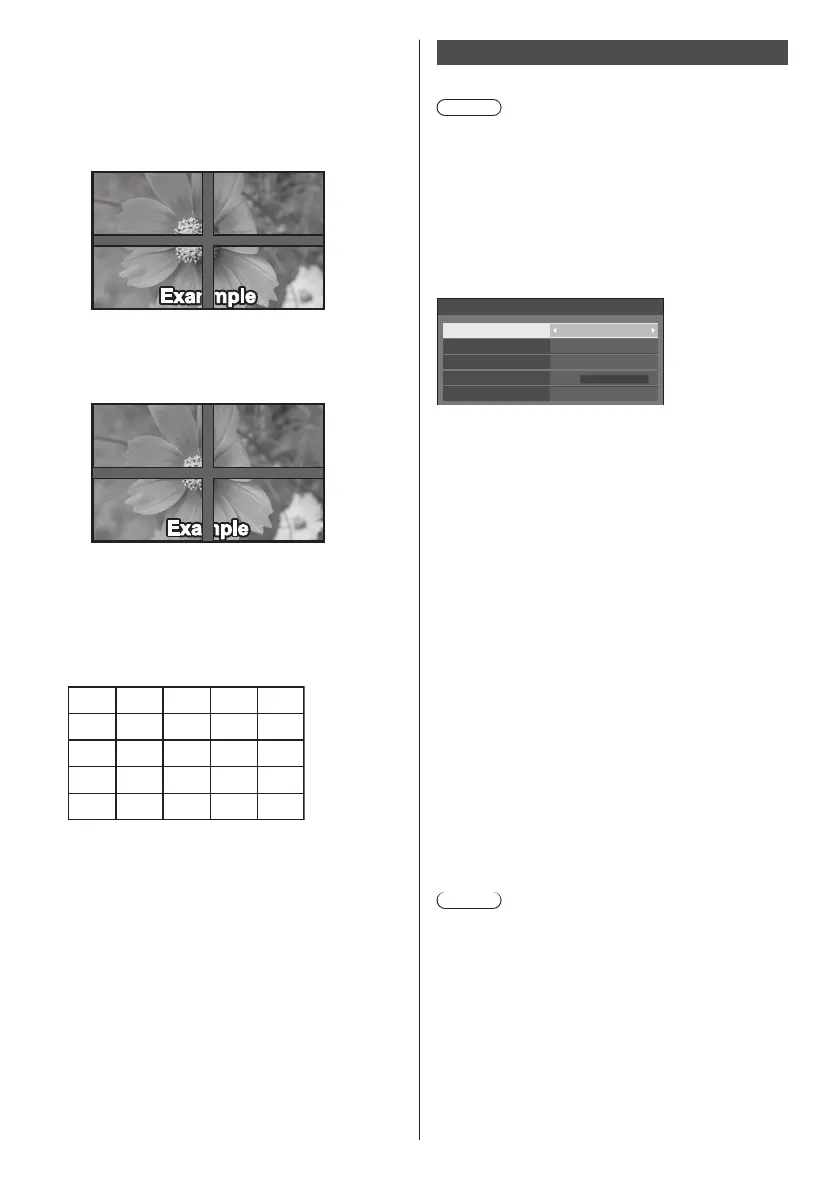
■ [Bezel H adjustment] / [Bezel V adjustment]
Adjust the area of image hidden in the joint
horizontally and vertically respectively.
0 to 100
Display example:
Setting value: 0
Displays the entire image including the joint area.
(Suitable when displaying character information
on PC.)
Setting value: 100
Does not display the image of the joint area.
(Suitable when displaying motion pictures.)
■ [Location]
Assign screen positions on the multi-screen.
Example:
[Horizontal scale] [10], [Vertical scale] [10]
A1 A2
....
....
....
....
B1 B2
.... ....
A9
B9
....
I1 I2 I9
A10
B10
....
I10
Select from A1 - J10.
●
The displayed content for setting changes
according to the settings for the [Horizontal scale]
and [Vertical scale].
●
By setting [Multi screen display] to [Off], it is
possible to check the location on the screen while
the setting menu is displayed.
●
If [Image rotation] is set to [180 degrees], the
enlarged location also rotates. (see page 87)
Portrait settings
This function displays input images by rotating 90°.
Note
●
Set to the input other than [Screen Transfer] /
[MEMORY VIEWER], and then set [Portrait settings].
●
For video or picture you want to display, use the ones
with16:9 resolutions.
●
About playing back with USB input, refer to “Using
“USB media player”” (see page 111).
●
While this menu is displayed, aspect mode will be
[16:9].
[Portrait settings] - submenu screen
Portrait settings
Portrait display
No. of displays
Display format
Bezel adjustment
Location
Off
3
Mode 1
0
1
■ [Portrait display]
[Off]:
Disables portrait display.
[On]:
Enables portrait display.
When it is set to [On], aspect mode will be [16:9].
■ [No. of displays]
Set the number of displays comprising the portrait
display.
1, 3
■ [Display format]
[Mode 1]:
Displays images without missing portion, however,
some portion of the input images on the right and left
is cut.
[Mode 2]:
Displays the entire input images, however, some
portion of the images on top and bottom is not
displayed.
[Mode 3]:
Displays the entire input images so that the image is
displayed without missing portion.
Note
●
[Mode 1] and [Mode 2] keep the aspect ratio 16:9 but
[Mode 3] doesn’t.
■ [Bezel adjustment]
Adjusts the area of image hidden in the joint area on
the portrait screen.
0 to 100


 To Next Page
 Loading...