EN-40
Protecting Images
Set the data to read-only to prevent images from being erased by mistake.
Protecting Images
1. Slide the mode switch to [
].
2. Select the image that you want to protect with the W / X
buttons.
3. Press the MENU button.
J The playback menu is displayed.
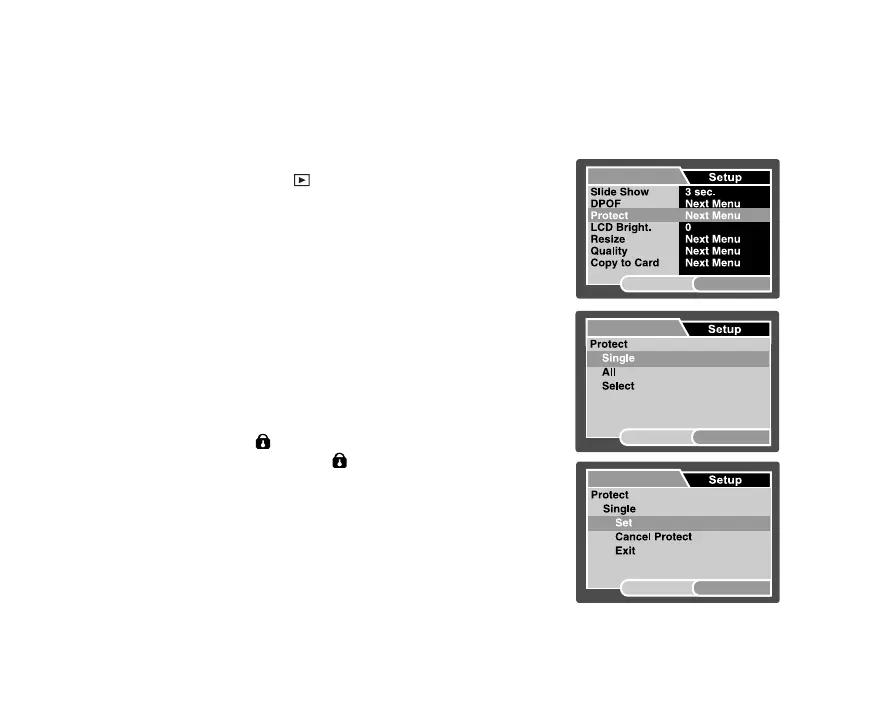
4. Select [Protect] with the S / T buttons, and press the SET
button.
5. Select [Single] or [All] with the S / T buttons, and press the
SET button.
6. Select [Set] with the S / T buttons, and press the SET
button.
J Protection is applied to the image and the camera returns
to the playback mode.
J The protect icon [ ] is displayed with protected images.
When [All] has been selected, [
] is displayed with all the
images.
Play
SET:Adj.
MENU:Exit
Play
SET:Enter
MENU:Exit
Play
SET:Enter
MENU:Exit


 To Next Page
 Loading...