SilverCrest SCW 5 A1
English - 31
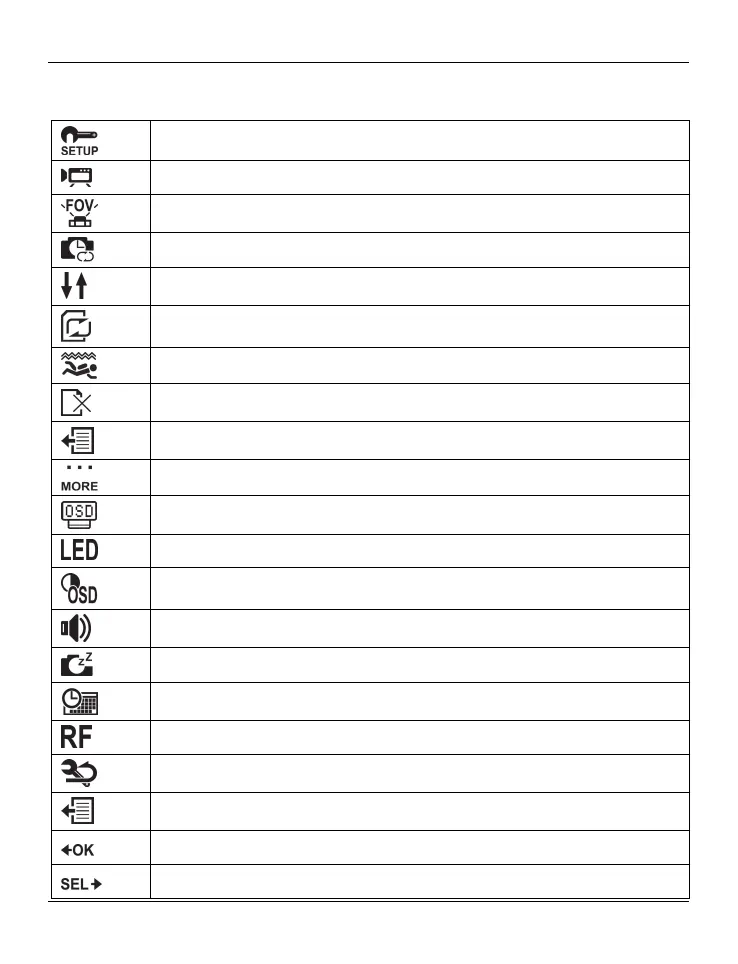
Menu icons
Customise recording settings
To set the video resolution
To select the camera’s field of view
To set the time-lapse delay
To rotate the recording by 180°
To toggle the loop recording mode on/off
To toggle the diving mode on/off
To delete recordings/format the memory card
To exit the menu
Customise camcorder settings
To rotate the display image by 180°
To toggle the status LEDs on/off
To customise the display brightness
To customise the beeper volume
To customise the auto power-off delay
To set the date and time
To connect a remote control (not included in the package)
To reset to factory defaults
To exit the menu
Record button [9] to confirm
On/Off/Mode button [2] to select


 To Next Page
 Loading...