142
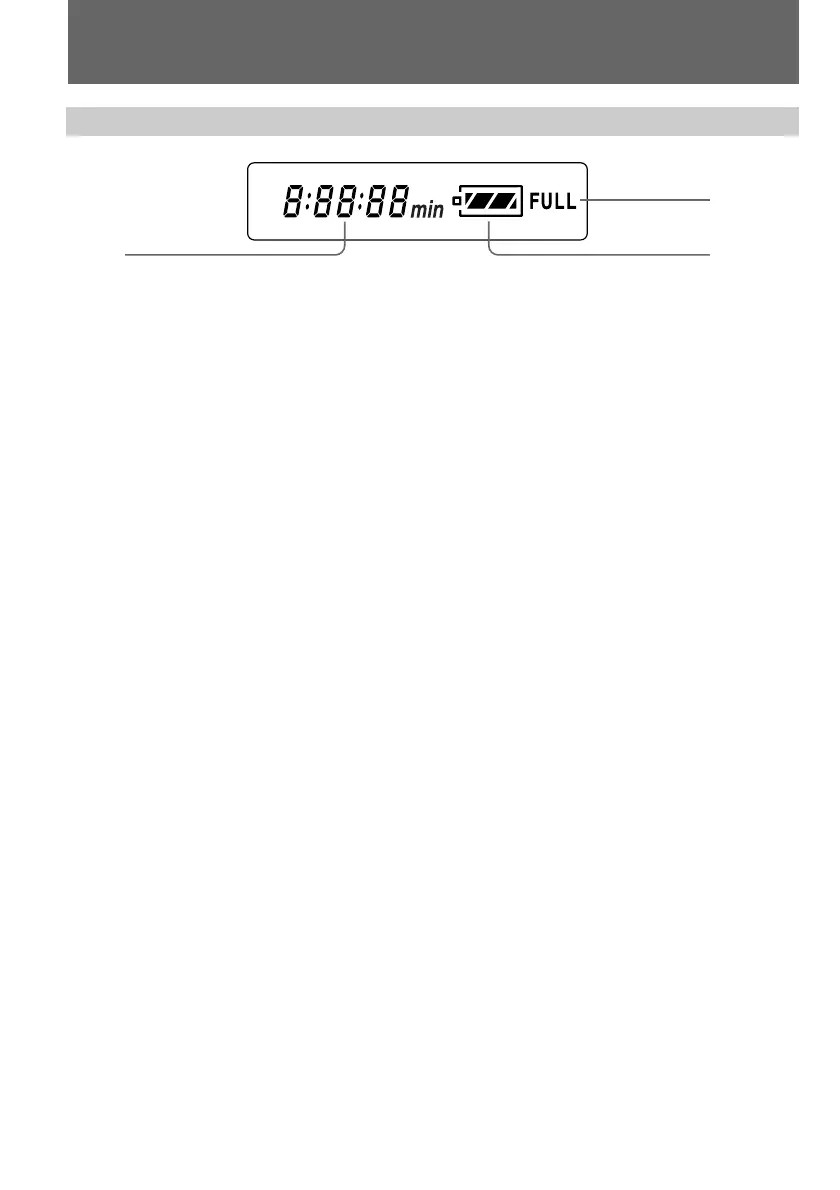
1 Remaining time in minutes indicator (p. 8) /
Tape counter (p. 78) /
Memory counter (p. 106) /
Time code indicator (p. 12)
Identifying the parts
1 3
2
Display window
2 FULL charge indicator (p. 8)
3 Remaining battery indicator (p. 8, 120)
To watch the demonstration
You can watch a brief demonstration of pictures with special effects. If the demonstration
appears when you turn on the camcorder for the first time, exit the demo mode to use your
camcorder.
To enter demo mode
(1)Eject the cassette and set the POWER switch to VTR.
(2)While holding down ·, set the POWER switch to CAMERA. The demonstration starts.
The demonstration stops when you insert the cassette.
Note that once you enter demo mode, this mode is retained as long as the vanadium
rechargeable battery is in place. Therefore, demonstration starts automatically 10 minutes
later every time you set the POWER switch to CAMERA, and after you eject the cassette.
To exit demo mode
(1)Set the POWER switch to VTR.
(2)While holding down π, set the POWER switch to CAMERA.


 To Next Page
 Loading...