53
Advanced operations
Shooting with manual adjustment
Adjusting gain shift
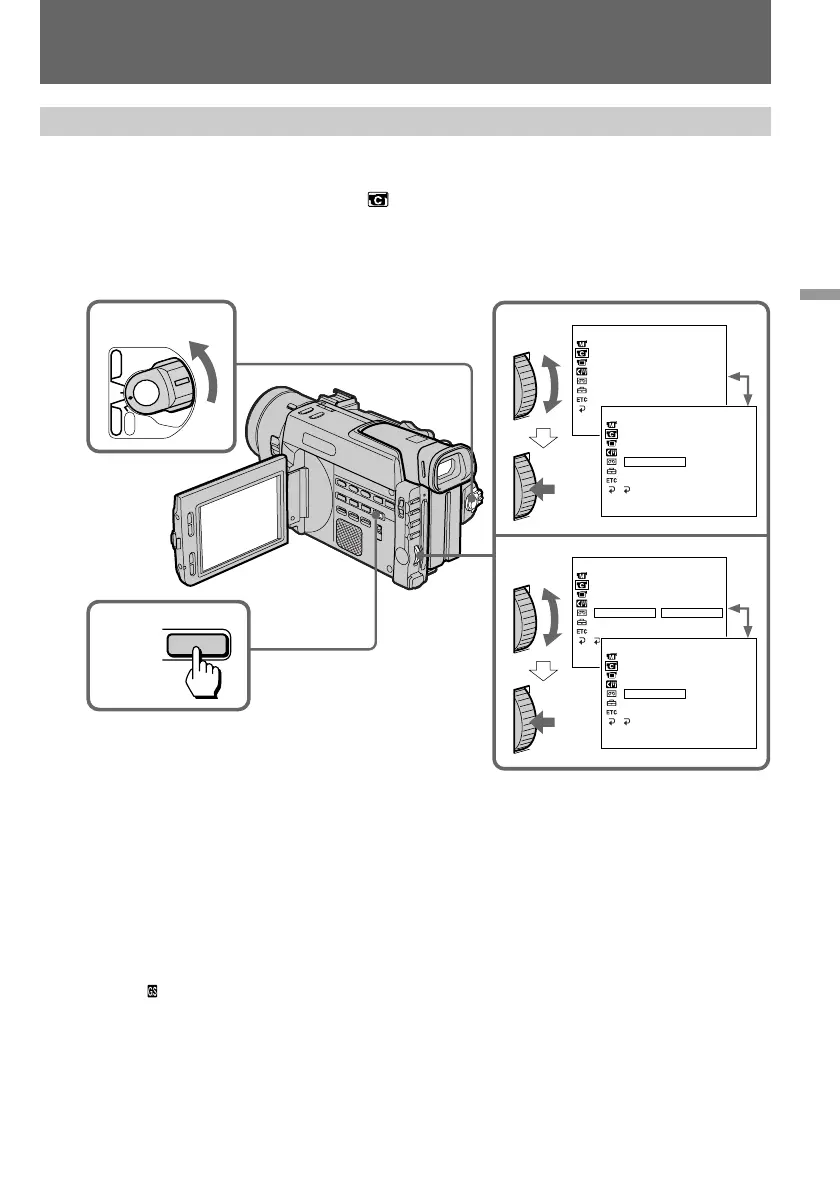
(1) Set the POWER switch to CAMERA.
(2) Press MENU to display the menu.
(3) Turn the control dial to select
, then press the dial.
(4) Turn the control dial to select GAIN SHIFT, then press the dial.
(5) Turn the control dial to select –3dB, then press the dial.
(6) Press MENU to erase the menu display.
To deactivate gain shift
Select 0dB in step 5, then press the control dial.
What is gain shift
When shooting in bright conditions, the gain shift function automatically adjusts the
automatic exposure control’s gain value to –3dB as much as possible. This helps you shoot
pictures with less noises in a bright condition. In dark conditions, the unit operates as usual.
When you adjust gain shift
The indicator is displayed on the LCD screen or in the viewfinder.
CAMERA SET
DZOOM
16: 9WIDE
STEADYSHOT
AE SH I FT
GA I N SH I FT 0dB
FRAME REC –3 dB
I NT .REC
RETURN
[MENU] :END
CAMERA SET
DZOOM
16: 9WIDE
STEADYSHOT
AE SH I FT
GA I N SH I FT
FRAME REC
I NT .REC
[MENU] :END
CAMERA SET
DZOOM
16: 9WIDE
STEADYSHOT
AE SH I FT
GAIN SHIFT –3dB
FRAME REC
I NT .REC
RETURN
[MENU] :END
CAMERA SET
DZOOM
16: 9WIDE
STEADYSHOT
AE SH I FT
GA I N SH I FT 0dB
FRAME REC
I NT .REC
RETURN
[MENU] :END
1
2,6
POWER
OFF
CAMERA
MEMORY
VTR
MENU
3,4
5


 To Next Page
 Loading...