20
US
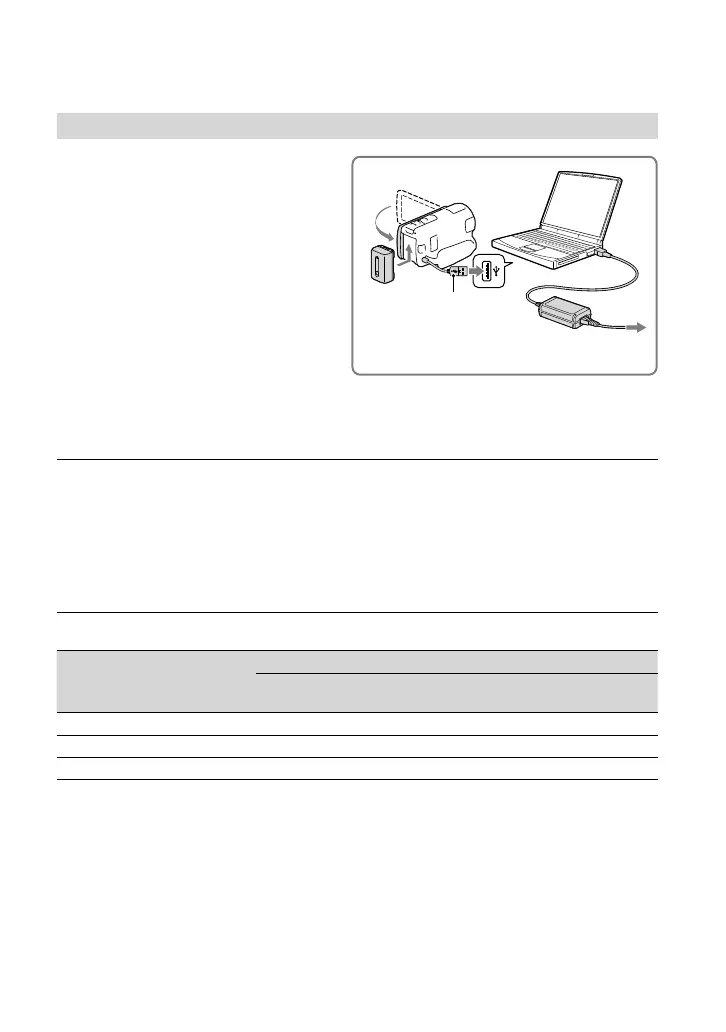
Charging the battery using your computer
Turn off your camcorder and connect
the camcorder to a running computer
using the Built-in USB Cable.
To charge the battery from a wall outlet (wall socket) using the Built-in USB
Cable
You can charge the battery by connecting the Built-in USB Cable to a wall outlet (wall socket)
using an AC-UD10 USB charger/AC Adaptor (sold separately). You cannot use a Sony CP-
AH2R, CP-AL, or AC-UP100 portable power supply device (sold separately) to charge the
camcorder.
Charging time
Approximate time (min.) required when you fully charge a fully discharged battery pack.
Battery pack
Charging time
AC Adaptor
Built-in USB Cable
* (when
using your computer)
NP-FV50 (supplied) 155 280
NP-FV70 195 545
NP-FV100 390 1,000
The charging times shown in the table above are measured when charging the camcorder at a
temperature of 25 °C (77 °F). It is recommended that you charge the battery in a temperature range of 10
°C to 30 °C (50 °F to 86 °F).
* The charging times are measured without using the USB connection support cable.
Built-in USB cable
To the wall outlet (wall socket)


 To Next Page
 Loading...