SETUP - PERFORMANCE MENU
PERFORMANCE- SETUP MENU
SETUP
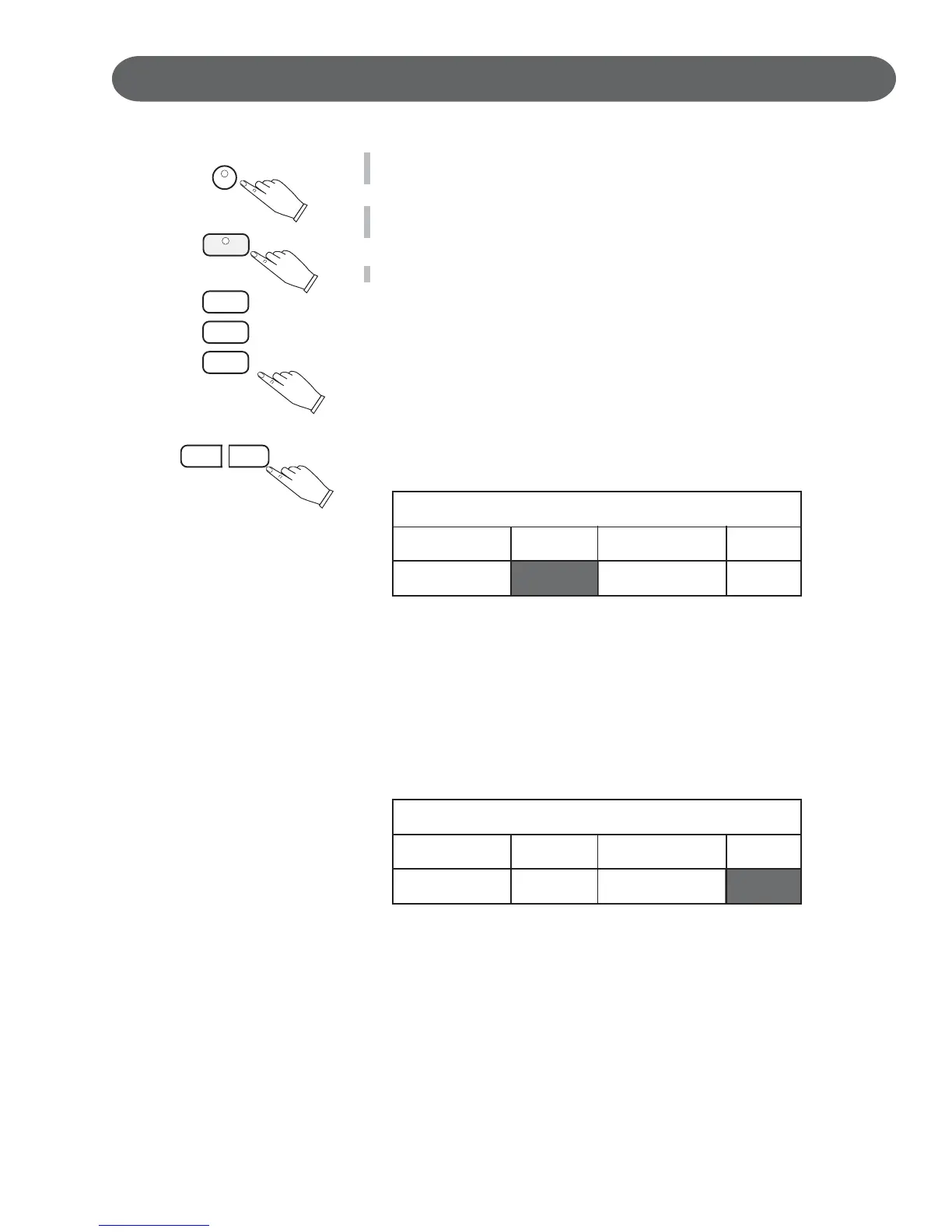
1. Press the SETUP button.
The first Set Up Menu Screen will appear on the LCD Screen
CURSER
ENTER
2. The Performance Listing will be highlighted.
Press the ENTER button to access the Performance menu.
3. Use the CURSOR buttons to access the following options shown below.
TRANSPOSE -
The Transpose feature can shift the pitch of the piano up or down in
semitone intervals.
Use the VALUE + or VALUE – buttons to set the transpose value range
from –5, five consecutive piano keys lower, to six consecutive piano keys
higher.
The Transpose setting of zero is pitch neutral or not engaged.
– +
VALUE
Transpose does not affect notes that are sounding and it does not affect
the piano percussion.
Performance Setup
Velocity
Norm
Split Point G2
Transpose 0
Screen Hold 45
LCD SCREEN DISPLAY HOLD -
The Screen Hold sets the time for which the selected Menu Screen will
stay on the LCD Display before automatically reverting to the prior
screen.
Use the – VALUE + buttons or the VALUE wheel to select a screen hold
in the range of 1 second to 44 seconds.
Press the – VALUE + buttons simultaneously to recall the default setting
of 4 seconds.
Performance Setup
Velocity
Norm
Split Point G2
Transpose 0
Screen Hold 4S


 To Next Page
 Loading...