ADVANCED FUNCTI ONS
90
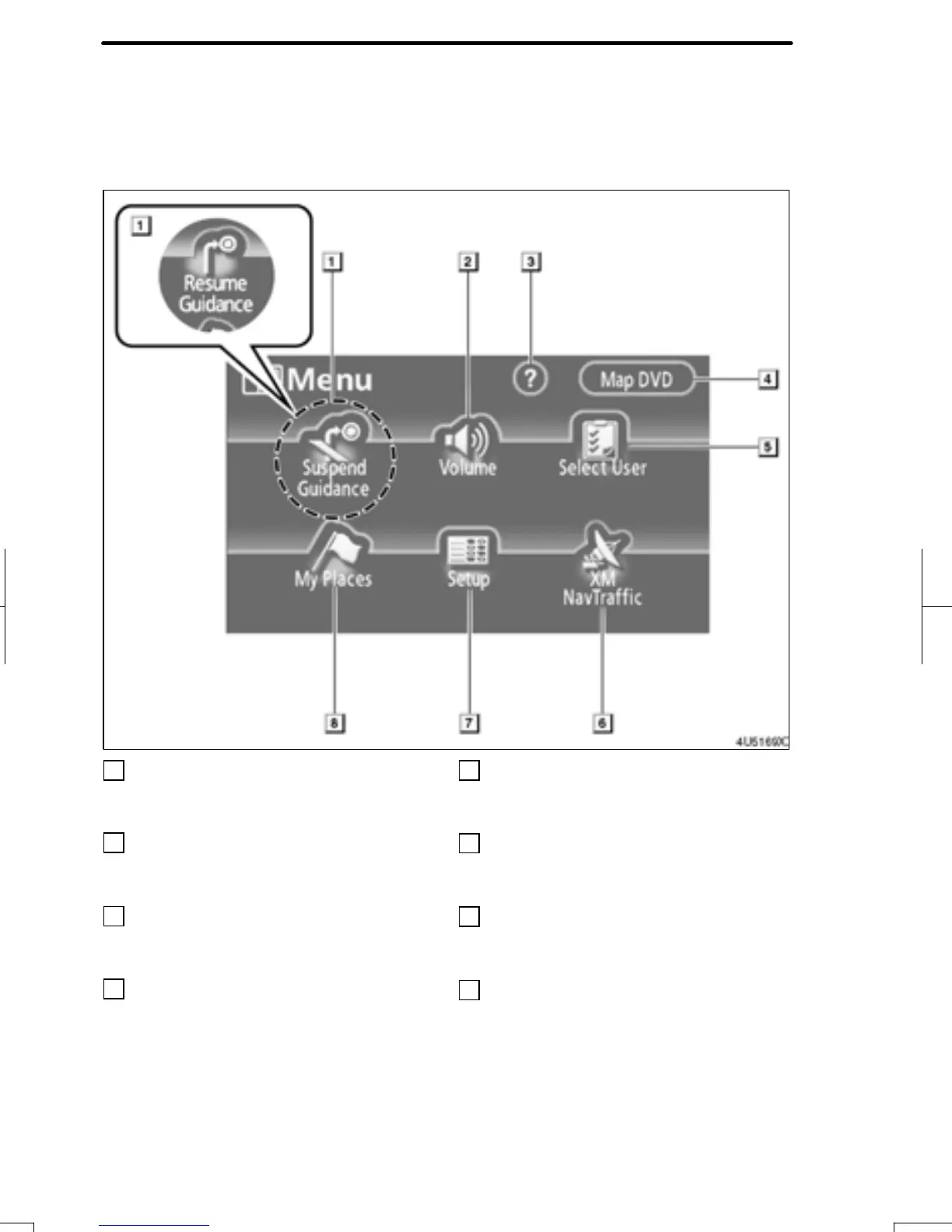
The “Menu” screen allows effective use of the navigation system. To display the “Menu”
screen, push the “MENU” button.
1
“Suspend Guidance” or “Resume
Guidance”
Suspends or resumes guidance. 92....
2
“Volume”
Sets the volume for voice guidance.
93.................................
3
“?”
Function help for the “Menu” screen can be
viewed on this screen. 29............
4
“Map DVD”
Displays information regarding the disc
version or covered area. 180..........
5
“Select User”
Up to 3 different settings for different users
can be memorized. 94...............
6
“XM NavTraffic”
Sets XMr NavTraffic information.
120................................
7
“Setup”
Enables various settings for the navigation
system. 91, 110.....................
8
“My Places”
Enables changes to “Memory points”,
“Home” and “Areas to avoid”. Enables
deletion of the previous point. 96......
RAV4_Navi_U
Finish
Quick reference (“Menu” screen)


 To Next Page
 Loading...