D-302754 13
USER SETTING
ENTER CODE
1. NEW INSTL CODE
2. ENROLLING
3. DEFINE ZONES
[installer code]
INSTALLER MODE
ENROL WL 1WAY KP
15. PARTITIONING
<OK> TO EXIT
[WL 1-way keypad
No. 1 to 8] (e.g. 5)
1way kp No :
1way kp No : 5 1way kp No : 5
(**)
<OFF> TO DELETE
key until
red LED
lights
TRANSMIT NOW
Deleting a wireless
commander MCM-140+
1way kp No: 5
*
press
ENROL WL 2WAY KP
[MKP-150/MKP-151
No. 1 or 2] (e.g. 2)
2way kp No:
2way kp No : 2 2way kp No : 2
(**)
<OFF> TO DELETETRANSMIT NOW
Enrolling a wireless keypad
MKP-150/MKP-151
for next
enrolling action
ENROL WL SIREN
[WL siren No.
1 or 2] (e.g. 2)
SIREN No :
siren No : 2 siren No : 2
(**)
Momentarily press the
wireless siren self-test
button until a squawk is
heard (1 sec. approx.)
TRANSMIT NOW
Enrolling a
wireless siren
siren No: 2
for next
enrolling action
AWAY
2way kp No: 2
Deleting a wireless keypad
MKP-150/MKP-151
Press MKP-150/
MKP-151
back tamper
switch once
(see MKP-150/
MKP-151
inst. instructions)
2way kp No: 2
<OFF> TO DELETE
Deleting a
wireless siren
siren No: 2
Open WL
siren cover
and remove
its battery
ENROLLING TYPE
normal enroll
by tamper
ENROLL KEYFOB
Keyfob No: -
Keyfob No: 5
<OFF> TO DELETE
KEYFOB No: 05
[Keyfob No.]
(e.g. 5)
Deleting a Keyfob
(*)
(**)
ENROLL PROX TAG
Tag No: 5
Tag No: -
PRESENT TAG
Tag No: 5
<OFF> TO DELETE
Tag No: 05Tag No: 05
(Prox tag No.)
(e.g. 5)
for next
enrolling action
Enrolling a Prox tag Deleting a prox tag
(*)
(**)
(**)
Present
tag
Optional
Keyfob No: 5
TRANSMIT NOW
(**)
ZONE No: 05
<OFF> TO DELETE
ZONE No: 05
[WL Zone No.
01-28] (e.g. 05)
(**)
Deleting wired/
WL sensor
ZONE No: 05
[Initiate transmission)
ZONE No: 05
TRANSMIT NOW
(**)
Enrolling a WL sensor
(***)
for next
enrolling action
ZONE No: 29
ZONE No: 29
Enrolling wired sensor
for next
enrolling action
[wired Zone No.
29/30] (e.g. 29)
<OK> TO ENROLL
ENROLL SENSORS
ZONE No: - -
SET SENSITIV.
higher sensitivit
lower sensitivit
Select by
or
(****)
[wired/WL Zone No.
01-30] (e.g. 05)
(press
any
key)
KEYFOB No: 05
for next
enrolling action
Enrolling a Keyfob
ACCESS TO PART
F01:P1 P2 P3
[select any combiantion
of up to 3 partitions]
Note:
Applies only
when in Partition mode
1way kp No: 5
Enrolling a wireless
Commander MCM-140+
for next
enrolling action
Note:
Applies only
when in Partition mode
(**)
(**)
(First display)
WALK TEST
READY 00:00
ACCESS TO PART
C01:P1 P2 P3
[select any combiantion
of up to 3 partitions]
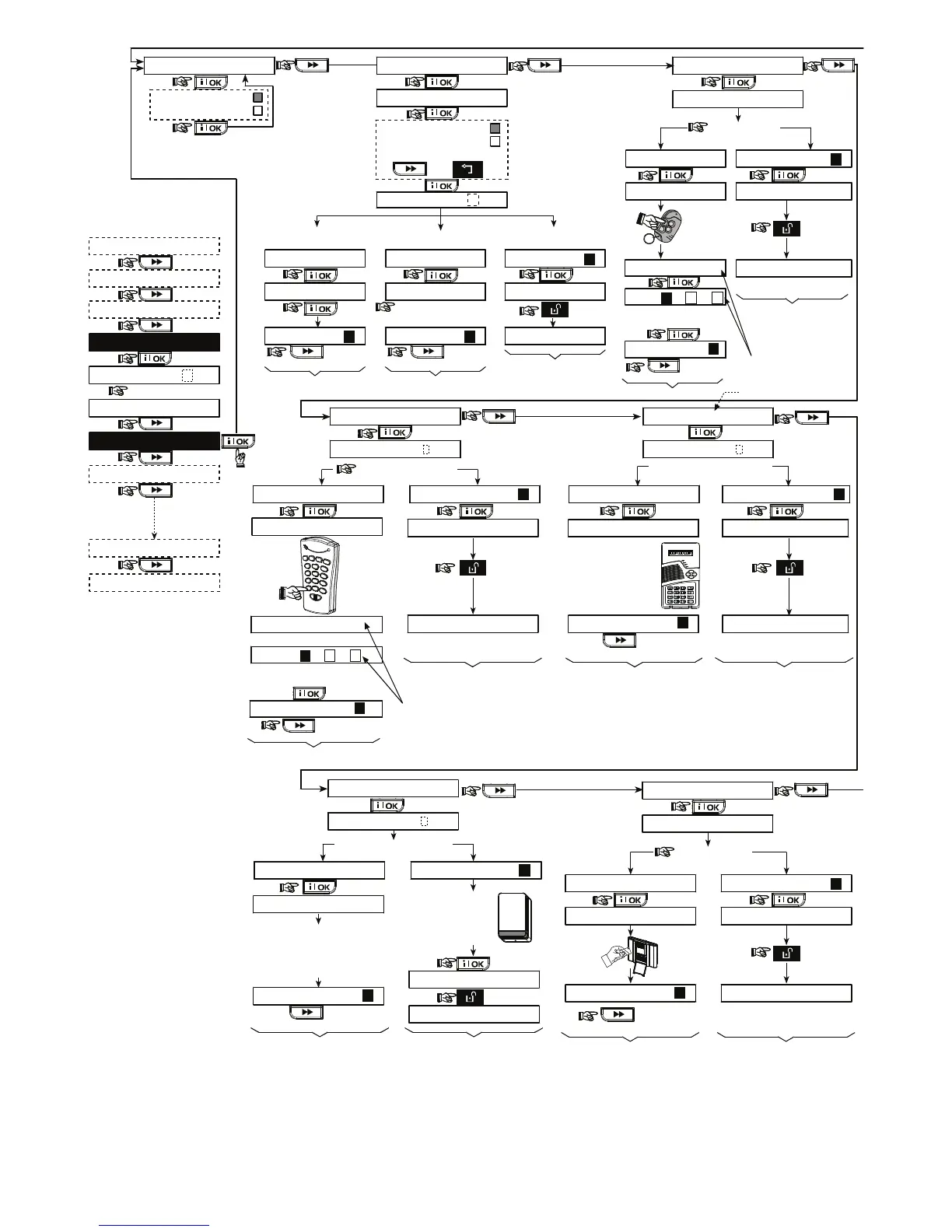
Figure 4.2 - Enrolling / Deleting Wireless Devices / Keyfobs / Wireless Commanders / Wireless Sirens
* Keyfob & proximity tags enrolling can be performed by the
installer or by the user (via USER SETTINGS menu).
** A black box in the display means that a device is
enrolled (the system has learned its ID). No black box
indicates that the device is not enrolled.
*** Initiate either normal transmission or the device tamper
function (see ENROLLING TYPE, Par. 4.2.2).
****Select "higher" sensitivity for far wireless device,
"lower" for near devices.
Note: This changes the RF range during enrolling only
and does not affect the performance of the sensor.



 To Next Page
 Loading...