
 Need help?
Do you have a question about the Atlas Copco POWER FOCUS 6000 and is the answer not in the manual?
Describes the Power Focus controllers and their features.
Explains setting up tightening parameters like torque, angle, and strategy.
Explains electronic and physical methods for license distribution.
Describes server-based vs. USB device methods for feature distribution.
Details using ToolsTalk for distributing virtual stations and features.
Explains using a USB device for distributing stations and features offline.
Introduces the default strategy for fast, ergonomic tightening.
Describes the Two Step strategy and guides on its fine-tuning.
Explains the Quick Step strategy for reducing preload scatter.
Details the Three Step strategy including a conditioning step.
Explains setting limits for torque and angle monitoring.
Explains using compensation to improve clamping force accuracy.
Covers upgrading controllers and programming parameters via ToolsTalk 2.
Details easy data collection setup and enhanced reporting/filtering.
Highlights increased production traceability via analysis of tightening traces.
Describes the Power Focus controllers and their features.
Explains setting up tightening parameters like torque, angle, and strategy.
Explains electronic and physical methods for license distribution.
Describes server-based vs. USB device methods for feature distribution.
Details using ToolsTalk for distributing virtual stations and features.
Explains using a USB device for distributing stations and features offline.
Introduces the default strategy for fast, ergonomic tightening.
Describes the Two Step strategy and guides on its fine-tuning.
Explains the Quick Step strategy for reducing preload scatter.
Details the Three Step strategy including a conditioning step.
Explains setting limits for torque and angle monitoring.
Explains using compensation to improve clamping force accuracy.
Covers upgrading controllers and programming parameters via ToolsTalk 2.
Details easy data collection setup and enhanced reporting/filtering.
Highlights increased production traceability via analysis of tightening traces.
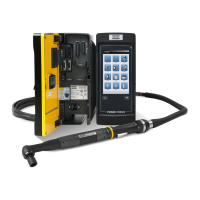
The Power Focus 6000 system is a comprehensive solution for assembly operations, designed to enhance error-proofing, connectivity, and flexibility. It introduces software ergonomics to the industry, a feature that earned it the prestigious Red Dot design award in 2012. The core system comprises the Power Focus 6000 controller, an Intelligent Application Module (IAM), a Tensor STR tool, a Tensor STR cable, and various accessories and communication interfaces. This integrated system is designed to work seamlessly in typical customer environments.
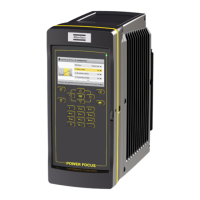
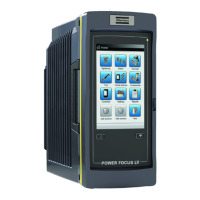
The Power Focus 6000 controller is globally recognized for its outstanding tightening capabilities. Its intuitive and user-friendly interface allows navigation by tapping on menu items or swiping across the display. The web interface mirrors the controller display, enabling configuration and programming via a web browser on a connected computer. The controller offers several menus for managing different aspects of the system. The Tightening menu lists available tightening programs (Psets) for configuration. The Batch Sequence menu displays stored batch programs. The Sources menu lists hardware accessories or functions that control the selection of tightening programs or batch sequences, and it's also where scanners used with tools are configured. The Tool menu provides access to information about connected tools, allows for tool calibration, motor tuning, and setting up tool maintenance. The Virtual Station menu is where tools and accessories are assigned to virtual stations, and task selection is performed. The Controller menu facilitates the administration and installation of new controller software, viewing hardware device information, and exporting or importing configurations and reports. The Accessories menu allows configuration of internal I/Os and hardware accessories like I/O Expanders, Stacklights, Operator Panels, Socket selectors, and Scanners. Finally, the Reports menu provides access to historical tightening results, events, and NOK ratios. The Settings menu allows configuration of LAN, PIN, language, date, time, torque unit, tool alarms, Wi-Fi channels for wireless tools, and event display settings.
Basic programming involves setting parameters like target torque or target angle for tightening operations. Optional settings include soft start, self-tap, and torque compensation, as well as choosing the tightening strategy. The tightening progress can be monitored by adding limits for torque or specified tightening angle. Psets can be managed by naming them and setting general tightening parameters, including the tightening strategy (manual or quick prog mode) and target value.
The Power Focus 6000 also enables communication through Open Protocol, a standard developed by Atlas Copco to facilitate communication between controllers and external parties in production processes. This interface supports building applications for remote control or data subscription, is platform-independent, and supports Ethernet connection. An Open Protocol message consists of a header, data field, and message end. Message IDs (MIDs) are represented by a four-digit number and can have several revisions to ensure backward compatibility. The main value of Open Protocol lies in its ability to provide a standard and easy-to-use communication protocol that can be set up in minutes and integrated into production processes.
The Functionality Management System (FMS) is Atlas Copco's new licensing platform, simplifying the delivery and administration of functionality on Power Focus 6000 controllers. FMS allows functionality to be added and removed based on station needs, offering flexible rebalancing, customization, upgradability, instant delivery, and trial licenses. Features and licenses can be distributed to the customer portal either electronically or physically. Electronic delivery automatically links features to the customer account, while physical delivery involves a paper license and manual registration. The customer portal is used for activating controller functionality, reviewing purchase orders, and mapping features to a USB license device or FMS server.
Once licenses are linked to the customer portal, features can be distributed to controllers via a server-based solution (for production facilities needing quick rebalancing) or a non-network required solution using an FMS USB license device (for customers without an IP-based network or less need for rebalancing). The FMS server-based functionality is integrated into ToolsTalk, making it efficient for distributing virtual stations and features to multiple controllers. The FMS USB device is ideal for individual controllers, allowing users to load and distribute virtual stations and features by transferring license files to the USB device and then plugging it into the controller. Functionality can also be moved between controllers using the same USB device.
The Intelligent Application Module (IAM) has an 8 GB memory capacity and stores all data for the Power Focus 6000, including licenses, results, events, configurations, controller firmware, and service logs. This data can be easily transferred between Power Focus 6000 controllers by simply removing and inserting the IAM. Firmware updates are secure, as old firmware versions are kept available, allowing for quick switching if needed. The IAM is located inside the controller's door and comes in three versions: IAM Critical control, IAM Process control, and IAM Process+ control, each offering different levels of functionality.
The Tensor STR tool is a complete tool designed for optimal performance with the Power Focus 6000 controller. It is the result of extensive research and development focused on improving productivity, quality, and ergonomics. The Tensor STR cable, developed with Atlas Copco's extensive experience since 1987, offers optimal cable performance, combining maximum flexibility with durability through its flat-cable design. This design allows for access to difficult applications and features a 'Cable Twist' design to spread flex load over a greater distance, minimizing strain in critical areas.
The Power Focus 6000 hardware includes a 7" resistive touch screen display with 480 x 800 pixels and an LED backlight with a lifetime of 70,000 hours. The controller operates on a single-phase 115 or 230 VAC line voltage with a power rating of 1500 W. It automatically senses and switches to the connected line voltage. The equipment is designed for indoor use, altitudes up to 2,000 m, and maximum relative humidity of 80% for temperatures up to 31 °C, decreasing linearly to 50% at 50 °C.
Communication features include W-LAN wireless networking (IEEE 802.11a/b/g/n compatible), Bluetooth 2.1 + EDR wireless technology, and 10/100 Mb/s Ethernet (RJ-45 connector). The controller also has a mono speaker for audio feedback. Connections include two 2.0 High Speed USB ports, two 10/100 Ethernet ports, four digital inputs (24V -15% +20%), four digital outputs (24V ±20%, 1A), one I/O bus, one auxiliary input (24V ±10%, 0.5A min), one auxiliary output (24V, 1.5A max), one emergency stop circuit class 3, two communication ports (daisy chain), one fan power output connector, one remote start switch, one Anybus CC connector, one IAM connector, and one tool cable connector.
Tightening strategies are crucial for applying clamping force to a joint. Different joints require different strategies to achieve the desired clamping force and minimize unwanted in-service effects. The Turbo Tight® strategy is the default, designed for fast and ergonomic tightening based on the tool's maximum speed, requiring only the target torque to be set. It optimizes tightening speed for faster cycles, reduced heat development, and energy savings. It also reduces reaction force by optimizing tightening speed, leading to faster torque build-up and less force transmitted to the operator's hand, improving operator comfort and reducing the need for reaction absorbing devices. Turbo Tight® is easy to set up, often requiring only the target torque. Fine-tuning involves adjusting the "Rundown complete" setting to prevent overshoot, especially for stiff joints.
The Two Step Tightening Strategy is similar to the Quick Step strategy but includes a small time delay between the first and final steps to counteract short-term relaxation effects. Fine-tuning involves choosing the First torque value and Pause time to improve ergonomics for handheld tools. The Quick Step Tightening Strategy reduces preload scatter by adding an initial step with a given torque and speed, then reducing the target speed in the final step. The Three Step Tightening Strategy adds a loosening step between the first and final steps to overcome short-term relaxation effects due to embedment and reduce preload scatter, useful for conditioning the joint. This involves tightening to a First torque, releasing the load by turning the nut a specified Conditioning angle, and then retightening to the Target torque.
The Rotate Strategy is primarily for testing and demo purposes, allowing the tool to turn the socket to a specified angle using the lowest possible torque. Target Torque Limits allow discarding a tightening if the torque result falls outside specified limits, preventing bolt deformation or insufficient clamping force. Target Angle Limits monitor if the nut is turned to the desired angle during tightening. The Stop Stage terminates the tightening, allowing the socket to be released. Soft Stop makes the tightening stop more ergonomically by decreasing tool speed gradually, avoiding uncomfortable abrupt stops. Torque Compensation improves the determination of actual clamping force and reduces scatter by compensating for torque used during rundown.
The Tensor STR tools come in various models: ETV, ETD, ETT, and ETP. ETV and ETD are full-featured STR tools, while ETT lacks IP classification and gyroscope, and ETP is an older design. The tools are designed for high reliability and durability, with improved heat transfer, increased grease life, and IP54 classification (for ETV and ETD) for protection against dust and fluids. The STR concept uses modules (handle, HMI, motor, torque transducer, gears, and angle head) to increase quality and flexibility, allowing for interchangeable motors and easier part replacement. The handle module is common for all STR ETV and ETD models, including the main electronic board molded into plastics for protection, a vibrator for operator feedback, and a gyroscope for sensing tool movements. The HMI module provides LED lights (yellow, green, red, blue) and a tightening direction indicator, with a lockable reverse ring and a speaker for sound signals.
The motors in STR ETV/ETD tools have the same diameter, with more powerful motors being longer. Robustness is enhanced with stronger aluminum bearing houses and a new insulation system. Motor rotation speed is higher than on ST tools when running with a Power Focus 6000. An RFID tag is included in the motor module. The torque transducer provides accurate readings from 100% down to 20% of nominal torque, with improved STR range reducing motor disturbance on the signal. Planet gears and angle gears are made of special steel for maximum accuracy and durability, with larger angle heads prepared for reaction plates. The ETT front part differs by placing the transducer after the angle gear and attaching it to the output shaft, providing 2.5% accuracy over 3s.
The tool supports various accessories attached via two connections, allowing combinations like a scanner and headlight. Accessories include lever triggers (135deg and straight) for alternative grips, a button for sending impulses, a headlight for illuminating the work area, a 2D scanner, a selector ring button, tool LEDs for operator feedback, and an EHMI (small display with 3 buttons) for tightening information and Pset selection. Mounting brackets are available for fixturing the tool, and protection covers prevent scratches. Shorter levers can be used as safety triggers. A suspension allows the tool to rotate when attached to a balancer. Local customization is possible by adding accessories to fit operator preferences or application needs.
Cable management is crucial for all Atlas Copco tools and assembly equipment. Cables connect power supply, controller, nutrunner, and accessories. Proper cable management increases cable life and reduces operator tripping hazards. A cable clamp bracket can be attached to a hand tool cable and then to a cable balancer to keep the cable off the floor. The flat-cable design features a Kevlar-reinforced core to absorb tensile loads, preventing lead damage and ensuring optimal signal integrity by separating high and low voltage conductors.
Fieldbus is an industrial network system for real-time distributed control, connecting instruments like Power Focus controllers in a manufacturing plant. It supports daisy-chain, star, ring, branch, and tree network topologies, requiring only one communication point at the controller level and allowing hundreds of analog and digital points to be connected simultaneously. The Power Focus 6000 (release 2.1) supports DeviceNet, EtherNet/IP, and ProfiNetIO fieldbus types. Fieldbus parameters can be set up using ToolsTalk 2, providing real-time control over multiple controllers in a standardized way.
ToolsTalk 2 is developed for the multi-controller concept of Power Focus 6000, simplifying the management and programming of multiple controllers. It supports user authentication, ensuring only approved users make changes to controllers and tightening programs, with full traceability of all changes. The plant structure in ToolsTalk 2 allows organizing controllers according to the plant layout, making it easier to find and update controllers and tightening programs. ToolsTalk 2 also simplifies controller programming by providing a single view of all tightening parameters, allowing changes to be made and verified before saving to the controller. It saves all versions of tightening programs, enabling rollback to previous versions. ToolsTalk 2 also facilitates multiple controller upgrades with a single click, loading new firmware without immediate activation, and allowing easy switching between software versions.
ToolsNet 8 is the next-generation data collection and production analysis software from Atlas Copco, built on modern technologies for enhanced value. It offers reliable data collection from Atlas Copco controllers and supports competitor tools via Open Protocol. Simple setup involves setting the IP address of the ToolsNet 8 server in the controller. Data buffers on both the controller and ToolsNet 8 server ensure high security. Simple Data Analysis in ToolsNet 8 provides enhanced reports with filtering, customizable fields, data grouping, favorite report saving, Excel export, detailed tightening information, and access to all traces. Production Alarms can be set up based on specific controller events, sending email notifications to reduce downtime. Alarms based on statistical trends help identify material or process problems automatically. The Dashboard provides a direct overview of production, with customizable widgets showing SPC data, tool maintenance needs, and latest results. Traceability is enhanced, allowing users to find specific products and verify tightening correctness by analyzing traces based on time intervals, VIN numbers, and statistical deviations. Tool Service Information automatically collects data on tools in production, including service logs, performance statistics, software versions, last service/calibration dates, current controller connection by serial number, and custom tool serial number management.
 General
| Brand | Atlas Copco |
|---|---|
| Model | POWER FOCUS 6000 |
| Category | Controller |
| Language | English |



 To Next Page
