iDrive
14
iDrive
iDrive integrates the functions of a large
number of switches. These functions can now
be controlled from one central point. The fol-
lowing introduction illustrates how easy the
iDrive is to use. Details of how to control individ-
ual functions are provided under the descrip-
tions of the items of equipment concerned.
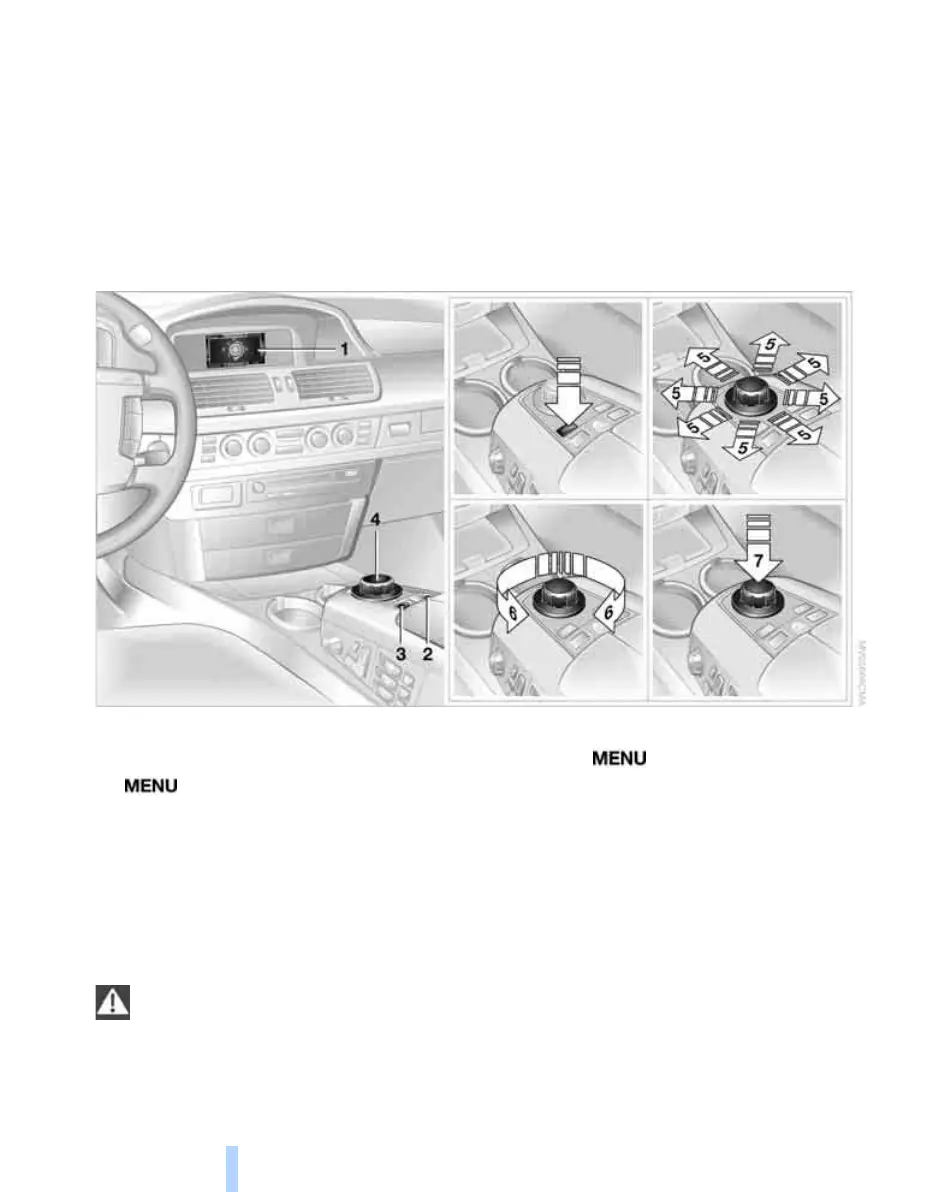
Controls
1 Control display
2 Programmable button 50
3 button
To call up the start menu
4 Controller
You can select menu items and adjust set-
tings with the controller:
> Move it in eight directions, arrows 5
> Turn it, arrow 6
> Press it, arrow 7
Only make adjustments if the traffic con-
ditions are sufficiently quiet or clear, so as
not to endanger the car's occupants and other
road users by being distracted.<
Switching control display on/off
1. Press the button to call up the start
menu.
2. Press the controller.
Press the controller to switch on.
Online Edition for Part no. 01 41 0 013 197 - © 02/07 BMW AG


 To Next Page
 Loading...