5-13
5
Setting Page
Initial Camera Settings
(1) [Intelligent Function Information]
Select from [Do not add] or [Add] for intelligent
function information other than volume detection in
JPEG header information.
JPEG
(1) [Image Quality]
Select a desired image quality from 1 to 5 (5 levels) for
images transmitted at each image size in JPEG.
Greater values have higher quality.
(2) [Image Size: Image Transmission]
Select [160 x 120], [320 x 240], [640 x 480] or
[1280 x 960] for the size of images transmitted. This
becomes the start-up video size used by each viewer
if no video size has been set.
(3) [Maximum Frame Rate: Image Transmission]
Limit the maximum transmission frame rate per
second to reduce the viewer load. The maximum is 30
frames/sec. Enter a value of between 0.1 and 30.0.
(4) [Image Size: Upload]
Select [160 x 120], [320 x 240], [640 x 480] or [1280 x
960] for the size of images uploaded. For
details of upload settings, see p. 5-15.
H.264
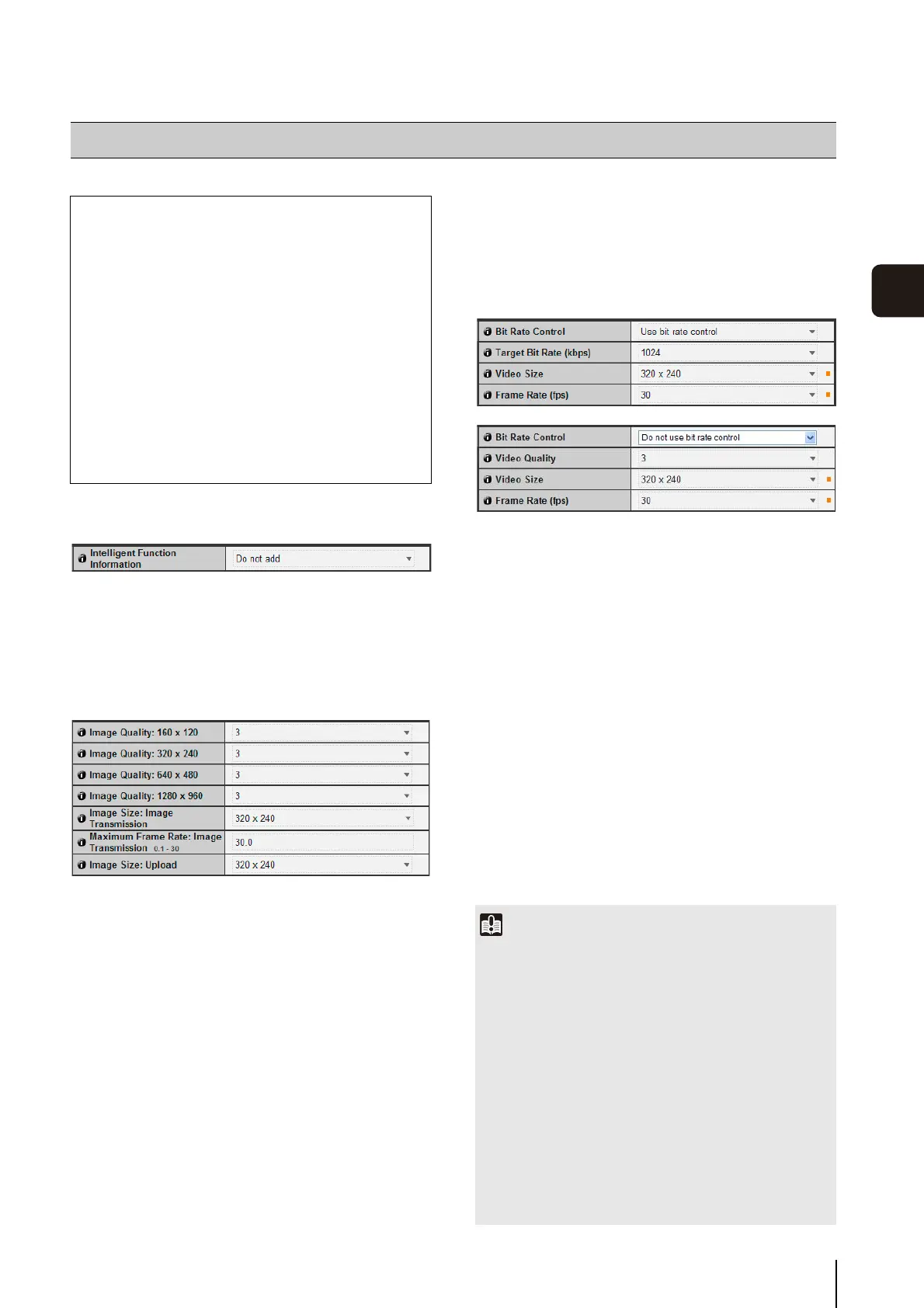
(1) [Bit Rate Control]
Select [Do not use bit rate control] or [Use bit rate
control].
(2) [Target Bit Rate (kbps)]
If [Use bit rate control] is selected in (1), select 32 to
4096 (total 12 levels) for the target bit rate.
(3) [Video Quality]
If [Do not use bit rate control] is selected in (1), select
a desired quality from 1 to 5 (total 5 levels) for H.264
video transmission.
Greater values have higher quality.
(4) [Video Size]
Select [320 x 240], [640 x 480] or [1280 x 960] for the
size of video transmitted.
(5) [Frame Rate (fps)]
Select [30], [15] or [10] (fps) for the frame rate of
video transmitted.
[Video] Setting Image Size, Quality and Frame Rate
The following can be set here.
• Initial Camera Settings
Set to add intelligent function information (except
volume detection) to JPEG headers.
• JPEG
Set the image quality, size, maximum frame rate
and upload size in JPEG.
• H.264
Set the bit rate, video size and capture frame rate
in H.264.
• On-screen display
Set time, character string, etc. displayed over
images.
Important
• Network load will increase if a larger video size is set or
higher video quality and target bit rate are set, as this
increases data size per frame. As a result, the following could
occur:
JPEG: The frame rate may drop
H.264: Video may be temporarily disrupted
• Block noise may become noticeable if a large image size and
low target bit rate are set.
• The data size may increase depending on the type or
movement of the subject. If the frame rate remains low or
other undesirable conditions continue for a prolonged
period, lower the image size or quality setting.
• Note that if you are using included RM-Lite, the hard disk
usage will also be affected during recording.


 To Next Page
 Loading...








