115
Admin Tools
4
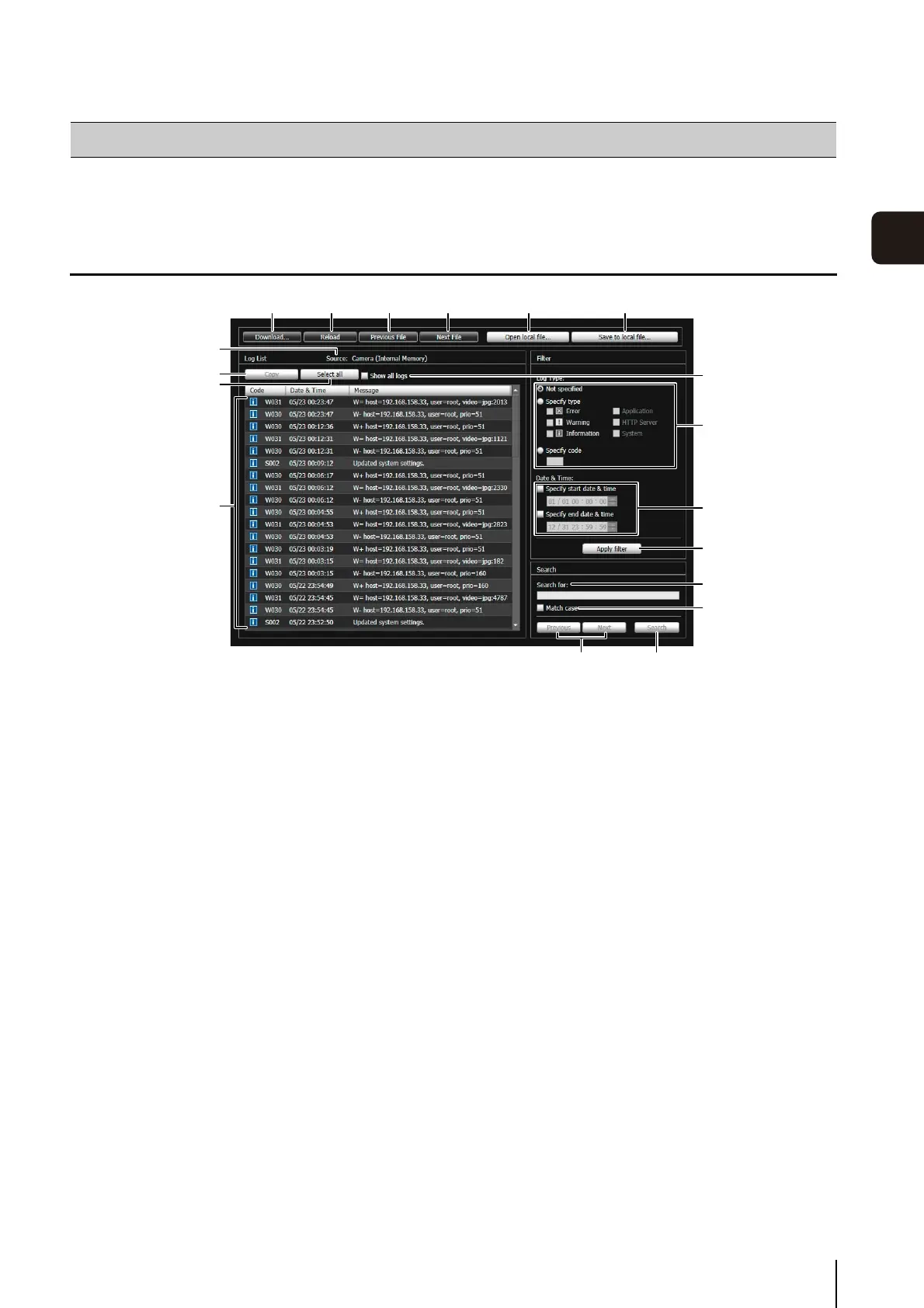
This tool lets you view the operating condition log of the camera.
Display Screens of Log Viewer
(1) [Download]
Download log files from this camera or memory cards.
(2) [Reload]
Reload the displayed log file and show the latest logs.
(3) [Previous File]
If there are multiple log files in the camera's internal
memory or memory card, load and display the file
before the currently shown log list.
(4) [Next File]
If there are multiple log files in the internal memory or
memory card, load and display the file after the
currently shown log list.
(5) [Open local file]
Load log files that are saved on a computer to the log
display area.
(6) [Save to local file]
Save the displayed log data as a text file to a
computer.
(7) [Source]
The name of the source from where log files are
loaded is shown.
From the camera's internal memory:
Camera (Internal memory)
From a memory card: Camera (Memory card)
From files saved to a computer:
File name
(8) [Copy]
Copy to the clipboard logs that you have selected on
the log display area.
(9) [Select all]
Select all the logs that are shown in the log display
area.
(10)[Show all logs] checkbox
When selected, all logs, including those without a log
code, are shown.
(11)Log display area
The content of log files downloaded from the camera,
memory card, or computer is shown.
(12)[Log Type]
Select log types you want to show using the filter
function.
[Not specified]:
Select to show all log types.
[Specify type]:
To specify the log type, select the level ([Error],
[Warning], [Information]) and output module
([Application], [HTTP Server], [System]) of the log.
Multiple checkboxes can be selected.
[Specify code]:
Logs matching the entered log code are shown.
Log Viewer
(1)
(11)
(9)
(8)
(7)
(17) (18)
(2) (3) (4) (5) (6)
(12)
(10)
(13)
(14)
(15)
(16)


 To Next Page
 Loading...













