Connecting PC(15pin D-sub)
• This product
supports resolutions
of VGA, SVGA, XGA.
• Before connecting a
PC to the PDP, be
sure to adjust the
resolution of the PC.
Connecting PC
Before Connecting to the PDP, Set the
Resolution of the PC.
• Go to SETUP-CONTROL PANEL-DISPLAY PROPERTIES in Window Screen
of the PC.
• Choose the SETTINGS tab in the DISPLAY menu.
• In the SETTINGS menu, select 640 x 480 or 800 x 600.
1
Audio
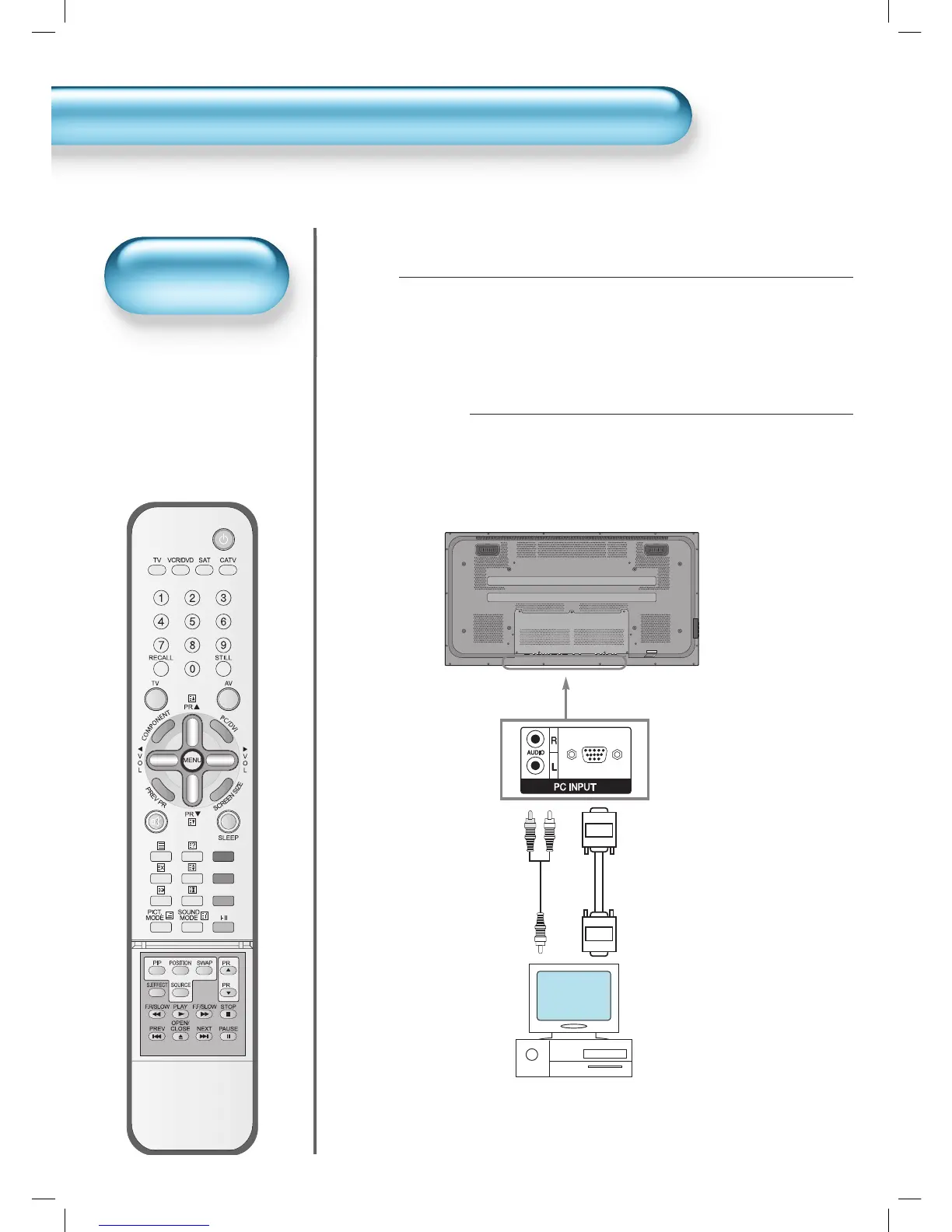
Connect the PC to the PDP.
• Prepare the PC cable (D-sub 15pin) and
the PC audio cable.
• Connect the PC(Output) to the
PDP(Input) as shown below.
2
15 PIN D-sub
PC


 To Next Page
 Loading...