English 21
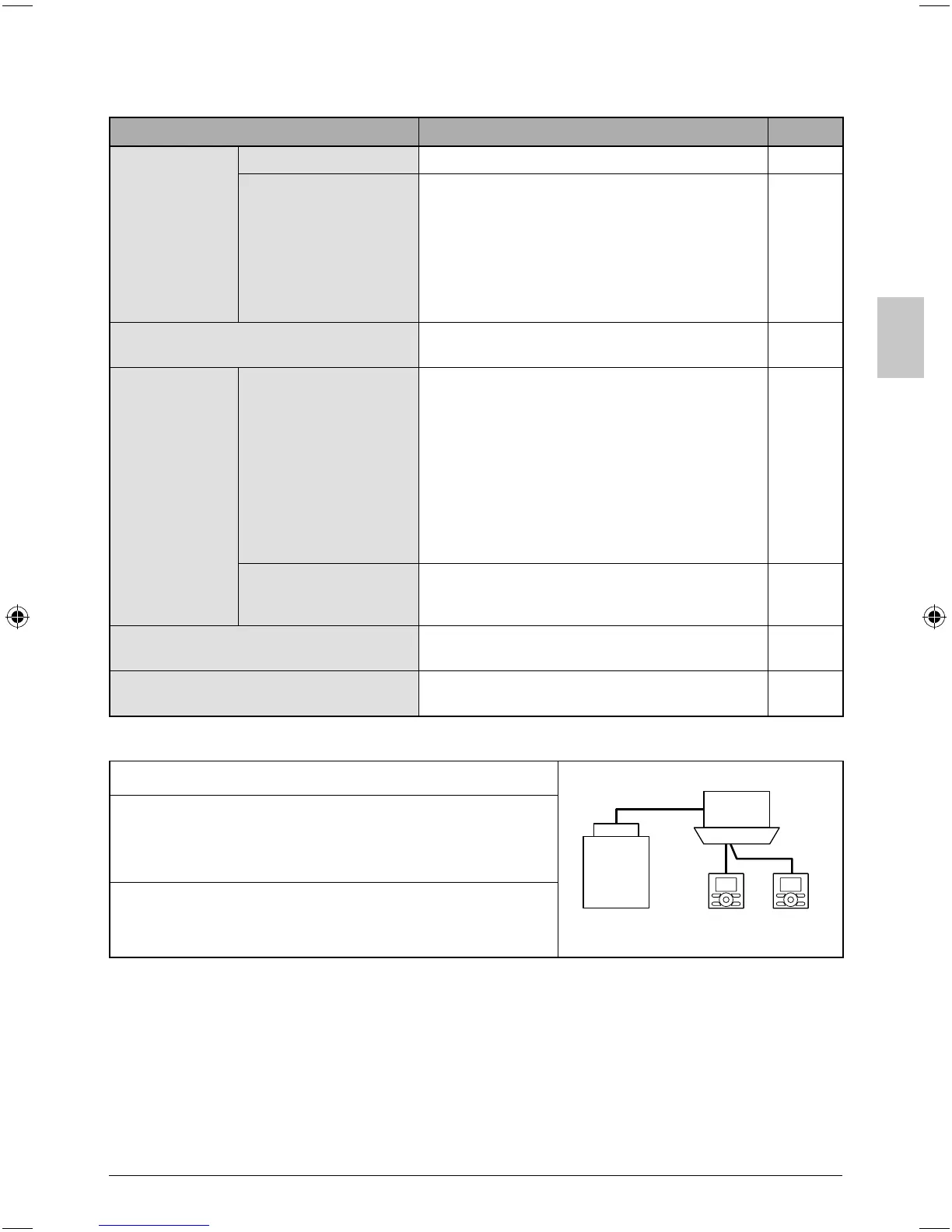
Menu item Description
Reference page
Confi guration
Contrast Adjustment
Used to make LCD contrast adjustment.
36
Display
Standard or Detailed
Display
Used to set standard or detailed display
mode.
Display mode ●
Standard or detailed display
Detailed display provides the choice to
●
display between Room Temp, Outside Air
Temp, System or None.
37
Current Settings
Used to display a list of current settings for ●
available items.
39
Clock &
Calendar
Date & time
Used to confi gure date and time settings
and corrections.
The default time display is 12H. ●
The clock will maintain accuracy to within ●
±30 seconds per month.
If there is a power failure for a period not ●
exceeding 48 hours, the clock will continue
working with the built-in backup power
supply.
39
12H/24H Clock
The time can be displayed in either a 12 hour
or 24 hour time format.
42
Daylight Saving Time
Used to adjust the clock in observance of
daylight saving time.
–
Language
The display language can be selected
between English, Francais or Espanol.
42
Note: Available setting items vary with the indoor unit model.
Sub Remote Controller Menu Items
Two remote
controllers in control
Outdoor unit
Indoor unit
If two remote controllers are in control of a single indoor
unit, the following menu items are not set in the sub remote
controller. In this case, the following items should be
confi gured in the main remote controller.
Schedule ●
Off timer ●
Setback ●
01_EN_3P243520-2C.indd 2101_EN_3P243520-2C.indd 21 8/27/2009 1:48:45 PM8/27/2009 1:48:45 PM


 To Next Page
 Loading...









