About your monitor | 13
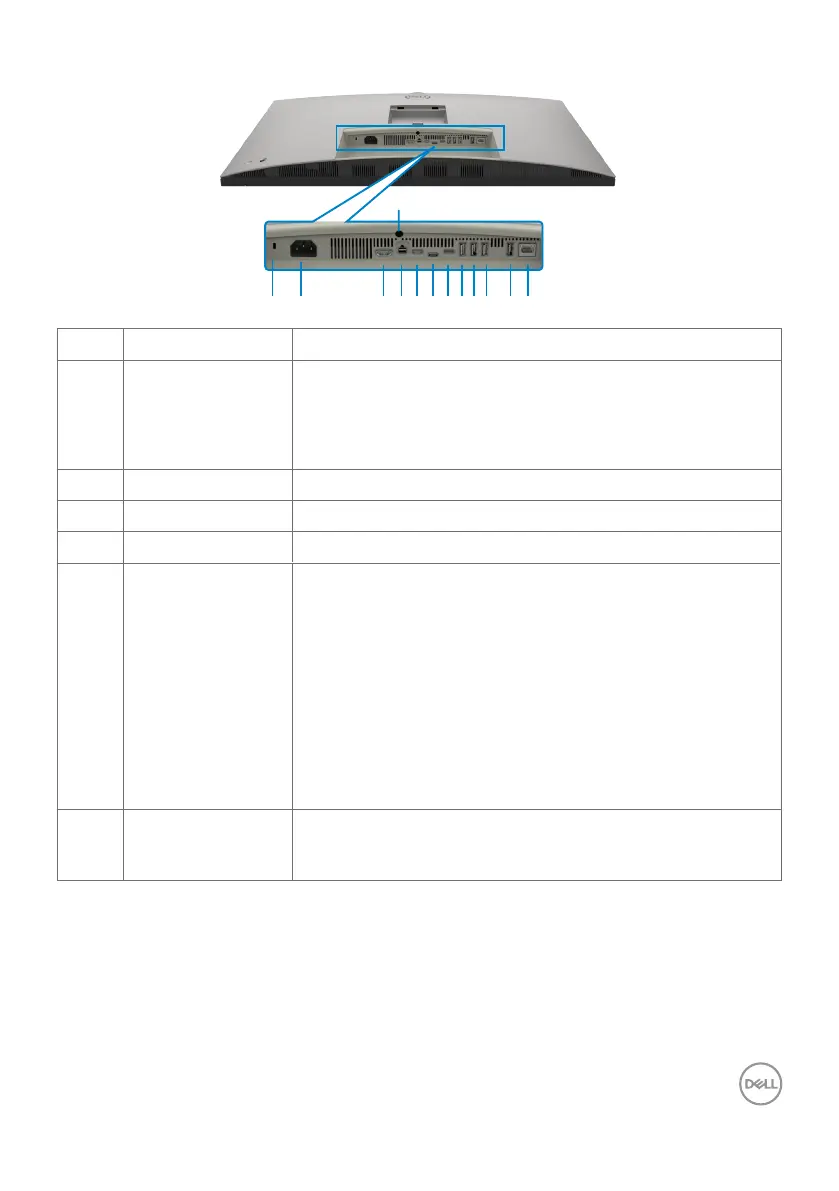
Bottom view
1 4 5 6 7 8
13
32 11 12910
Label Description Use
1 Security lock slot
(based on
Kensington
Security Slot
TM
)
Secures monitor with security cable lock (sold separately)
2 Power connector Connect the power cable.
3 HDMI port Connect your computer with the HDMI cable.
4 mDP Connect your computer with the mDP to mDP cable.
5 Thunderbolt
TM
4
downstream
Thunderbolt
TM
4 downstream port only suitable for video
output under Daisy chain, Connecting the monitor for
TBT daisy chain.
NOTE:
1) Thunderbolt™ 4 up to 40Gbs bandwidth;
2) Support up to two 6K monitors through the Daisy
chain;
3) The highest power output up to 15W;
4) USB-C downstream port supports 5V/3A.
6 USB-C upstream
port
Connect the USB cable that comes with your monitor to
the computer. Once this cable is connected, you can use
the USB downstream connectors on the monitor.


 To Next Page
 Loading...