Setting up the monitor | 55
monitor’s Thunderbolt
TM
4 cable via Power Delivery (PD); please set
Thunderbolt
TM
4 Charging to On in Off Mode.
* Ensure to check the Dell PC for DBPS supportability.
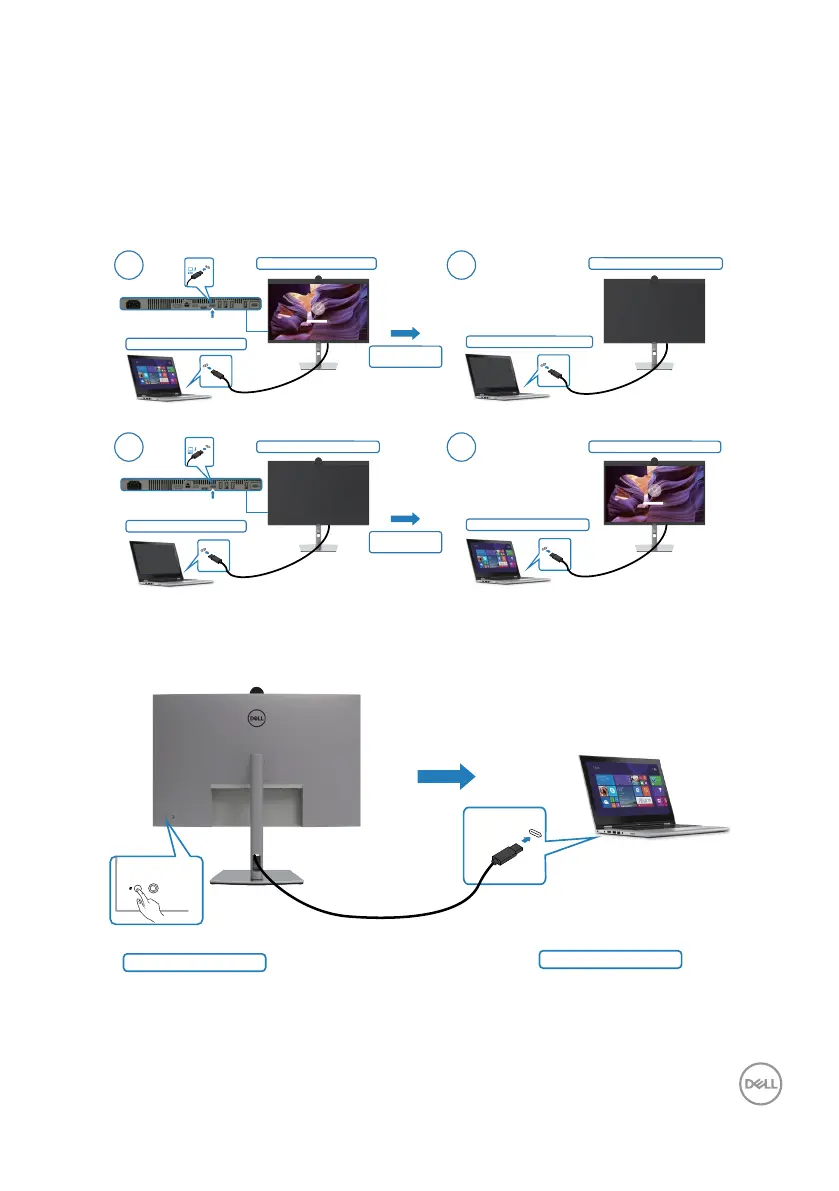
Using DPBS function
When you press the monitor power button or PC power button, the Monitor / PC
state is as follows:
Initial monitor power state (OFF)
Initial monitor power state (ON)
New Power state of monitor (ON)
New Power state of system (ON)
New Power state of monitor (OFF)
New Power state of system (OFF)
1 2
1 2
Initial system power state (OFF)
Initial system power state (ON)
Press PC/Monitor
power button
Press PC/Monitor
power button
Thunderbolt
TM
4
Thunderbolt
TM
4
Thunderbolt
TM
4
Thunderbolt
TM
4
Thunderbolt
TM
4
upstream
Thunderbolt
TM
4
upstream
When the monitor and PC power state are both ON, while you press and hold 4
seconds on monitor power button, the screen prompt will ask if you would like to
shut down the PC.
Press and hold 4s
Thunderbolt
TM
4
PC will shut down


 To Next Page
 Loading...