17
Getting Ready
1
16
SELECTING THE LANGUAGE DISCHARGING RECHARGEABLE BATTERIES
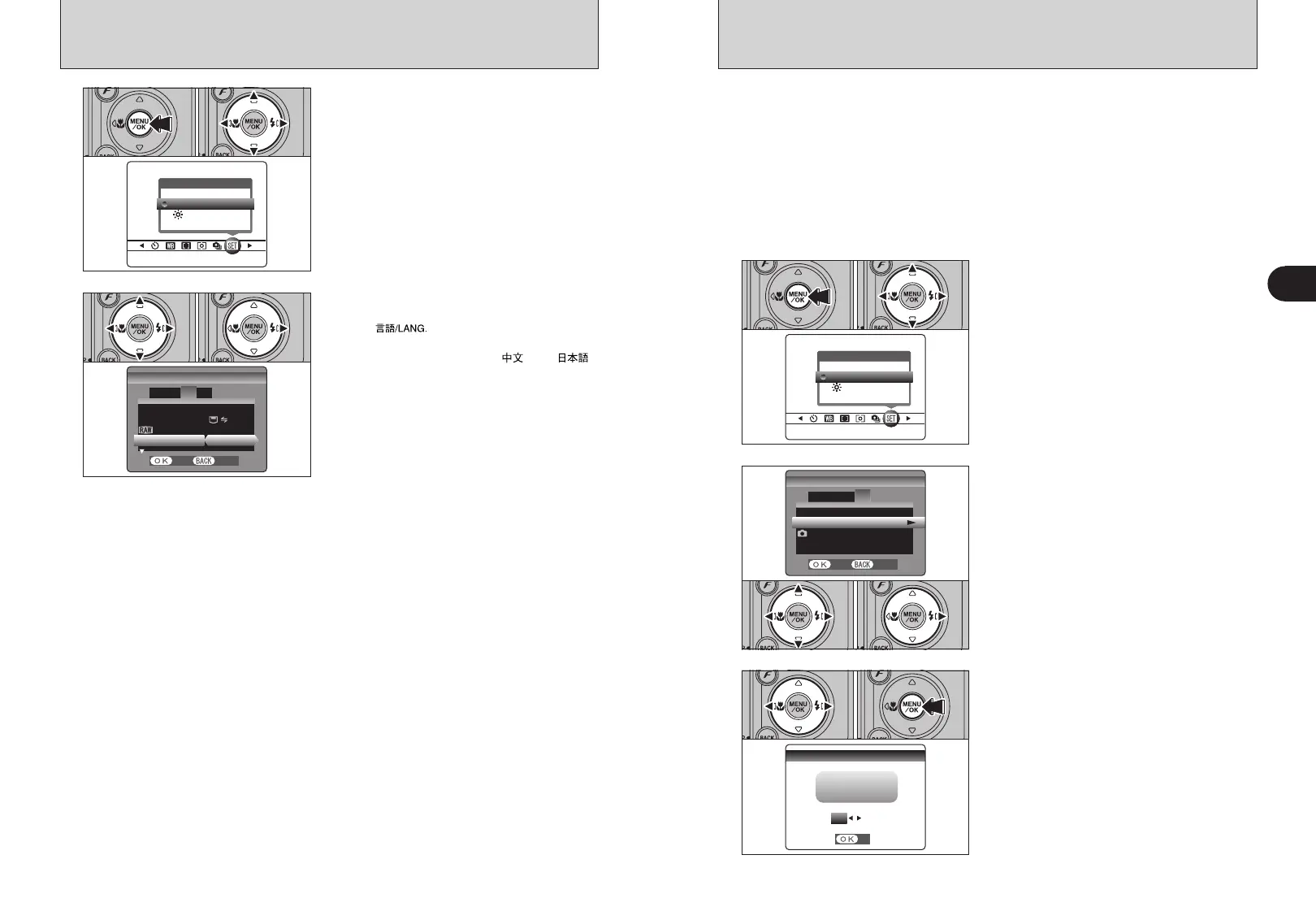
1The “SET-UP” screen appears. Press “d” or “c”
to move to option 3 and then press “a” or “b” to
select “ ”.
2Press “c” to select “ENGLISH”, “FRANCAIS”,
“DEUTSCH”, “ESPAÑOL”, “ ” or “ ”.
Press “c ” to cycle through the language
settings.
●
!
The screens in this manual are shown in English.
●
!
See P.79 for more information on the “F” OPTION menu.
1Press the “MENU/OK” button to display the
menu on the LCD monitor.
2Press “d” or “c” to select “F” OPTION and
then press “a” or “b” to select “SET-UP”.
3Press the “MENU/OK” button.
OPTIONOPTION
LCDLCD
SET−UPSET−UP
01 03 02
1
FRAME NO.FRAME NO.
USB MODEUSB MODE
言語言語
/LANG./LANG.
CCD−RAWCCD−RAW
ENGLISHENGLISH
:OFF:OFF
:
:CONT.
:CONT.
1
3
42
SET−UP
SET−UP
SETSET CANCELCANCEL
01 02
2
1
OPTIONOPTION
LCDLCD
SET−UPSET−UP
1Press the “MENU/OK” button to display the
menu on the LCD monitor.
2Press “d” or “c” to select “F” OPTION and
then press “a” or “b” to select “SET-UP”.
3Press the “MENU/OK” button.
01 03 02
●
!
Remove the camera from the cradle when discharging
batteries.
●
!
Do not use the procedure for discharging
rechargeable batteries with alkaline batteries.
2
1Press “d” or “c” to move to option 4 and then
press “a” or “b” to select “DISCHARGE”.
2Press “c”.
VIDEO SYSTEMVIDEO SYSTEM
DISCHARGEDISCHARGE
RESETRESET
:OKOK
OKOK
:NTSC:NTSC
1 3
4
2
SET−UP
SET−UP
SETSET CANCELCANCEL
01 02
3
DISCHARGEDISCHARGE
OKOK CANCELCANCEL
SETSET
DISCHARGDISCHARGE OK? OK?
IT MAY TAKE A WHILEIT MAY TAKE A WHILE
FOR DISCHARGINGFOR DISCHARGING
1Press “d” or “c” to select “OK”.
2Press the “MENU/OK” button.
The screen changes and discharging begins.
When the battery level indicator blinks red and
discharging ends, the camera turns off.
01 02
●
!
To cancel discharging, press the “BACK (DISP)” button.
The “Discharging rechargeable batteries” function can only be used with Ni-MH
batteries.
The “Discharging rechargeable batteries” function should not be used with
alkaline batteries as it will completely drain the battery charge.
Use the “Discharging rechargeable batteries” function in the following situations:
i When the batteries only last for a short time after being charged normally
i When the batteries have not been used for a long period
i When you purchase new Ni-MH batteries
Do not use the “Discharging rechargeable batteries” function when the camera is set in the cradle or
while using the AC power adapter. In these situations, the Ni-MH batteries will not be discharged
due to the external power supply.



 To Next Page
 Loading...








