4. AIS OPERATION
4-3
Note 2: You can turn the AIS display off by putting the cursor in the AIS box and
long-pushing the left button to show FUNC OFF. Data processing is
terminated.
Note 3: AIS symbols are momentarily erased and the screen is redrawn after the
heading is changed in the head-up mode.
Note 4: When no AIS data is received, the message "RECEIVE" appears in the
Alert Box. Check the AIS transponder.
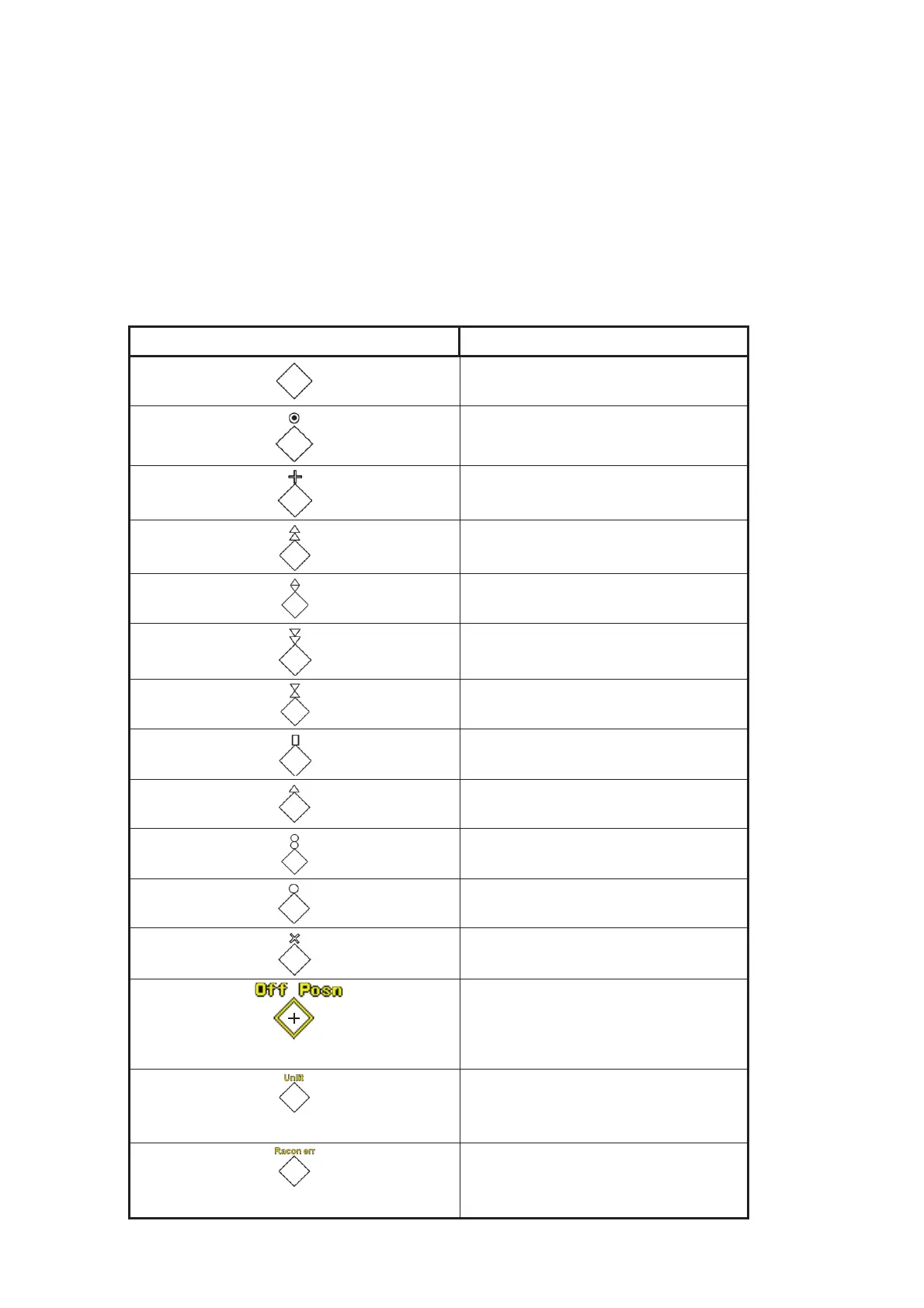
Note 5: Physical AIS AtoN symbols that may appear are shown in the table
below.
Symbol Meaning
Basic shape
RACON
Emergency wreck mark
North cardinal mark
East cardinal mark
South cardinal mark
West cardinal mark
Port hand mark
Starboard hand mark
Isolated danger
Safe water
Special mark
Shown in yellow line and characters
Off position
Shown in yellow characters
Light fail or at reduced range
Shown in yellow characters
RACON error


 To Next Page
 Loading...





