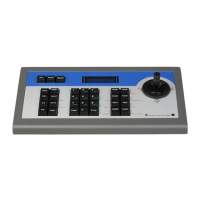
DS-1200KI/1006KI Keyboard User Manual
v
Dome by RS-232 ..................................................................................................... 27
Analog Matrix by RS-232 ........................................................................................ 28
Platform Access .............................................................................................................. 28
Access to KPS by Network ...................................................................................... 28
Access to Third-Party Platform by Network ........................................................... 29
Access to HikCentral .............................................................................................. 30
Shortcut Operation ......................................................................................................... 32
System Menu Configuration ............................................................................................. 34
Version ............................................................................................................................ 34
Network .......................................................................................................................... 34
DHCP ...................................................................................................................... 34
SADP ...................................................................................................................... 34
SSH ......................................................................................................................... 34
User Management .......................................................................................................... 35
Serial Port Settings .......................................................................................................... 35
Hardware ........................................................................................................................ 36
Time Settings .................................................................................................................. 36
Maintenance ................................................................................................................... 36


 To Next Page
 Loading...