Status Screen
0
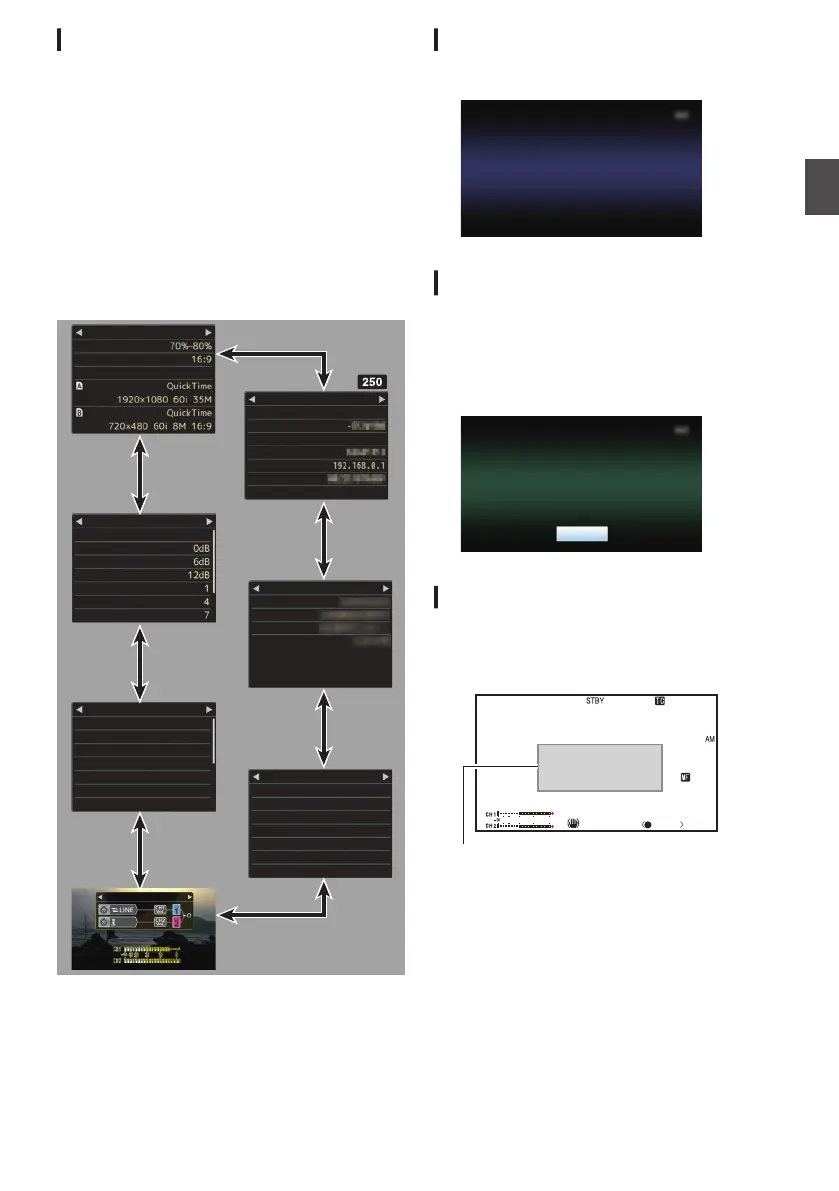
This screen allows you to check the current
settings.
0
To display the status screen, press the
[STATUS]
button in the normal screen.
0
The status display differs according to the
operation mode (two types).
(A P20 [Operation Modes] )
0
Press the [STATUS] button to switch to the
display screen.
0
Press the [MENU/THUMB]
button at each status
screen (other than the [Camera 1] screen) to
enter the setting screen.
0
Use the cross-shaped button (HI) to switch
between the screens.
.
-62dB
Audio
Planning Metadata
Creator
Description
Title2
Title1
Marker Aspect
Zebra
Camera 1
Safety Zone
None
Handle Zoom Speed H
Handle Zoom Speed M
Handle Zoom Speed L
GAIN H
GAIN M
GAIN L
FAW
Camera 2
USER7
USER6
USER5
USER4
USER3
USER2
USER1
Rec
OIS
Zebra
Clip Review
Lolux
TC Preset
Focus Assist
USER Switch Set
HDMI Enhance
HDMI Color
Resolution
HDMI/SDI Out
Video
WPA2
P2P
MAC Address
IP Address
Passphrase
Security Type
SSID
Ty p e
Network
Format
Format
7.5%
Rec Trigger
SD Aspect
SD Set Up
Squeeze
HDMI+SDI
1080i
Auto
Off
Off
Off
Live Streaming
HM250
* These are screen examples. The contents
displayed are different
depending on the model
and settings.
USB Mode Screen
This screen displays the USB mode.
.
Remote Edit Mode Screen n
This is a mode for accessing the page for editing
the metadata that is recorded in a clip via a web
browser on devices such as a smartphone, tablet
terminal, or PC.
(A P167
[ Clip Metadata ] )
.
Warning Display
Warning display is displayed in the display screen
(Camera mode, Media mode).
(A P
198 [Error Messages and Actions] )
.
1/100
F1.6
18
dB
AE+6
ND 1/16
12 :34 :56
Jan 24,2015
00:00: 00.00
4030 20 10 0
5 . 6 f t
P 15000K
Warning Display Area
Displays on the LCD Monitor and Viewfinder
39
Preparations


 To Next Page
 Loading...