EasyManua.ls Logo

JVC KW-AVX810 - Using Short Cut Icons; Accessing Functions with Short Cut Icons

JVC KW-AVX810
102 pages
Print Icon
To Next Page IconTo Next Page
To Previous Page IconTo Previous Page
Loading...
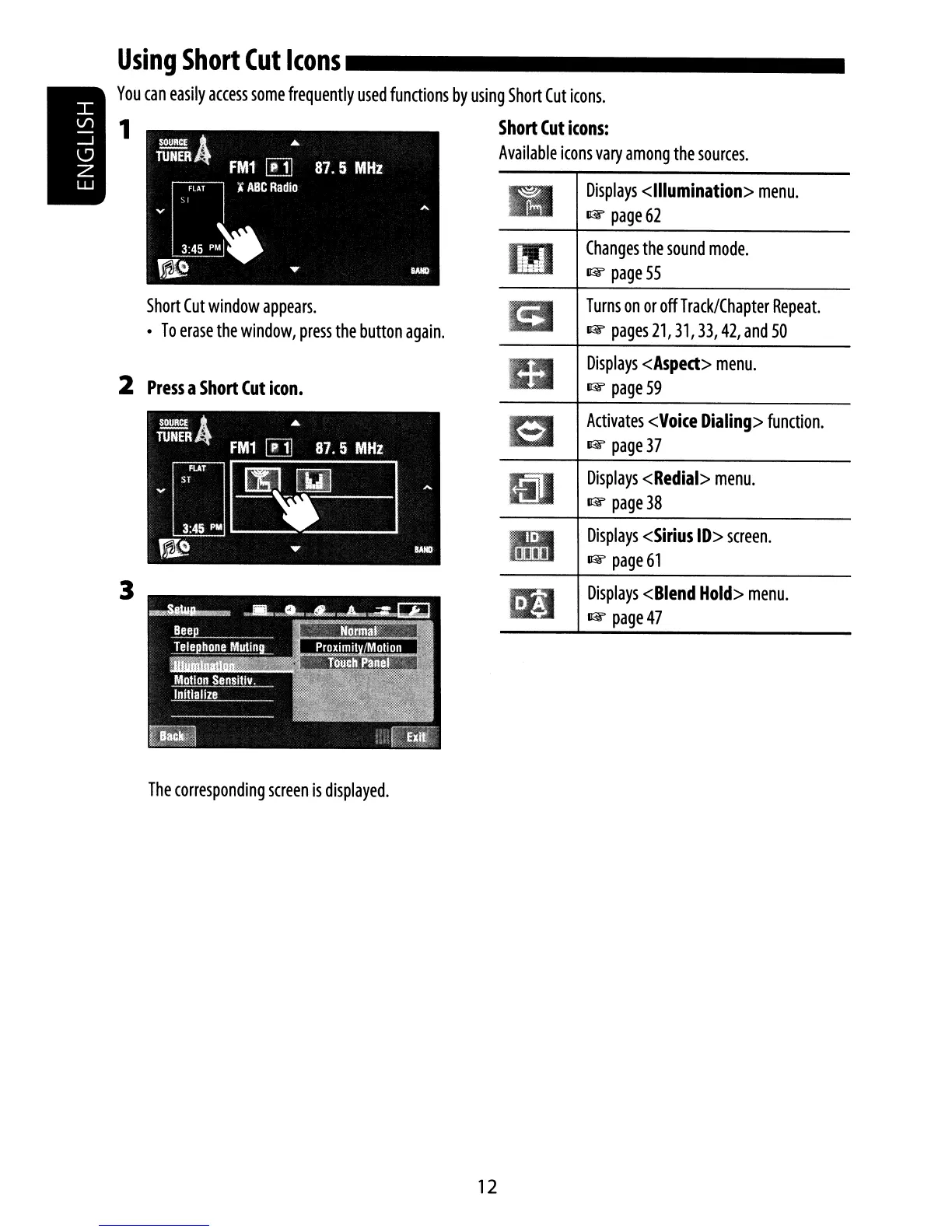
Displays
<Sirius
ID>
screen.
1&
page
61
Displays
<Blend
Hold>
menu.
1&
page
47
Displays
<Redial>
menu.
1&
page
38
Activates
<Voice
Dialing>
function.
1&
page
37
Displays
<Asped>
menu.
1&
page
59
Turns
on
or
off
Track/Chapter
Repeat.
1&
pages21,31,33,42,and50
Changes
the
sound
mode.
1&
page
55
Displays
<Illumination>
menu.
1&
page
62
Short
Cut
window
appears.
To
erase
the
window,
press
the
button
again.
3
2
Press
a
Short
Cut
icon.
Using
Short
Cut
Icons
_
You
can
easily
access
some
frequently
used
functions
by
using
Short
Cut
icons.
1
Short
Cut
icons:
Available
icons
vary
among
the
sources.
The
corresponding
screen
is
displayed.
12

Other manuals for JVC KW-AVX810

Related product manuals