EasyManua.ls Logo

JVC KW-AVX810 - Track Selection and Disc Ejection; Browsing and Selecting Tracks from Lists

JVC KW-AVX810
102 pages
Print Icon
To Next Page IconTo Next Page
To Previous Page IconTo Previous Page
Loading...
You
can
also
use
MENU
on
the
monitor
panel.
2
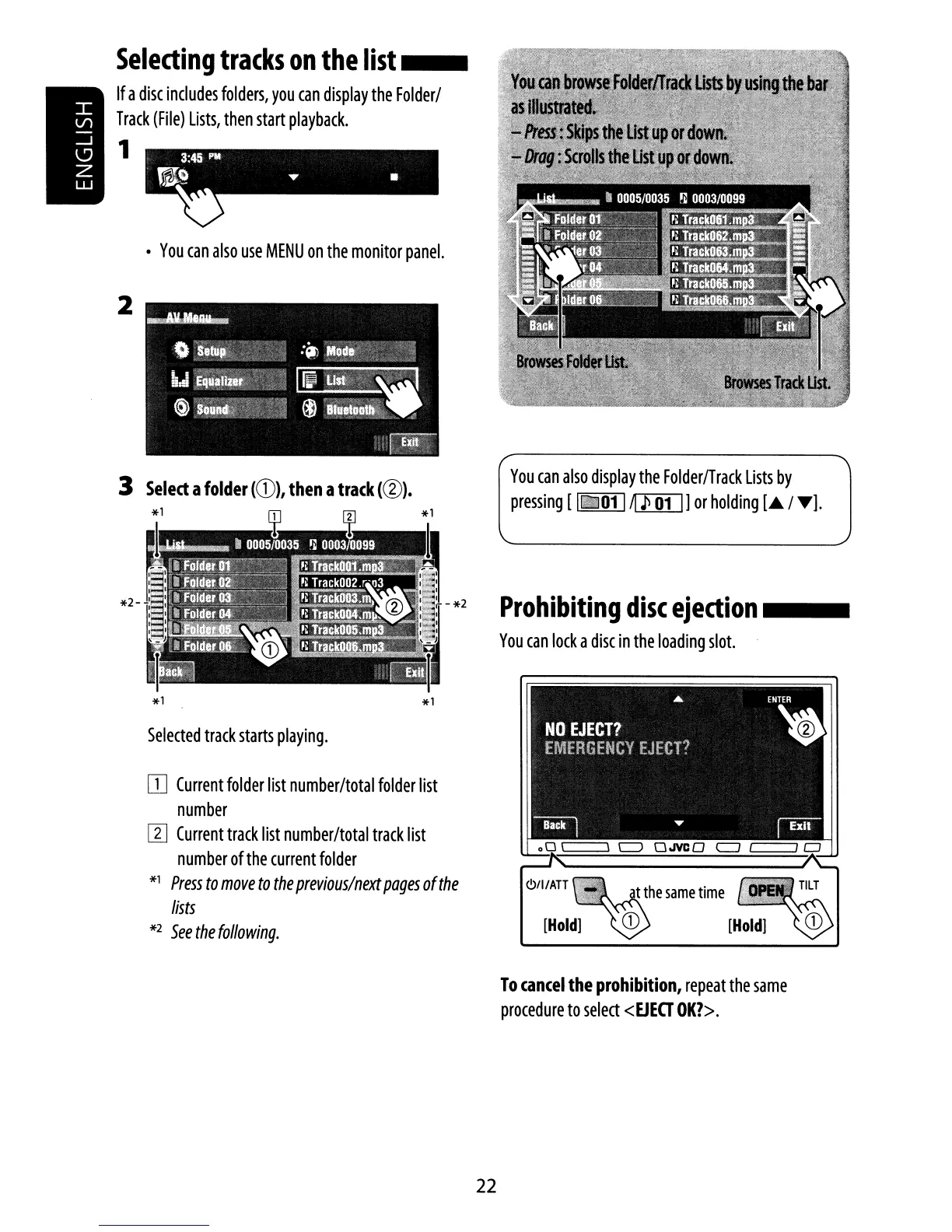
Selecting
tracks
on
the
list
__
If
a
disc
includes
folders,
you
can
display
the
Folder/
Track
(File)
Lists,
then
start
playback.
1
3
Select
a
folder
KD),
then
a
tra(k
(@).
Selected
track
starts
playing.
OJ
Current
folder
list
number/total
folder
list
number
[I]
Current
track
list
number/total
track
list
number
of
the
current
folder
*1
Press
to
move
to
the
previous/next
pages
of
the
lists
*2
See
the
following.
You
can
also
display
the
Folder/Track
Lists
by
pressing
[ 1
iii
01
1
Jll]I]]
or
holding
[.
/
T].
Prohibiting
disc
ejection
_
You
can
lock
a
disc
in
the
loading
slot.
[Hold]
To
(an(el
the
prohibition,
repeat
the
same
procedure
to
select
<EJEO
OK?>.
22

Other manuals for JVC KW-AVX810

Related product manuals