EasyManua.ls Logo

JVC KW-AVX820 - On-Screen Bar Operations; Playback Menu Navigation; Time;Number Entry and PBC Cancel

JVC KW-AVX820
88 pages
Print Icon
To Next Page IconTo Next Page
To Previous Page IconTo Previous Page
Loading...
For
MPEG1/MPEG2IJPEG/MP3IWMAIWAV/AAC,
track
is
searched
within
the
same
folder.
For
DVD-VR,
program/playlist
search
is
possible
during
Original
program
playback
(PG)/Playlist
playback
(Pl).
To
erase
a
misentry,
press
ClR
(clear)
while
holding
SHIFT.
Using
menu
driven
features
DVDVideo
IT]
Press
TOP
M/MENU
to
enter
the
menu
screen.
rn
Press
6./'\1
/
<:J/r>
to
select
an
item
you
want
to
start
play.
W
Press
ENT
(enter)
to
confirm.
DVD-VR
IT]
Press
TOP
M
to
enter
the
Original
Program.
Press
MENU
to
enter
the
Playlist.
rn
Press
6./'\1
/
<:J/r>
to
select
an
item
you
want
to
start
play.
W
Press
ENT
(enter)
to
confirm.
Original
Program/Playlist
screen,
~
53.
VeD
IT]
While
holding
SHIFT,
press
DIRECT
to
enter
the
search
mode.
rn
While
holding
SHIFT,
press
the
number
buttons
(0
-
9)
to
enter
the
desired
number.
W
Press
ENT
(enter)
to
confirm.
To
return
to
the
previous
screen,
press
RETURN.
Canceling
the
PRC
playback
...
(VCD)
IT]
Press.,
then
press
DIRECT
while
holding
SHIFT.
rn
While
holding
SHIFT,
press
the
number
buttons
(0
-
9)
to
enter
the
desired
number.
W
Press
ENT
(enter)
to
confirm.
To
resume
PBC,
press
TOP
M/MENU.
,.
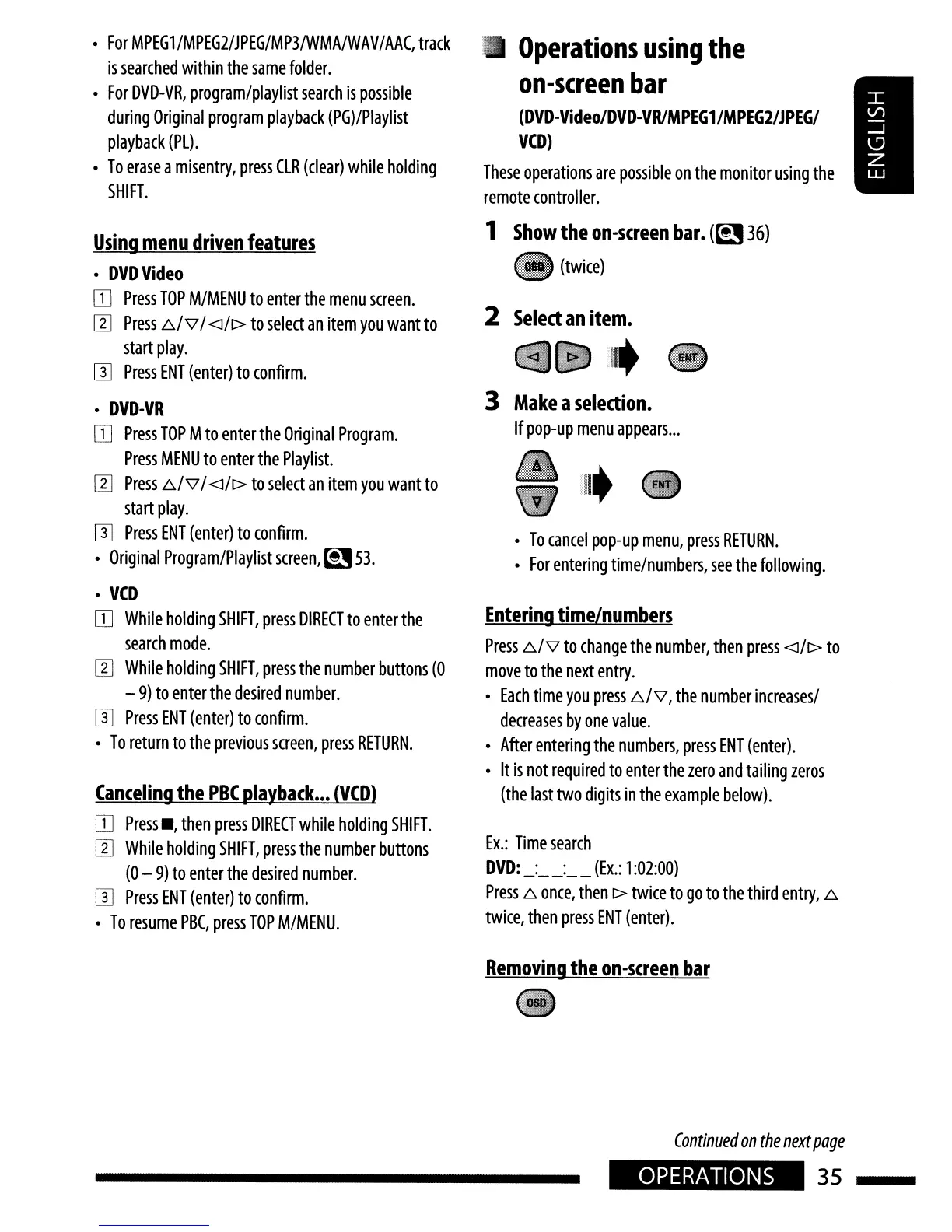
Operations
using
the
on-screen
bar
(DVD-Video/DVD-VRIMPEG1/MPEG2/JPEGI
VeD)
These
operations
are
possible
on
the
monitor
using
the
remote
controller.
1
Show
the
on-screen
bar.
(~
36)
(twice)
2
Select
an
item.
:lIt
3
Make
a
selection.
If
pop-up
menu
appears
...
To
cancel
pop-up
menu,
press
RETURN.
For
entering
time/numbers,
see
the
following.
Entering
time/numbers
Press
6./'\1
to
change
the
number,
then
press
<:J/r>
to
move
to
the
next
entry.
Each
time
you
press
6./'\1,
the
number
increases/
decreases
by
one
value.
After
entering
the
numbers,
press
ENT
(enter).
It
is
not
required
to
enter
the
zero
and
tailing
zeros
(the
last
two
digits
in
the
example
below).
Ex.:
Time
search
DVD:
_:
__
:
__
(Ex.:
1
:02:00)
Press
6.
once,
then
r>
twice
to
go
to
the
third
entry,
6.
twice,
then
press
ENT
(enter).
Removing
the
on-screen
bar
Continued
on
the
next
page
OPERATIONS
35

Other manuals for JVC KW-AVX820

Related product manuals