24
Appendix A. CRU instructions
Replacing the battery
- - - - - - - - - - - - - - - - - - - - - - - - - - - - - - - - - - - - - - - - - - - - - - - - - - - - - - - - - - - - - - - - - - - - - - - - - - - - - - - - - - - - - - - - - - - - - - - - - - -
To replace the battery, do the following:
1
Turn off the computer, or enter hibernation mode. Disconnect the AC adapter and all cables
from the computer.
2
Close the computer display, and turn the computer over.
3
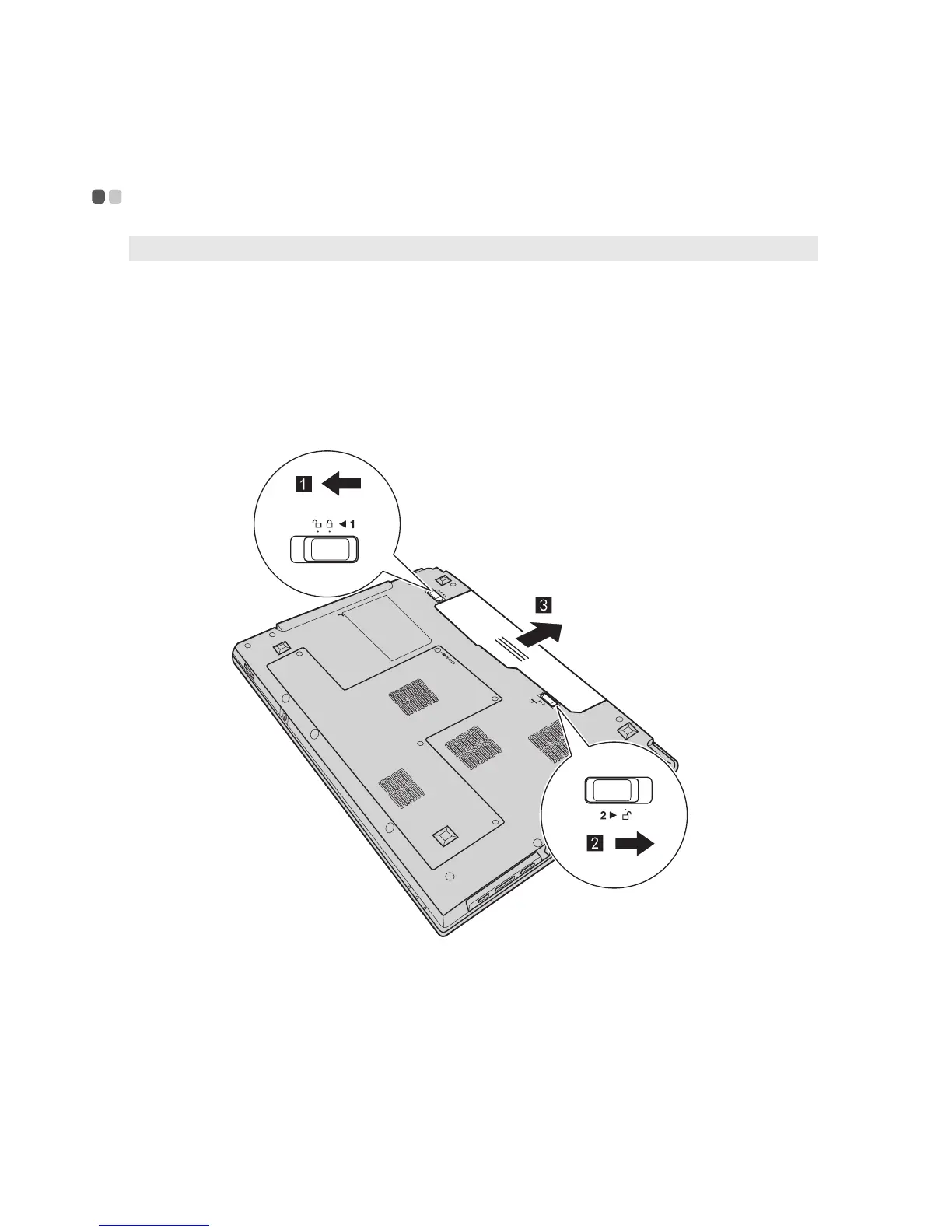
Unlock the manual battery latch . Holding the spring-loaded battery latch in the
unlocked position , remove the battery pack in the direction shown by the arrow .
4
Install a fully charged battery.
5
Slide the manual battery latch to the locked position.
6
Turn the computer over again. Connect the AC adapter and the cables to the computer
again.
Note: Use only the battery provided by Lenovo. Any other battery could ignite or explode.
a
b


 To Next Page
 Loading...