Chapter 1. Getting to know your computer
3
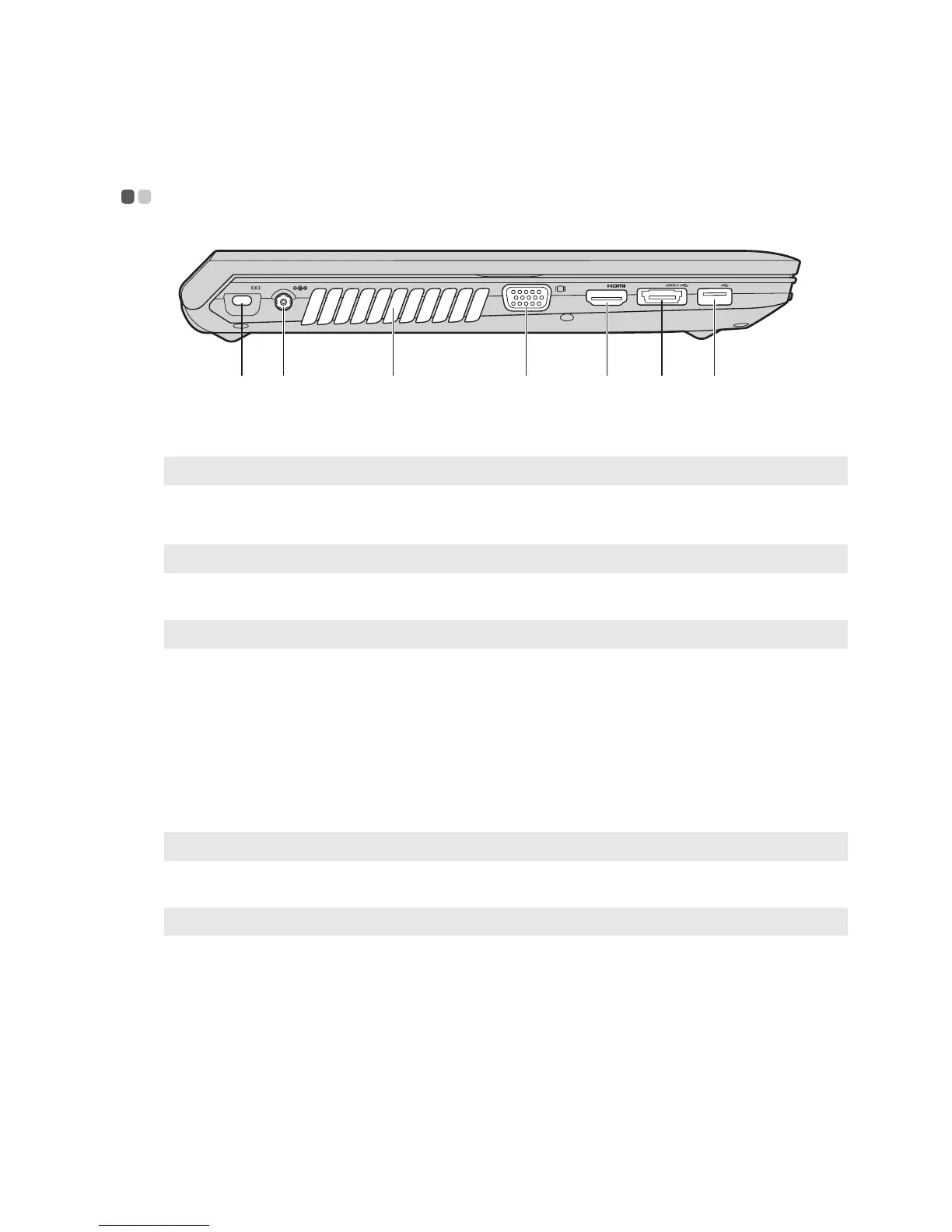
Left-side view - - - - - - - - - - - - - - - - - - - - - - - - - - - - - - - - - - - - - - - - - - - - - - - - - - - - - - - - - - - - - - - - - - - - - - - - - - - - - - - - - - - - - - - - - - - - - - - - - - - - - - - - - - - - - -
Kensington slot
Attach a security lock (not supplied) here.
Note: For details, see “Attaching a security lock (not supplied)” on page 17.
AC power adapter
jack
Connect the AC adapter here.
Note: For details, see “Using AC adapter and battery” on page 9.
Fan louvers
Dissipate internal heat.
Note: Make sure that none of the fan louvers are blocked or else overheating of the computer may occur.
VGA port
Connects to external display devices.
HDMI port (Select
models only)
Connects to devices with HDMI input such as a TV or a display.
USB port or eSATA/
USB combo port
(Select models only)
Connects to eSATA or USB devices.
Note: For details, see “Connecting a universal serial bus (USB) device” on page 13.
USB port
Connects to USB devices.
Note: For details, see “Connecting a universal serial bus (USB) device” on page 13.


 To Next Page
 Loading...