EasyManua.ls Logo

LG 47LH90 - Input Label

LG 47LH90
140 pages
Print Icon
To Next Page IconTo Next Page
To Previous Page IconTo Previous Page
Loading...
WATCHING TV / CHANNEL CONTROL
53
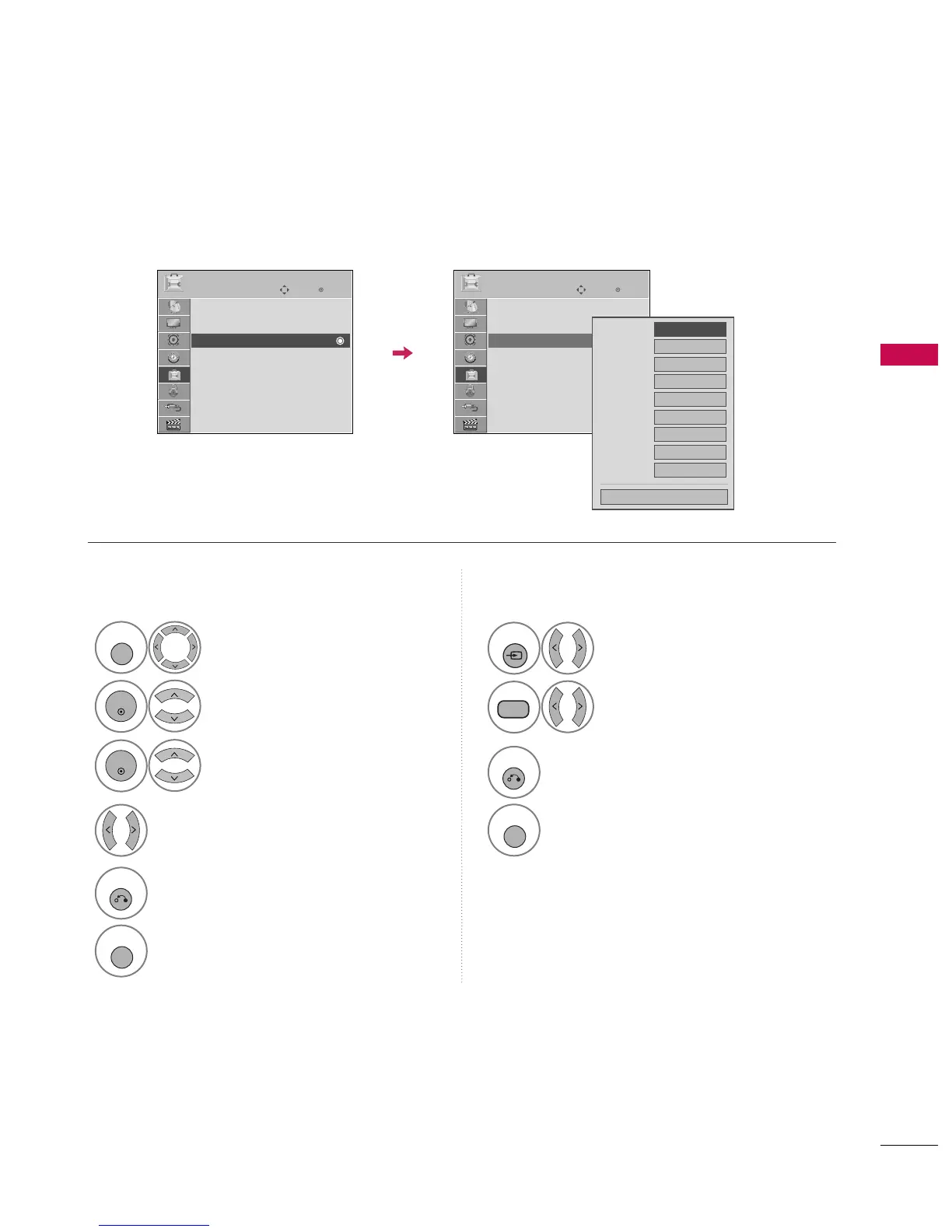
INPUT LABEL
You can set a label for each input source when it's not in use.
Enter
Move
OPTION
Menu Language : English
Audio Language : English
Input Label
SIMPLINK : On
Key Lock : Off
Simple Manual
Caption : Off
Set ID : 1
Select
O
OPPTTIIOONN
.
Select
IInnppuutt LLaabbeell
.
Select the label.
1
MENU
2
ENTER
Select the source.
3
ENTER
4
5
RETURN
Return to the previous menu.
MENU
Return to TV viewing.
With using OPTION menu
Select the source.
Select the label.
1
INPUT
2
BLUE
3
RETURN
Return to the previous menu.
MENU
Return to TV viewing.
With using INPUT button
AV1
AV2
Component1
Component2
RGB-PC
HDMI1
HDMI2
HDMI3
HDMI4
FF GG
Close
EE
Enter
Move
OPTION
Menu Language : English
Audio Language : English
Input Label
SIMPLINK : On
Key Lock : Off
Simple Manual
Caption : Off
Set ID : 1
EE

Table of Contents

Other manuals for LG 47LH90

Related product manuals