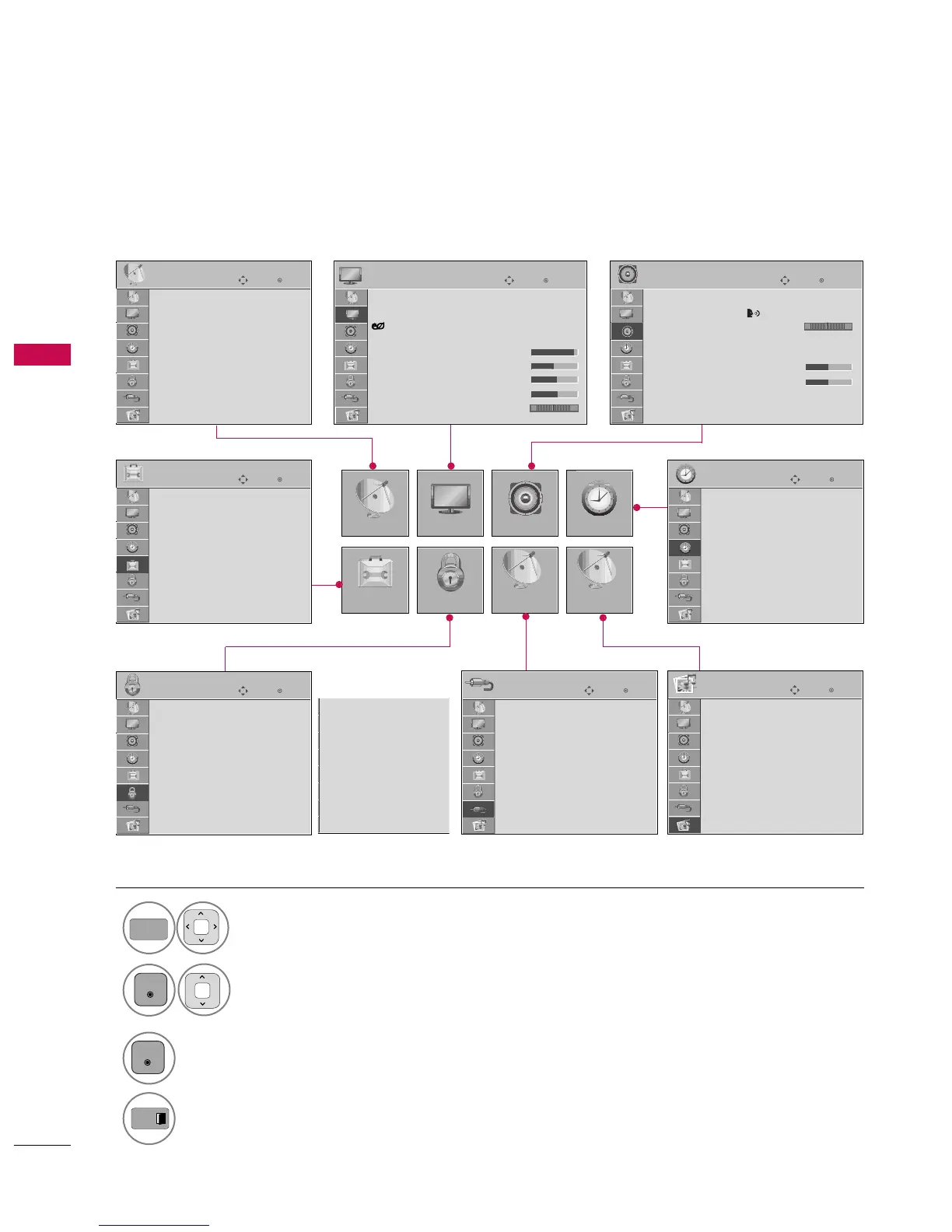
ON-SCREEN MENUS SELECTION
WATCHING TV / CHANNEL CONTROL
40
WATCHING TV / CHANNEL CONTROL
Yo ur TV 's OS D ( On Sc re en D isp lay ) m ay d if fe r s li gh tly from t hat sh ow n i n th is ma nua l.
Enter
Move
Auto Tuning
Manual Tuning
Channel Edit
CHANNEL
CHANNEL
OPTION
PICTURE
LOCK
AUDIO
INPUT
TIME
USB
Enter
Move
Aspect Ratio : 16:9
Picture Wizard
Energy Saving : Off
Picture Mode : Standard
• Contrast 90
• Brightness 50
• Sharpness 60
• Color 60
• Tint 0
PICTURE
E
Enter
Move
Auto Volume : Off
Clear Voice II : Off + 3
Balance 0
Sound Mode : Standard
•
Infinte Sound:
Off
• Treble 50
• Bass 50
• Reset
TV Speaker : On
AUDIO
Enter
Move
Clock
Off Time : Off
On Time : Off
Sleep Timer : Off
TIME
Enter
Move
Photo List
Music List
USB
Enter
Move
TV
AV1
AV2
Component1
Component2
RGB-PC
HDMI1
HDMI2
HDMI3
INPUT
Enter
Move
Lock System : Off
Set Password
Block Channel
Movie Rating
TV Rating-Children
TV Rating-General
Downloadable Rating
Input Block
LOCK
Lock System : Off
Set Password
Block Channel
TV Rating-English
TV Rating-French
Downloadable Rating
Input Block
Enter
Move
Language
Input Label
SIMPLINK : On
Key Lock : Off
Caption : Off
Demo Mode : Off
ISM Method : Normal
Set ID : 1
Initial Setting : Home Use
OPTION
For USA For Canada
RG
LR
Display each menu.
Select a menu item.
Accept the current selection.
1


 To Next Page
 Loading...